Sitecore Stream - Configure AI capabilities into Sitecore XP using Stream Platform DxP package

May 14, 2025 ·

Sitecore Stream - Configure AI capabilities into Sitecore XP using Stream Platform DxP package

Hi Folks,

Recently, I delivered a webinar on "Do more in era of less with AI capabilities, Ideation to execution with Sitecore Stream" and I also have a blog around the same which you can read here on Sitecore Stream - Do more in era of less with AI capabilities, Ideation to execution

The purpose of the webinar session and above blog is to first set the tone for reader and audience to understand what Sitecore Stream is and how it operates and what values it can bring in, if possible, I will share the slides too so you can go through it.

That session and the blog above were more from how Sitecore Stream is solving marketer's challenges

Today, I will be showing you how you can configure the power of stream and its Brand Aware AI capabilities right into your on-prem XP, Why XP is because all other SaaS based (Cloud based) DxP products like XMC, Search, CH already has the power of Stream, So I will show you the steps of configuring Stream into on-prem XP version.

Prerequisites

To be able to configure stream in your XP, Following are the prerequisites 

1) You will need Sitecore Stream license, Your on-prem XP is actually going to talk to your SaaS Stream and its configuration of brand-kit etc to generate content, so you need Stream license.

2) Your Sitecore version should be >=10.2 to be able to use this.

3) Sitecore Stream for Platform DxP package or module, which you will install using package installation wizard.

Configuration Steps

Step-1: First of all, to download the package you will need to login to https://portal.sitecorecloud.io/ 

Step-2: If you have stream subscription then and have access to Stream App, you will see that on the launchpad, so click on the Stream App

Step-3: Click on "Sitecore Stream for Platform DXP" and it will download a package

Step-4: Open your on-prem Sitecore instance and install the package you downloaded and verify the files to ensure that installation was successful.

NOTE: It is important to note that, when you download the package, it ships with other compressed folders too, so you can not give the downloaded package directly to Sitecore, but make sure to unzip it and only use folder called "SitecorePackage" to be uploaded in installation wizard of Sitecore package installation.


Step-5: To verify if the package installation was successful You can go to dashboard and see Stream section

So now, you have all binaries and config files now available which can talk to the SaaS Stream app in your subscription, now it is time to configure the connection to the Stream app so we can start getting the AI capabilities built into Sitecore.

Step-6: Configuring the connection to Sitecore Stream involves adding connection string of stream in connectionstring.config file, Connection string consists of "Client_id, client_secret, authority, audience"


While authority and audience values are fixed and global to the installation (authority=https://auth.sitecorecloud.io and audience=https://api.sitecorecloud.io), you just need to generate client_id and secret from Sitecore Stream portal itself from the "Admin" menu as shown in below screenshot. (Make sure you note them down somewhere, else they are only displayed once).

Step-7: Now write that values into connection string and put it in the our standard sitecore's connectionstring.config file

HINT: What i did was the package ships with all the helpful documentation, there is a "docs" folder in the package which has all the "MarkDown - .md files, which also helps with step by step processes, I referred to install.md and i updated my client_id and client_secret into the sample given in install.md and copied the whole connectionstring from there.

<add

name="sitecore.aiclient.stream"

connectionString="client_id=YOUR_CLIENT_ID;client_secret=YOUR_CLIENT_SECRET;authority=https://auth.sitecorecloud.io;audience=https://api.sitecorecloud.io"

/>

Step-8: How to make your local XP brand aware? You have configured the stream connection, but you would want to generate the content in context of your brand, right? if you do not know what is "Brand aware -AI" in Stream, please refer to my blog post on Stream where I have explained this.

Again, you will find how to configure brand-kit connection into your XP, is given in install.md file which ships with the package, here are the steps

1. Get your Brand Kit ID from the Stream Portal URL

2. Get your Organization ID from the Sitecore Portal URL

3. Update the following settings in `Sitecore.AiClient.config` located at "\App_Config\Sitecore\AiClient" folder

 <setting name="Sitecore.AiClient.Stream.BrandKitId" value="<<BRAND_KIT_ID>>" />

 <setting name="Sitecore.AiClient.Stream.BrandKitReferencePath" value="/api/brands/v1/organizations/org_<<ORG_ID>>/brandkits/<<BRAND_KIT_ID>>" />

You can get the brand kit id by going to Stream app -> Brand Kits -> Select your brand kit 

and click on your brand it and find the brand kit id in URL address bar of the browser

NOTE: Above brand kit configurations is for platform DxP package 1.0, In versions later than this brand kit selection can be done directly from Stream dialog box.


That is it my friends :) You connected and configured Sitecore Stream into your XP, now to check that, go to content editor and you will see AI icon

Content generation is possible with following field types

1) Single-line text

2) Multiline text

3) Rich text

Step-9: Let's open content editor and check AI icons on above field types

Step-10: See how you can use generative AI right into the editor and power of AI using Stream, Click the AI icon on the "Content" field and it will open Stream window, See I have requested Stream AI to generate the content

Thing to observe is, I have grounded the AI data using the brand-kit, so it knows how to output brand related content, for demo of my webinar I already grounded data for SUGNAGPUR and you can see AI is outputting it exactly that, that is called "Brand-Aware AI"

On top of it, you can also do things like "Make it shorter", "Improve writing", "Fix spelling and grammar", "Make longer", "Change Tone" (like soft, hard, friendly) using the button available on top of stream dialog box.
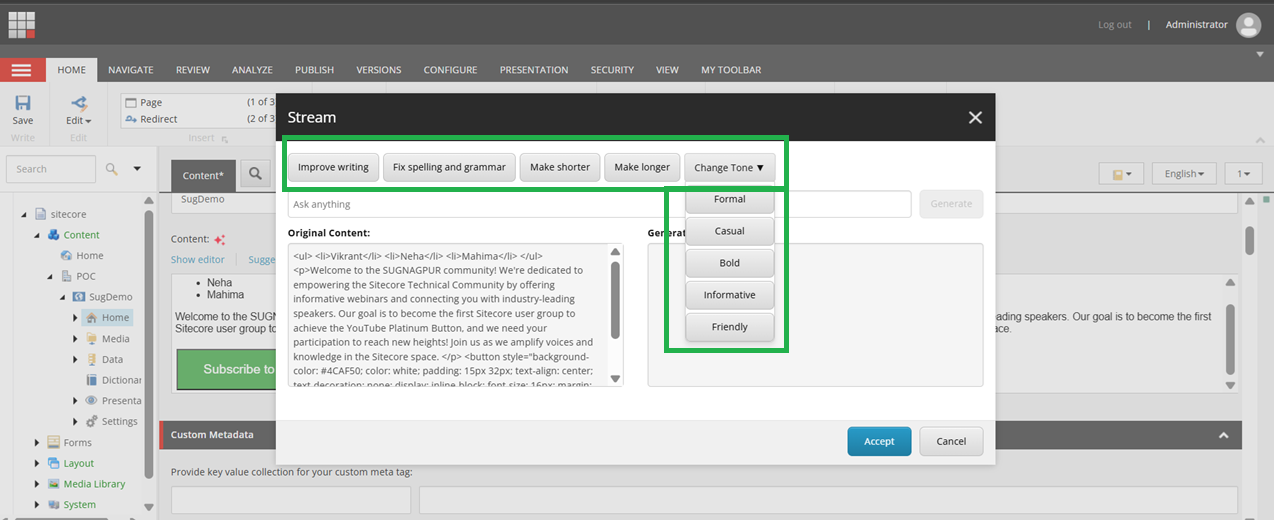
Read more on what are the possible option here

Summary


As you can the power of AI and its capabilities can be configured right into your Sitecore XM/XP (>-10.2 versions) and that also having brand awareness

This is pretty neat and need of the hour, which will make content authors and marketer's life easy and efficient.

Sitecore Stream - Do more in era of less with AI capabilities, Ideation to execution

April 30, 2025 ·

Sitecore Stream - Do more in era of less with AI capabilities, Ideation to execution

Hi Folks,

This blog post is around my point of view from technologist on AI capabilities and orchestration provided by Sitecore Stream, and why it is important to know what it has to offer and RoI for a business and what it has for future roadmap, Because every customer has similar problems and as a technologist you should always try to solve those business problems, and hence below statement comes to my mind  for Sitecore Stream.

A true innovation should start from "Looking at the business problem and then choosing the tech to solve, and not vice versa"

With Sitecore Stream , This is exactly what Sitecore team has done, The product team and technical team worked with marketers and marketing team and with customer to understand their problems and then came up with this amazing innovation and AI capabilities throughout their composable stack.

I will try to simplify things for end audience, so it is easy for them to understand

What is Sitecore Stream? A new Product?

Before we even talk about real life challenges which Sitecore Stream solves, Let's try understanding in extremally simply manner what it Stream.

"Well, It is not a new DxP product, But it is the AI capabilities already available in all the Sitecore DxP products, It is designed to make life of marketers and content authors easy by giving them their brand specific content, and information on tip of their hand with chat like interface."

As we talk, These AI capabilities are already there across all products built in, The biggest win is content authors and marketers get AI capabilities not only while creating marketing campaign but right into their content authoring environment too with XP, XM, XMC what not, With use of GEN AI and power of Microsoft Azure Open AI, Now they can generate the content right from the editor itself.

Now Let's understand what the problems were and why something like this was needed, how was life of a marketers before it and after it.

Problems of marketers or content creators in every organization

Well, generally marketers follow the workflow, where to get the campaign out or getting a page live, they need to go through typical workflow


Now consider following challenges

1) Multiple brands and multiple channels.

2) Lot of old and historic assets and documents on different platforms.

3) Comply with brand guides of all the brands, not all documents are handy and takes lot of time.

4) Make sure they are aligning with the brand strategy, going through all of those documents to align with the brand strategy.

5) Finally make sure tone of voice, fonts, visual guidelines, Grammar align with the brand.

Lot of work right, and in today's world for marketers "There is less budget, less time" but still they need to get "Faster go to market", this is a real challenge and Sitecore Stream comes for a rescue for the very same reason

On top of above challenge, BetterBreifs research says 35% of marketing budget is wasted due to poor briefs, now consider AI at your help, more productive and as they say "Smarter - Strategic - Secure".

How Sitecore Stream Helps in Above Scenario?

1) Brand Aware AI

Sitecore Stream grounds the AI data model to learn against the brand documents uploaded and injected into the portal, This is very SMART way of making sure that all the AI capabilities around the products are targeted specific to your brand, So it is aware about your brand guidelines like tone of voice, which colors to use, which fonts, which images and what not

When you search anything on stream portal or ask anything to AI, It will now give or generate the content or campaign or briefs using your own brand context, which is a huge win.

2) Copilots & Agents

In Stream, there are copilots and agents which helps enhancing productivity by working along with you and doing automated tasks so that you can focus on actually doing what you are supposed to do, either strategy on your next campaign or focus on content which is the at the center and focus of Sitecore

There are multiple types of copilots which are responsible for different things

Brand Copilot

It makes sure that the generated content is aligned with brand's tone, color, voice and identity and context, It gets this context from brand kit documents uploaded from brand-kit section.

Content Copilot

Using this copilot content is generated from the brand kit context, It make sures and assist content authors or markets to add or edit content within the editor.


NOTE: Above screenshot is from one of the POC I am doing, I am excited to share it in my next blog

Experience Copilot

It facilitates the feedback loop kind of experience where it helps in content generation, image generation and then gives marketers to edit that content as per their need and run that cycle till content is satisfactory, majorly used for content hub to perform natural language search, visual search, tags images etc. 

3) Agentic Workflows 

It covers overall ideation to execution; End-to-end workflow automation and content creation life cycle using agents and continues cycle of generating a content till the validation and getting final output.

NOTE: Well, One might think that increasing use of the AI might take marketers or content author's job as now it knows the brand and context and also it completely automates lot of things using GEN AI using these copilots.

But the fact is, it will actually increase the productivity of marketers to think about strategy, and they will do more of those work which they should actually be doing and let the technology do these tasks.

Sitecore Stream portal is the orchestration layer, so it's like central collaborative manner task where you can project manage you campaign get the things done 

Technical Insights

Well, Let's talk something about what powers Stream and technology behind it.

1) Sitecore Stream uses Microsoft Azure OpenAI Services, that gives access to LLMs (Large Learning Models) and RAG (Retrieval Augmented Generation) which are grounded and trained on brand specific data and documents, it currently uses GTP-4 model, which gives amazing "Brand Aware" AI power.

Some says "Sitecore + Microsoft AI" - Match made in haven :)

2) You can use AI capabilities of Sitecore Stream on any DxP platforms, be it XMC, Search, Content Hub, XP, XM

For XP or XM, you can start using Stream from Sitecore 10.2 onwards and upwards. (Depending on the license and other things but Sitecore Stream supports >=10.2 versions)

See below table to understand which product has what feature of stream already available as you read it (This might change depending on future roadmap or some changes might be there and already implemented too)


(Image Source Credit: From the webinar "Supercharge your marketing engine with AI" by Kelly Masters,Sr. Product Manager at Sitecore and Michele Fisher, Global Director of Business Strategy at Microsoft" Find Here)

3) Sitecore Stream can be accessed in two ways 

  • Using online stream app through the Sitecore Cloud Portal
        Login to Stream Cloud Portal and find the Sitecore Stream App (I am going to have a detailed demo and blog around it soon of how stream app is used.)
  • From within your composable stack and Sitecore products.
        AI Capabilities within the products are powered by Stream and it is already built into them, and you can start using it today.

4) With capabilities in DxP, you can generate content using AI for your specific brand as well as you can generate multiple versions of the content too.

5) You can do content translations using Strem AI capabilities.

What is the ROI? and why a customer should use Sitecore Stream?

This is my favorite part and section because the whole purpose of this blog so that it adds value to customers using Sitecore and thinking about getting ROI.

Before 4-5 years we all know if a marketing team or content team needs to get the campaign out or create a content for specific brand of a customer, they had to do briefing and find right asset also scan through historical asset and campaigns and find the right style and font which matches with their brand

Before 2-3 years we had external APIs for generative AI using which we could create content, also we could create campaign using ChatGPT and time to market was made little faster.

But today with Stream, Marketers/Content team gets their brand specific asset, font, style, documents everything as per their brand and they literally get it by just asking on using the same chat as prompt and it will generate content right for your brand which is Complient, Proprietary and secure.

One of the case study or a use case is the brand "Nestle", They partnered with Sitecore on the journey to solve those issues of marketers using AI capabilities using Stream. Watch Here

Nestle has over 2000 brands and its huge, consider just to get a campaign out, how many brand strategic document one will need to go through and make sure it aligns with the policy and brand before it is actually live, that is where Stream gave them ROI and faster go to market.

NOTE: If you have a question like we can do the same in ChatGPT or Gemini and get the job done, but remember one thing, It is like having a general knowledge of all kind, it does not know your brand and content it produces could not be compliant for your brand, Where with Sitecore Stream Brand Aware AI, it super charges your content creation and ideation or execution. 

Future Roadmap

Well future of Sitecore Stream is extremally promising, remember these points are subject to change as per the roadmap and plan from Sitecore.

1) Component Creation using AI

There will be possibility of component creation without writing any code, this will be a game changer where marketing team will not have dependency on a developer to create a component, but it will be possible to output the components using NLPs - Natural Language Processing.

2) Creating Content and Variants

More improvements in the way content is being generated using GEN-AI and making it useful of content authors and marketers to generate variations of content and images.

There are so many other AI capabilities planned but I only have listed which are shared publicly on the web or in Sitecore webinars. 

Summary

“Content is a king and still a king, but without relevance it's nothing”, when we say relevance it's again the experiences, so with relevant content, it captures attention, it drives more engagement and of course it creates a strong brand loyalty.

And there for you know having stream is needed in this digital space is because you need things faster, relevant, faster go to market and with top notch experiences.

NOTE: With Sitecore Stream customer data is fully secure.

Next blog post, I will show the actual business use case and how it addresses the faster go to market and so much of productivity by actually demoing the product.

Sitecore 10.2 Headless SXA is looking for "master" db on CD server

March 28, 2025 ·

Sitecore 10.2 Headless SXA is looking for "master" db on CD server

Hi Folks,

Sometimes you are trying to troubleshoot one thing and end up solving another :), How many of you have ended up same? 

Well, I was actually troubleshooting the high CPU and no. of requests on CD was trying to find some error patterns from Sitecore logs for one of the issues we were facing, there was one specific error which we kept observing was below

Exception

and if you drill further down into it, Sitecore was looking for master DB on CD servers, which is not possible, so definitely, this is bug

I previously faced the same error but for other assembly and to troubleshoot and resolving that the approaches were different but for both meaning of the error is same, for 10.3 where i got the error is drafted here Error in Sitecore 10.3 XM with CDs - Could not find configuration node: database/database[@id='master']


Troubleshooting

It was clear that because some the code which is in "VersionInitializer" class of "SItecore.XA.Foundation.Upgrade.dll" is referring to "master" database on a CD server.

So, I just tried dissembling the DLL to understand what's going on and you can see below

It is clearly seen that code is referring to wrong DB instead of the context DB, it is "master" DB and that is the reason of the error

Solution

Further troubleshooting and research suggested that this can be safely ignored, and this comes only when the instance is starting, but just to keep our logs clean we just commented out below lines from "\App_Config\Modules\SXA\Foundation\Sitecore.XA.Foundation.Upgrade.config" of CD instance


and that is the suggested approach from Sitecore.


Sitecore XM Cloud Components - BYOC - Bring in your existing react or nextjs component library

March 24, 2025 ·

Sitecore XM Cloud Components - BYOC - Bring in your existing react or nextjs component library

Hi All,

Last year i did lot of research and hands on to "XM Cloud Component Builder", Very powerful futuristic tooling provided by Sitecore.

At that time it was still in "Early Access" phase.

You can have a look at my "SUGCON 2023 - Presentation on XM Cloud Component Builder"  to know about it's capabilities and use cases.

and if you are PODCAST lover, find the podcast here 


I would highly recommend going through above video or podcast to understand "Low code, No code" and what is "FeaaS" and power of it, As LCAPs (Low Code Application Platforms) are growing at the speed of around 25% every year, And it's a future.

Now, Let's talk about Part-2 of it, more advance use cases of "XM Cloud FeaaS", Once you have understanding of the component builder, you can do wonders, and this part-2 we will talk about something amazing it can do which is BYOC, Bringing Your Own Components.

What is BYOC - Bring Your Own Code (Or Components)

In Part-1, this feature BYOC was still under development, but now it is live from long time and available and as its name suggests, you can technically bring your already developed react / NextJS component directly into XM Cloud, Developers can bring their own code (BYOC) by referencing an external code base that includes components so that they can be used in the component builder interface.

Sounds so powerful right? Also, it could be great sellable point or a feature where, you do not have to rewrite your business code which you had in those components which you have created in react or NextJS, that means you can almost get them working straight into XM Cloud.

It opens endless possibilities for those customers who already have their component libraries and the sites using those components, and with composable features of XM Cloud, they can reuse their code too.

My Experience working with it.
 

There are three options I have personally configured and work like a charm.

1) If you have XM Cloud Starter Kit Repo and XM Cloud Project already, it has seamless support where you can just do certain configurations and your react/NextJS components which are in XM Cloud StarterKit code will come to life in component builder, we will see the steps later in this blog

2)  If you have existing NextJS components already, you can bring those components straight to your builder & start using them on "Pages".

3) If you have existing react components already, you can bring those components straight to your builder & start using them on "Pages".

You can bifurcate these approaches in two broader categories.

1) Using an existing rendering host of XM Cloud - When your components are made part of XM Cloud Startkit which you are already using, in that case you do not require to add any external rendering host, XM Cloud default rendering host will take care of it.

2) Using "External Rendering Host" - In cases where your react/NextJS components are already residing in some other source control and live on some other sites and which you want to bring into XM Cloud component builder, Here it needs the live URL of the site to be configured into XM Cloud, If the components are configured correctly (which I will show you in this blog), XM Cloud will read those components too.

What are the steps?

Ok, Let's talk about the steps first, 

1) If you are trying to use your react or NextJS components to be made available, then first you will need to install below in your code repo

npm install @sitecore-feaas/clientside

2) Go to your component which you want to import and write below line 

/* eg. src/components/MyComponent.js */

import * as FEAAS from "@sitecore-feaas/clientside/react"

3) You will need to register the component

FEAAS.registerComponent(ExampleClientsideComponent, {
  name: "clientside-only",
  title: "Clientside-only component",
  description: "Description of my example component",
  thumbnail:
    "https://feaasstatic.blob.core.windows.net/assets/thumbnails/byoc.svg",
  group: "D Section",
  required: ["firstName"],
  properties: {
    firstName: {
      type: "string",
      title: "First name",
    },
    lastName: {
      type: "string",
      title: "Last name",
    },
    telephone: {
      type: "number",
      title: "Telephone",
      minLength: 10,
    },
    bold: {
      type: "boolean",
      title: "Show text in bold weight",
    },
  },
  ui: {
    firstName: {
      "ui:autofocus": true,
      "ui:emptyValue": "",
      "ui:placeholder": "Write your first name",
    },
    bold: {
      "ui:widget": "radio",
    },
  },
});

Remember BYOC support is out of the box for XM Clodud Starter repo, above steps are only for if you want your existing NextJS component to be registered and available in XMC as external rendering host

I think it is very powerful way of working where you can just Bring Your Code in and it just works, That means you do not have to rewrite those components for xm cloud but you will be able to see those components exactly like your current react site and will be able to drag & drop them on the pages

Reference - Walkthrough: Registering an external React component | Sitecore Documentation

Every Sitecore Instance using GQL is prone to this scenario of template not found - Sitecore Component With GQL Queries Broke On Production

October 27, 2024 ·

Every Sitecore Instance using GQL is prone to this scenario of template not found - Sitecore Component With GQL Queries Broke On Production

Hello Team,

Today, I wanted to share a real scenario and a solution of it about what happened  suddenly to our components and how we identified it and how we resolved it, and most importantly it could happen to your installations too

Scenario

We have one Sitecore 10.2 headless instance and two sites, One site is non-sxa which is legacy site and another site is a new site which uses headless SXA.

Now, non-sxa site is already live and working fine with all components etc. and the new headless site was in development and it has separate development team, So we have same DEV/UAT/PROD environments.

One fine morning they took their code and site on environment but strangely some of the GQL components like header footer of legacy site disappeared. 

Troubleshooting Steps

1) We checked the broken component's GQL query 

2) We took that query and fired it in GQL IDE, and we observed that, Some of the templates references we used were not found, which was working just fine and we have not had any deployment of this site, see below what it was giving 


3) Now, one thing was clear, that the path of this "Link" template the tooltip is showing is not the one we referenced in our query, if you see the tool tip on above screenshot it is showing the path of SXA template which does not have those fields, Our legacy site does not use SXA.

4) Upon further investigation, we found out that, the other team who is sharing Sitecore instance have installed headless-sxa package and it seemed like it somehow now taking that template

5) We double checked and our custom "Link" template which was on another path was also there but it was somehow giving precedence to this SXA template.

6) We knew how GQL schema is generated, If there are templates with the same name exists in the tree, then precedence will be given to the one which has older date and the template which is of later date will be renamed with _GUID format, Read on link

Sitecore GQL Schema 

If you read the paragraph highlighted below from the Sitecore link


7) We were still puzzled because our custom "Link" template was older as we are live from long time and the headless-sxa package was just recently added, so that should have newer date, So we went on to check the date of that template which was generated by installing the package.

8) With our surprise, it has very old date for obvious reasons, because the package is standard package and it comes up with its own date when package was created by Sitecore. See below


We knew the issue now, but what is the solution? Because headless-sxa package is now overriding the behavior because it is having the older dates in its template.

Solution

1) Change your queries to have template name with _GUID, Because that is the correct template, but in this case you will need to change all the places where this template is used.

2) You can modify the <AddIncludePaths> configuration in the GraphQL schema custom configuration, so that you can exclude the SXA path in generating template schema and configure only those templates which you are using in GraphQ like below.

Default Configuration

By default Sitecore uses helix schema and edgeschema to target specific template path depending on helixContentSchema and edgeSchema configuration like below, and if you observer it will create template schemas for all those given on below paths, now all SXA related folders are also inside these folders only, so it also creates schema for those too. 

Now, if you have a different folder or a path which you want to target, You can patch your custom graph GQL schema configurations so it targets only specific path and generates template schemas for those path only like below 

<?xml version="1.0" encoding="utf-8" ?>
<configuration xmlns:patch="http://www.sitecore.net/xmlconfig/" xmlns:role="http://www.sitecore.net/xmlconfig/role/">
<sitecore>
<api>
<GraphQL>
<endpoints>
<customGraphQLEndpoint>
<schema>
<content>
<templates>
<paths>
<patch:delete />
</paths>
<paths hint="list:AddIncludedPath">
<feature>/sitecore/templates/Feature/Content/MyCustomPath</feature>
</paths>
</templates>
</content>
</schema>
</customGraphQLEndpoint>
</endpoints>
</GraphQL>
</api>
</sitecore>
</configuration>

But the limitation here is, We have "AddIncludedPath" tag but we do not have "AddExcludedPath" tag, so if you have so many path to include but if you have only one path you want to exclude, It is not possible right now, instead you will need to have all those custom path registered in "AddIncludePath" for which i raised the feature request and Sitecore has acknowledge it and taken as feature request with reference no. DEVEX-2997

I hope this scenario will save troubleshooting time for you all, Because this could easily exist in your set up too.


Sitecore GQL not showing template in auto suggestion while using GQL playground

September 30, 2024 ·

Sitecore GQL not showing template in auto suggestion while using GQL playground

Hi Team,

We all work with GraphQL playground which was new some years back and we were all learning, today i am going to share a scenario which you might face too, So you can get the answer or solution handy with this blog post

Scenario

There are many of our components and code calling GQL, All works fine, but one scenario where it kept showing "Unknown type", There was nothing fancy there and same query and same expectations but it was failing, Below are details of it.

So, The context is i created a template, and also created items from that template.

Now, I had to write GQL just expose those content because our another downstream system will consume that data and use it.

But when i wrote simple query, it kept giving me "Unknown type" error and i was little clueless, Here is what is kept showing.


 Troubleshooting

1) I double checked, If template "RecurringScript" exists with same name in Sitecore

2) I renamed the template just to try but it did not work too

3) Out of the clue i tried searching for some other template and they were showing fine

4) I cleared cache and tried

Solution

Well, to resolve this, It is important how these templates schema is being generated, So first thing what i did was to understand how GQL schemas gets generated

By default schema configuration looks like below in your showconfig.aspx

If you see, the instruction are in place that read the templates on given paths, Now in my case the folder was created outside of whole structure (for some internal purpose).

There are two things you can do here

1) You can define you whole custom schema configuration with your custom paths and your personal GQL Playground endpoint and patch it

2) There is also an option, so if you create any template under "User Defined" folder, It will be considered in schema and you will be able to query normally

To cut the story short, anything that you defined in "AddIncludedPath" configurations, From those locations it will try to generate schema for templates and then you can query them.

So, for my needs, i moved my folder into "User Defined" folder (the folder which i moved had "RecurringScript" template inside it) and restarted the environment.

and now because i moved the folder which had my template into "User Defined" folder and because my GQL schema has that configuration to read from that folder, the error was resolved and i was able to hit the query just fine

Conclusion

GQL is full extensible, you can patch your own schema configuration and give different folder path for your needs, In my next blog i will explain a scenario which could exists in your existing set up too and it might break your components for you too.

For above change, i had one question to Sitecore, What if i want to exclude the paths, so if i have more path in exclusion and less path in inclusion, Having "AddExcludedPath" will help in those scenarios

And Sitecore has taken it as feature request and the tracking number for that request is "DEVEX-2997"

Sitecore SearchStax Component showing different results on every page refresh issue, troubleshooting, solution

August 31, 2024 ·

Sitecore SearchStax Component showing different results on every page refresh issue, troubleshooting, solution

Hi Fellas,

In today's blog post I will share a scenario which will help you also in your implementation, what is important here is to understand the issue when it is produced.

Generally, it is always puzzling why certain components show different results on different page refresh, and because my team members also spent same amount of time on both of the different scenarios and hence, I thought to get this article out, I will explain those two scenarios and also provide solution at the end, Though solution is easy and available on lot of sites but important here is finding out what is the issue and what are the steps to identify it, so in this blog post my focus is to show you the steps of identification rather than solution.

Scenario

Here are those two scenarios

Sccenario-1

On a home page we have a Sitecore component, which has a custom resolver, and that resolver basically reads from solr index and hits the query and returns the JSON result, and that is being read in JSS component, now every page refresh it was showing different results.

Scenario-2

Another puzzling scenario was, when our QA raised our video feed component is showing feeds in alternate refresh, because we had scenario-1 already happened where we spent good amount of time, so solving scneario-2 was not hard but because same code returns different results from index makes you puzzle and that is where I mentioned, Understanding the process before solving is interesting.

Troubleshooting

Well because it is a SOLR query which is returning different results, so we knew something is wrong there, and we are using SearchStax so we have multiple replicas of one index, we straight away checked the replicas we found following 


Now, it is clear that some documents are missing from index replicas and clearly replicas are out of sync as one of the replicas is showing less documents

So, what happens is depending on page refresh sometimes it returns data from on replica and another page refresh it returns data from another replica and because there are docs missing, it is not able to return any results and hence the miss match.

Now, to further troubleshoot and know if our specific documents which our component is trying to fetch data for, we took the query from Sitecore log and there is a way to fire that query in individual replicas, that means if our theory is correct, those queries against three replicas should return different results.

There is a good documentation available on Identical Queries Produce Inconsistent Results - SearchStax Help Center  and we followed that

Basically, we had three replicas so in three different browser tab we hit following queries 

1) https://<<Our cloud solr instance URL>>/solr/sitecore_web_index_shard1_replica_n1/select?q=<<solr query which we found in log for that component>>

2) https://<<Our cloud solr instance URL>>/solr/sitecore_web_index_shard1_replica_n2/select?q=<<solr query which we found in log for that component>>

3) https://<<Our cloud solr instance URL>>/solr/sitecore_web_index_shard1_replica_n4/select?q=<<solr query which we found in log for that component>>

You see those replica names those you can get from going into collection and then shard like below 


and all three tabs revealed inconsistent results as shown below


Hence it was proved that what is the issue and how to sync these replicas? So all data was published the issue was that somehow all replicas are not in sync

and because we are using searchstax, we asked them to do a Rolling Restart

As I said in this article, instead of the solution, the process of identifying is little important here because that is where maximum time goes, so next time when you land into this kind of scenario, you know what steps to perform to identify the issue :) 


Sitecore Multisite - Unexpected provider type: System.String. Expected: Sitecore.Links.LinkProvider

July 18, 2024 ·

Sitecore Multisite - Unexpected provider type: System.String. Expected: Sitecore.Links.LinkProvider

Hi Team,

Today's blog post is regarding real live scenario which we came across while having multisite solution in Sitecore headless set up.

Well, We have had couple of deployments but one fine morning after the deployment we started getting below error on our stagging site (UAT)


and in Sitecore logs we were getting same following logs 

Exception: System.InvalidOperationException
Message: Unexpected provider type: System.String. Expected: Sitecore.Links.LinkProvider
Source: Sitecore.Kernel
   at Sitecore.Configuration.DefaultFactory.GetProviders[TProvider,TCollection](List`1 nodes)
   at Sitecore.Configuration.DefaultFactory.GetProviders[TProvider,TCollection](String rootPath, TProvider& defaultProvider)
   at Sitecore.Configuration.ProviderHelper`2.ReadProviders()
   at Sitecore.Configuration.ProviderHelper`2.get_Provider()
   at Sitecore.Links.DefaultLinkManager.ParseRequestUrl(HttpRequest request)
   at Sitecore.Web.RequestUrl.Parse(HttpRequestBase request)
   at Sitecore.Pipelines.HttpRequest.HttpRequestArgs.Initialize()
   at Sitecore.Pipelines.CorePipeline.Run(PipelineArgs args)
   at Sitecore.Pipelines.DefaultCorePipelineManager.Run(String pipelineName, PipelineArgs args, String pipelineDomain, Boolean failIfNotExists)
   at Sitecore.Pipelines.DefaultCorePipelineManager.Run(String pipelineName, PipelineArgs args, String pipelineDomain)
   at Sitecore.Web.RequestEventsHandler.OnBeginRequest(HttpContextBase context)
   at Sitecore.Nexus.Web.HttpModule.HttpApplication_BeginRequest(Object sender, EventArgs e)
   at System.Web.HttpApplication.SyncEventExecutionStep.System.Web.HttpApplication.IExecutionStep.Execute()
   at System.Web.HttpApplication.ExecuteStepImpl(IExecutionStep step)
   at System.Web.HttpApplication.ExecuteStep(IExecutionStep step, Boolean& completedSynchronously)

Troubleshooting & Solution

Our actual set up is, We have

1) One site with headless SXA 
2) One legacy headless site without SXA

and development of both happening in parallel with two different team but deployments are planned in such a way that non SXA site gets deployed first and then the other SXA site on different times.

Now, Above error clearly says that on UAT, it is not able to find the LinkProvider which is configured, and previously it was working, So following was the patch which was applied and went on to both DEV and UAT server, but on DEV it worked fine and on UAT it is failing

<?xml version="1.0" encoding="utf-8"?>
<configuration xmlns:patch="http://www.sitecore.net/xmlconfig/">
  <sitecore>
    <linkManager>
      <providers>
        <add name="localizedProvider">
          <patch:attribute name="lowercaseUrls">true</patch:attribute>
        </add>
      </providers>
    </linkManager>
    <links>
      <urlBuilder>
        <lowercaseUrls>true</lowercaseUrls>
      </urlBuilder>
    </links>
  </sitecore>
</configuration>

Thanks to my colleague Ajay Gour who reviewed past commits and we figured the patch which went up.

So we looked at the showconfig.aspx of working DEV environment and compared it with above patch and found our that patch is looking for "localizedProvider" which requires SXA to be installed otherwise it will never find that provider and above yellow screen will come and because on DEV both the team are working SXA was installed and hence that patch was working.

Basically, Because of having same Sitecore instance for both the SXA and non SXA site, this patch went up but for this patch to work prerequisites is, SXA should have been installed for this "localizedProvider" to work

So solution to this was either to install SXA dependencies being same sitecore instance or changing the patch to target the default Sitecore link provider and patch it, Because for the site which is non SXA should not have dependencies on provider of SXA site

Because deployments for both sites can took place at different time expecting SXA to be present on Sitecore instance is not valid

so we changed that patch to following

<?xml version="1.0" encoding="utf-8"?>
<configuration xmlns:patch="http://www.sitecore.net/xmlconfig/">
  <sitecore>
    <linkManager defaultProvider="sitecore">
      <providers>
        <add name="sitecore">
          <patch:attribute name="lowercaseUrls">true</patch:attribute>
        </add>
      </providers>
    </linkManager>
    <links>
      <urlBuilder>
        <lowercaseUrls>true</lowercaseUrls>
      </urlBuilder>
    </links>
  </sitecore>
</configuration>
 
Above patch we made sure that it does not target the localizedProvider because if SXA is not installed, it will not work & for the sites which needs SXA when they go live, we made sure that those sites have "localizedProvider" selected from site settings so it works for both the sites with different link provider. 

Installing SXA is also an option, and keep the patch same, but we did not want SXA dependencies for legacy sites though it will  be one time activity.

Now when the site with SXA will go live, we will revisit and check things for both of them and because SXA site has provider configured in its site setting it should work "as-is"

Thank you for my partner in all these troubleshooting and discussions Kiran Sawant my team member for his help and making sure that changes are propagated to environments and checked.
Sitecore XM Cloud Forms - What changed since the launch

June 18, 2024 ·

Sitecore XM Cloud Forms - What changed since the launch

Hi Team,

I had an opportunity to take part in "Collaborative Program – XMC Forms Early Access" with Sitecore team to play around XM Cloud Sitecore Forms along with few of my colleagues before 6 months, When forms were not released officially, and the purpose was to review XM Cloud forms and provide feedback around it, We had great opportunity to connect with product Strategist Christa Marousek and Senior Product Manager Marina Kostopoulou on reoccurring meetings.

I along with my colleagues Brijesh Patel  Nimit Patel Varun Shringarpure  Jatin Prajapati Varalakshmi MD Gautam Bulchandani Irfan Masurkar and lot other folks explored Sitecore XMC Form and provided our inputs / feedbacks / improvement that we think should be part of public offering of Sitecore XMC Forms.

The objective of that program was to get inputs from partner community about forms and give them a feedback and improvise it.

In this blog i will highlight what feedback as a team we gave to Sitecore in exploring Sitecore XM Cloud Forms and how fast Sitecore is bringing those changes to production and for larger community to use, So it is going to be like highlights of "Half Year Anniversary" of XM Cloud Forms and the improvisation in those time.

We focused mainly on following topics

Sitecore XMC Forms Early Access Evolution Criteria.

Basically, We looked at the XMC Form from end user perspective and decided couple of common use cases to start with which were as follow.

1) Looking at the usability and ease of use of the forms

2) Real life use case and compare that with this new forms

3) Execution of the Use cases

4) Trying different validations and form styling etc.

5) Use multiple forms on the same page

6) Create and use multi steps form

7) Creating a web hook and configure that to a form

8) See google captcha integration

9) Deploy the page on vercel and test forms

10) Check file uploads

11) Feedback loop with Sitecore team  

Feedbacks which were shared with Sitecore XMC Forms team at that time and how do forms look now

Feedback we provided THEN

How does it look NOW

Users were not able to access forms until they were made admin

This limitation is not present anymore

We discussed with Sitecore team that once form is activated there is no way to change the form, but in real life scenario we will need to change the form, we can not create new versions every time.

This ability was recently rollout by Sitecore, Check the XM Cloud Changelog , So now changes to the active forms are immediately available in XM Cloud Pages, and are automatically applied to all live instances of that form.

Validation were getting fired but we did not see from where we can customize the validation error messages.

This feature was rolled out in February, Have a look at XM Cloud Changelog

File upload were not possible, We gave this feedback how to have file upload in the form, we could not find it.

This feature was released around 10th April, Check the release notes XM Cloud Changelog They released it and now in S3 bucket files are stored for 24 hours, Read more on where the files are stored on This Blog

You can not hook any events of onchange or onblur with those form controls, If a developer wants to wire some events on client side, it is not possible.

 Not exact same, but there was a feature called "Logic" which was added around 19th March which enables to create dynamic forms containing fields that display conditionally, Depending on the values entered to other form fields, This creates a personalized and interactive experience, Improving engagement and the changes of successful completion of the form. Check out XM Cloud Changelog , Know its detail workings on This Blog

Previously, i needed to go into every form and every control to style it, is there a way where we can create global styles or apply CSS?

There was a feature released along with file upload feature on 10th April called "Style Builder" XM Cloud Changelog using which now user can create two types of styles

1) Visual styles - built with the Styles builder

2) CSS styles - created by saving the style as CSS code.


Apart from above points, There were further inputs which currently are not available in XMC Forms, and which could be part of future releases (We do not have any confirmation from XMC team but pointers were shared with them so their product team can look into this), Following are those.

1) If dropdown has many options, User should be able to type the option, Instead of long scroll to find.

2) Position of the Success and Failure message can not be determined, It comes at the top all the time.

3) There is regex validation but it only works for single line text field & email. 

4) Cascading dropdowns are not available.

What else changed apart from above since the launch?

Below are the visuals of before and after change that happened since the XMC forms launch in January 2024

THEN : In early access the form UI was not refreshed to its full capabilities, also icon sets were different and there was no conditional logic functionality available, as shown in below screenshot


NOWIf you compare this screenshot with the NOW version below, you will see that the UI is refreshed and "styling" tab is renamed with "Options", Because now that options tab contains lot more than only styles, and upper icon list now have an option called "Logic" which is responsible to hide and show different controls depending on field values, in table above you can read more about it on the link given.


THENIn template library section, There was only four options or four categories as shown below, also UI of the button arrangement was different.


NOW : Now, We also get the option called "Shared" that means now templates can be shared with  other environments in your organization, also change in button layout can be seen too.


THEN : In initial release, Submit button was not mandatory to be present on the form, but in the new releases the submit button is part of default controls, that means, At start while creating a form, even if you drag and drop any element on the form, submit button will automatically be available along with it, The reason behind is, without submit button there is no purpose of the form

NOW : You can see that submit is part of it by default, as soon as you drag & drop any control.


Also, If you delete the submit button, the editor will show nice little warning about it, As shown below 


THEN : We had site analytics but now we also get the form analytics too, so you can also hook different events to collect analytics of forms, There is going to be lot more into analytics events based on the context id of your instance, but that is for the future

NOW


And last but not the least, as latest as 19th June 2024,

"You can now choose to only make a form available on specific sites in an environment. For example, if your environment includes five separately branded sites, you can create an appropriately branded form for each of those sites. To use this feature, configure the Form available on setting in the form editor, even after a form has been activated. If you don't specify anything for this option, the form will be available on all of your sites." Read more Here

As i write this blog, new features are still being added and forms are getting better and better.

Conclusion

As you can see how fast those feedbacks and inputs were taken into considerations and how fast they were rolled out in public releases, Sitecore XMC has been one of the platform of frequent releases and fast feature rollouts and kudos to the entire team of Sitecore XMC Forms and Sitecore XMC.

Sitecore XMC Form is one of the essential offering and with ease of use by simply drag/drop you could create your branded forms and super power your lead capturing and lead generation.