Sitecore XM/XM Cloud - DefaultSitemapQuery errors out if excludepaths has space in item name

July 20, 2023 ·

Sitecore XM/XM Cloud - DefaultSitemapQuery errors out if excludepaths has space in item name

Hi Team,

Recently, we had a requirement we needed to prerender pages in NextJS using GetStaticProps but excluding some pages, but it was failing due couple of reasons, I created two blog post around it 

1) Sitecore JSS - Error: `redirect` can not be returned from getStaticProps during prerendering (daivagnananavati.blogspot.com)

2) Sitecore XM/XM Cloud - Exclude specific Sitecore items from prerendering Sitecore JSS (daivagnananavati.blogspot.com)

First blogs explains, what issues we run into while prerendering pages and what is not supported at build time, it is good to understand the concept of prerendering and why redirects does not work while prerendering

and second blog explains once we knew redirect items in GetStaticProps does not work at build time, what are the possibilities and what is that we did to exclude those items from being given to GetStaticProps, so that it ignores those items and does not prerender them and build gets successfully built.

Today, in this blog post I will explain one more bug that exists in Sitecore JSS, In My blog post I have explained how you can use excludePaths property to exclude array of paths which you want to exclude from prerendering, but if redirect items are used in this array & if any redirect items has space in its name, it fails with following error, we needed to exclude redirect items because they are not supported at build time in GetStaticProps

"ClientError: GraphQL.ExecutionError: Provided exclude path <<path to the problematic page with space" is not exist in the <<site name>> site"

When you write a GraphQL query to get your redirect items using a search query, so basically try to find item with specific template, in my case, the query is find all item using redirect template, which is like following

query RedirectQuery(
        $rootItemId: String = "<<your home node GUID>>"
        $language: String = "en"
        $pageSize: Int = 1000
        $after: String
        $redirectTemplateId: String = "<<redirect template GUID>>"
      ) {
        search(
          where: {
            AND: [
              { name: "_path", value: $rootItemId, operator: CONTAINS }
              { name: "_language", value: $language }
              { name: "_templates", value: $redirectTemplateId, operator: EQ }
            ]
          }
          first: $pageSize
          after: $after
        ) {
          total
          pageInfo {
            endCursor
            hasNext
          }
          results {
            url
            {
              path
            }
          }
        }
      }

Now, if you hit this query in GraphQL IDE, it returns all the items which are of redirect type like following 


If you observe the first item path, which says "test-redirect-item", now this item in sitecore has a name with space but the GRAPHQL query and url { path } is automatically converting it and replacing spaces with "-"

This is expected behavior but the problem with this and build fails when "DefaultSitemapQuery" runs when you build the project

In normal scenario everything will work, but in our case we wanted to exclude some items from getStaticProps and for that we used "excludePaths" properties of GraphQLSitemapService, so what ever is the output of above graphql, we were running the loop in our NextJS and creating an string array and were giving it into "excludePaths" property, this whole execution is mentioned on the https://daivagnananavati.blogspot.com/2023/07/sitecore-xmxm-cloud-exclude-specific.html  blog 

Now, issue we run into was, because we had space in Sitecore item name, and our query was returning item path with "-" and "DefaultSitemapQuery" when runs along with "excludePaths" switch, it tries to find item with that "-" and it does not find that item and build fails


Because the build error also printed the default query it is executing, i tried to run the same query in the GraphQL editor to see what is causing it to fail? and i got the same error as shown below


So, now it clearly looked like a bug to me, because in ideal scenario, DefaultSitemapQuery (above) should also replace the item name's space with "-" and then compare but it was not doing that and that is why it was not able to find that item and build was failing.

Solution

One quick fix which I did was, instead of url { path } in my redirect item GraphQL query (first which I showed in this blog post), use path directly so you will need to change the query section like below 


so now instead of the "-" it will show actual item name without replacing which our "DefaultSitemapQuery" expects

but this has another draw back is that, instead of relative path, it shows the full path like "/sitecore/content/<<tenant>>/<<site name>>/Home/test redirect item" item, and that path does not work with "excludePaths" it only needs relative path because it only finds under home node and if you give full path, it will still not work

to get around that, in the .map function, you will need to replace "/sitecore/content/<<tenant>>/<<site name>>/Home" with empty value before pushing in to an array, this full code is available on https://daivagnananavati.blogspot.com/2023/07/sitecore-xmxm-cloud-exclude-specific.html  blog, i am pasting a small screenshot from that blog here so you know which .map function I am talking about, so then you can refer to above blog to connect the "dots"


Now, "DefaultSitemapQuery" which gets executed by default on build time, will be able to successfully ignore all those items and build will not fail and everything will work

On XM or XM Cloud if you are using preview API, you might end up in this issue if you have similar scenario.

NOTE: This behavior was verified with Sitecore and they acknowledge that this is a bug and registered as a bug in bug tracking system with reference number 591500


Sitecore JSS - Error: `redirect` can not be returned from getStaticProps during prerendering

July 19, 2023 ·

Sitecore JSS - Error: `redirect` can not be returned from getStaticProps during prerendering

Hi Team,

Recently in one of my project, I faced situation where we had getStaticProps complaining that it is not able to prerender some items and those paths were failing to build the app.

so scenario was everything was working fine and build was working, but then there were redirect items added to sitecore content tree and form that day onwards "npm run build" started failing out of the blue with following errors


First it was hard for me to wrap my head around it because, our Sitecore tree had different redirect items created from standard JSS redirect templates, so those redirect item were old URLs and in the field "redirectURL" we had the new page's path selected, because they are items just like any other items, I was expecting GetStaticProps to work, but build time only it was failing

our NextJS getStaticProps looked like below 


Basically, NextJS code in GetStaticProps meant following 

1) GetStaticProps should prerender all the pages at build time

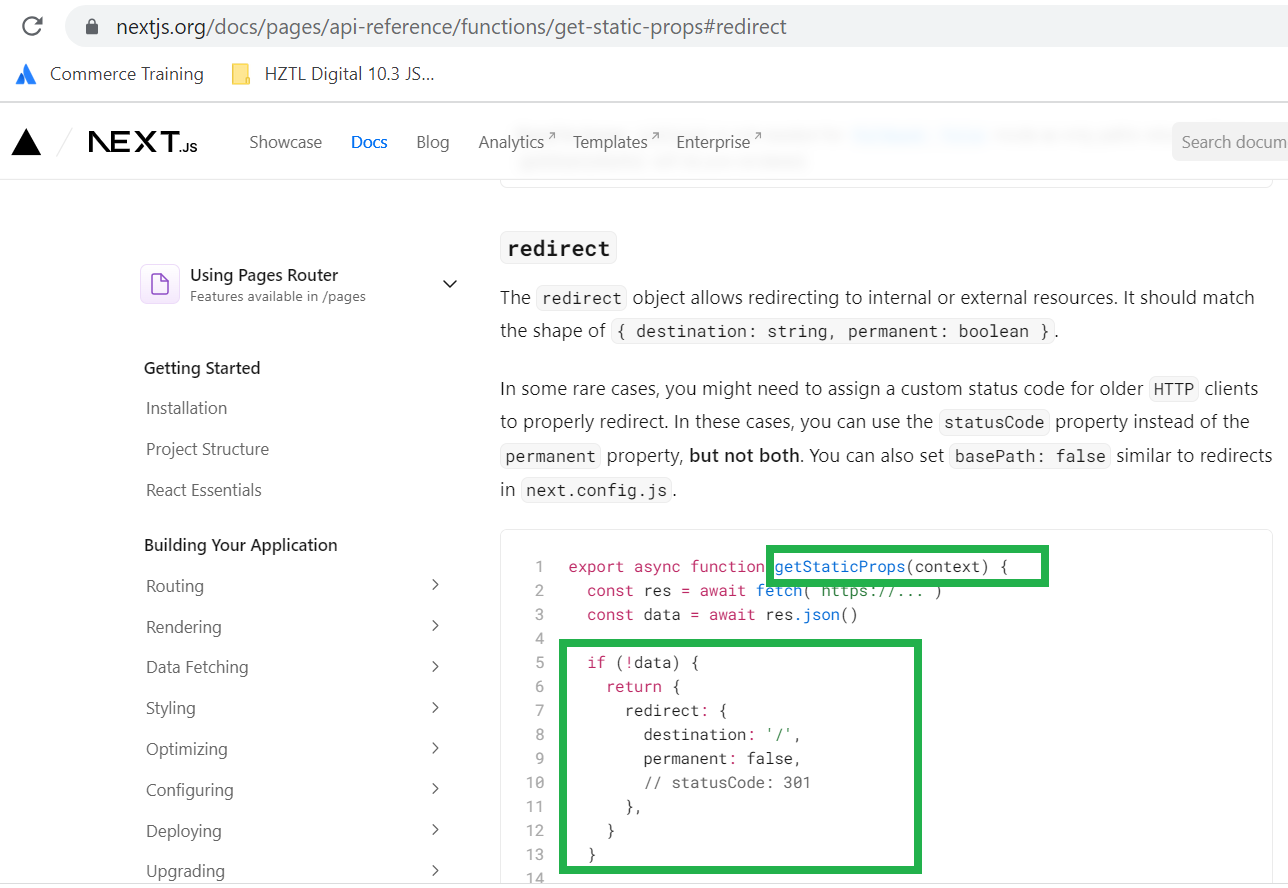
2) If it is redirect item, then assign a redirect from GetStaticProps - ( https://nextjs.org/docs/pages/api-reference/functions/get-static-props#redirect  , approach is documented on NextJS documentation that you can give redirect in getStaticProps) and expect it to redirect the page from old to new url when requested

If you see above screenshot of the getStaticProps, We did same as given on the NextJS documentation, where if the item is of type redirect we were giving it in a redirect object as shown in NextJS documentation.


But it was failing at build time only, so when we run "npm run build" it was just giving error for all the pages which were redirect items.

I am not a big front end guy, and I am on my way to become fullstack developer, so it was little difficult for me to understand at first why even if NextJS documentation is supporting the redirect option in its syntax, why it still fails?

After talking to our FED practice lead Anders Hopkins, it was known that redirects are 100% supported but not at the build time, So what happens is that when you run "npm run build" at the time you will need to make sure that all the redirect items are ignored from prerendering and then only it will build successfully 

So now i needed find out how can I ignore those paths with redirect items? that lead me to another discovery which is 10.3 specific syntax which i have blogged on this link Sitecore XM/XM Cloud - Exclude specific Sitecore items from prerendering Sitecore JSS (daivagnananavati.blogspot.com) , Go through that to see how can we exclude those paths which are of redirect items using GraphQL and make sure it is run before getStaticProps

But for those who are facing the same issue and trying to find why redirects does not work that is because "Redirects are not supported at build time, but they are supported once ISR kicks in"

So what happens is ,

1) At build time, all redirect items should be ignored so build gets successfully (you have to exclude those redirect items so they are removed from prerendering)

2) Now, when any redirect item is hit on the browser, because it does not have prerendering, request is served via server side and page is rendered

3) ISR (Incremental Static Regeneration) module handles the redirect and publish event, and make sure that item is redirect from server side (after predefined time set by your configuration for ISR)

So, now build works and redirect of page also works.