Sitecore XM Cloud Components - BYOC - Bring in your existing react or nextjs component library

March 24, 2025 ·

Sitecore XM Cloud Components - BYOC - Bring in your existing react or nextjs component library

Hi All,

Last year i did lot of research and hands on to "XM Cloud Component Builder", Very powerful futuristic tooling provided by Sitecore.

At that time it was still in "Early Access" phase.

You can have a look at my "SUGCON 2023 - Presentation on XM Cloud Component Builder"  to know about it's capabilities and use cases.

and if you are PODCAST lover, find the podcast here 


I would highly recommend going through above video or podcast to understand "Low code, No code" and what is "FeaaS" and power of it, As LCAPs (Low Code Application Platforms) are growing at the speed of around 25% every year, And it's a future.

Now, Let's talk about Part-2 of it, more advance use cases of "XM Cloud FeaaS", Once you have understanding of the component builder, you can do wonders, and this part-2 we will talk about something amazing it can do which is BYOC, Bringing Your Own Components.

What is BYOC - Bring Your Own Code (Or Components)

In Part-1, this feature BYOC was still under development, but now it is live from long time and available and as its name suggests, you can technically bring your already developed react / NextJS component directly into XM Cloud, Developers can bring their own code (BYOC) by referencing an external code base that includes components so that they can be used in the component builder interface.

Sounds so powerful right? Also, it could be great sellable point or a feature where, you do not have to rewrite your business code which you had in those components which you have created in react or NextJS, that means you can almost get them working straight into XM Cloud.

It opens endless possibilities for those customers who already have their component libraries and the sites using those components, and with composable features of XM Cloud, they can reuse their code too.

My Experience working with it.
 

There are three options I have personally configured and work like a charm.

1) If you have XM Cloud Starter Kit Repo and XM Cloud Project already, it has seamless support where you can just do certain configurations and your react/NextJS components which are in XM Cloud StarterKit code will come to life in component builder, we will see the steps later in this blog

2)  If you have existing NextJS components already, you can bring those components straight to your builder & start using them on "Pages".

3) If you have existing react components already, you can bring those components straight to your builder & start using them on "Pages".

You can bifurcate these approaches in two broader categories.

1) Using an existing rendering host of XM Cloud - When your components are made part of XM Cloud Startkit which you are already using, in that case you do not require to add any external rendering host, XM Cloud default rendering host will take care of it.

2) Using "External Rendering Host" - In cases where your react/NextJS components are already residing in some other source control and live on some other sites and which you want to bring into XM Cloud component builder, Here it needs the live URL of the site to be configured into XM Cloud, If the components are configured correctly (which I will show you in this blog), XM Cloud will read those components too.

What are the steps?

Ok, Let's talk about the steps first, 

1) If you are trying to use your react or NextJS components to be made available, then first you will need to install below in your code repo

npm install @sitecore-feaas/clientside

2) Go to your component which you want to import and write below line 

/* eg. src/components/MyComponent.js */

import * as FEAAS from "@sitecore-feaas/clientside/react"

3) You will need to register the component

FEAAS.registerComponent(ExampleClientsideComponent, {
  name: "clientside-only",
  title: "Clientside-only component",
  description: "Description of my example component",
  thumbnail:
    "https://feaasstatic.blob.core.windows.net/assets/thumbnails/byoc.svg",
  group: "D Section",
  required: ["firstName"],
  properties: {
    firstName: {
      type: "string",
      title: "First name",
    },
    lastName: {
      type: "string",
      title: "Last name",
    },
    telephone: {
      type: "number",
      title: "Telephone",
      minLength: 10,
    },
    bold: {
      type: "boolean",
      title: "Show text in bold weight",
    },
  },
  ui: {
    firstName: {
      "ui:autofocus": true,
      "ui:emptyValue": "",
      "ui:placeholder": "Write your first name",
    },
    bold: {
      "ui:widget": "radio",
    },
  },
});

Remember BYOC support is out of the box for XM Clodud Starter repo, above steps are only for if you want your existing NextJS component to be registered and available in XMC as external rendering host

I think it is very powerful way of working where you can just Bring Your Code in and it just works, That means you do not have to rewrite those components for xm cloud but you will be able to see those components exactly like your current react site and will be able to drag & drop them on the pages

Reference - Walkthrough: Registering an external React component | Sitecore Documentation

Every Sitecore Instance using GQL is prone to this scenario of template not found - Sitecore Component With GQL Queries Broke On Production

October 27, 2024 ·

Every Sitecore Instance using GQL is prone to this scenario of template not found - Sitecore Component With GQL Queries Broke On Production

Hello Team,

Today, I wanted to share a real scenario and a solution of it about what happened  suddenly to our components and how we identified it and how we resolved it, and most importantly it could happen to your installations too

Scenario

We have one Sitecore 10.2 headless instance and two sites, One site is non-sxa which is legacy site and another site is a new site which uses headless SXA.

Now, non-sxa site is already live and working fine with all components etc. and the new headless site was in development and it has separate development team, So we have same DEV/UAT/PROD environments.

One fine morning they took their code and site on environment but strangely some of the GQL components like header footer of legacy site disappeared. 

Troubleshooting Steps

1) We checked the broken component's GQL query 

2) We took that query and fired it in GQL IDE, and we observed that, Some of the templates references we used were not found, which was working just fine and we have not had any deployment of this site, see below what it was giving 


3) Now, one thing was clear, that the path of this "Link" template the tooltip is showing is not the one we referenced in our query, if you see the tool tip on above screenshot it is showing the path of SXA template which does not have those fields, Our legacy site does not use SXA.

4) Upon further investigation, we found out that, the other team who is sharing Sitecore instance have installed headless-sxa package and it seemed like it somehow now taking that template

5) We double checked and our custom "Link" template which was on another path was also there but it was somehow giving precedence to this SXA template.

6) We knew how GQL schema is generated, If there are templates with the same name exists in the tree, then precedence will be given to the one which has older date and the template which is of later date will be renamed with _GUID format, Read on link

Sitecore GQL Schema 

If you read the paragraph highlighted below from the Sitecore link


7) We were still puzzled because our custom "Link" template was older as we are live from long time and the headless-sxa package was just recently added, so that should have newer date, So we went on to check the date of that template which was generated by installing the package.

8) With our surprise, it has very old date for obvious reasons, because the package is standard package and it comes up with its own date when package was created by Sitecore. See below


We knew the issue now, but what is the solution? Because headless-sxa package is now overriding the behavior because it is having the older dates in its template.

Solution

1) Change your queries to have template name with _GUID, Because that is the correct template, but in this case you will need to change all the places where this template is used.

2) You can modify the <AddIncludePaths> configuration in the GraphQL schema custom configuration, so that you can exclude the SXA path in generating template schema and configure only those templates which you are using in GraphQ like below.

Default Configuration

By default Sitecore uses helix schema and edgeschema to target specific template path depending on helixContentSchema and edgeSchema configuration like below, and if you observer it will create template schemas for all those given on below paths, now all SXA related folders are also inside these folders only, so it also creates schema for those too. 

Now, if you have a different folder or a path which you want to target, You can patch your custom graph GQL schema configurations so it targets only specific path and generates template schemas for those path only like below 

<?xml version="1.0" encoding="utf-8" ?>
<configuration xmlns:patch="http://www.sitecore.net/xmlconfig/" xmlns:role="http://www.sitecore.net/xmlconfig/role/">
<sitecore>
<api>
<GraphQL>
<endpoints>
<customGraphQLEndpoint>
<schema>
<content>
<templates>
<paths>
<patch:delete />
</paths>
<paths hint="list:AddIncludedPath">
<feature>/sitecore/templates/Feature/Content/MyCustomPath</feature>
</paths>
</templates>
</content>
</schema>
</customGraphQLEndpoint>
</endpoints>
</GraphQL>
</api>
</sitecore>
</configuration>

But the limitation here is, We have "AddIncludedPath" tag but we do not have "AddExcludedPath" tag, so if you have so many path to include but if you have only one path you want to exclude, It is not possible right now, instead you will need to have all those custom path registered in "AddIncludePath" for which i raised the feature request and Sitecore has acknowledge it and taken as feature request with reference no. DEVEX-2997

I hope this scenario will save troubleshooting time for you all, Because this could easily exist in your set up too.


Sitecore GQL not showing template in auto suggestion while using GQL playground

September 30, 2024 ·

Sitecore GQL not showing template in auto suggestion while using GQL playground

Hi Team,

We all work with GraphQL playground which was new some years back and we were all learning, today i am going to share a scenario which you might face too, So you can get the answer or solution handy with this blog post

Scenario

There are many of our components and code calling GQL, All works fine, but one scenario where it kept showing "Unknown type", There was nothing fancy there and same query and same expectations but it was failing, Below are details of it.

So, The context is i created a template, and also created items from that template.

Now, I had to write GQL just expose those content because our another downstream system will consume that data and use it.

But when i wrote simple query, it kept giving me "Unknown type" error and i was little clueless, Here is what is kept showing.


 Troubleshooting

1) I double checked, If template "RecurringScript" exists with same name in Sitecore

2) I renamed the template just to try but it did not work too

3) Out of the clue i tried searching for some other template and they were showing fine

4) I cleared cache and tried

Solution

Well, to resolve this, It is important how these templates schema is being generated, So first thing what i did was to understand how GQL schemas gets generated

By default schema configuration looks like below in your showconfig.aspx

If you see, the instruction are in place that read the templates on given paths, Now in my case the folder was created outside of whole structure (for some internal purpose).

There are two things you can do here

1) You can define you whole custom schema configuration with your custom paths and your personal GQL Playground endpoint and patch it

2) There is also an option, so if you create any template under "User Defined" folder, It will be considered in schema and you will be able to query normally

To cut the story short, anything that you defined in "AddIncludedPath" configurations, From those locations it will try to generate schema for templates and then you can query them.

So, for my needs, i moved my folder into "User Defined" folder (the folder which i moved had "RecurringScript" template inside it) and restarted the environment.

and now because i moved the folder which had my template into "User Defined" folder and because my GQL schema has that configuration to read from that folder, the error was resolved and i was able to hit the query just fine

Conclusion

GQL is full extensible, you can patch your own schema configuration and give different folder path for your needs, In my next blog i will explain a scenario which could exists in your existing set up too and it might break your components for you too.

For above change, i had one question to Sitecore, What if i want to exclude the paths, so if i have more path in exclusion and less path in inclusion, Having "AddExcludedPath" will help in those scenarios

And Sitecore has taken it as feature request and the tracking number for that request is "DEVEX-2997"

Sitecore SearchStax Component showing different results on every page refresh issue, troubleshooting, solution

August 31, 2024 ·

Sitecore SearchStax Component showing different results on every page refresh issue, troubleshooting, solution

Hi Fellas,

In today's blog post I will share a scenario which will help you also in your implementation, what is important here is to understand the issue when it is produced.

Generally, it is always puzzling why certain components show different results on different page refresh, and because my team members also spent same amount of time on both of the different scenarios and hence, I thought to get this article out, I will explain those two scenarios and also provide solution at the end, Though solution is easy and available on lot of sites but important here is finding out what is the issue and what are the steps to identify it, so in this blog post my focus is to show you the steps of identification rather than solution.

Scenario

Here are those two scenarios

Sccenario-1

On a home page we have a Sitecore component, which has a custom resolver, and that resolver basically reads from solr index and hits the query and returns the JSON result, and that is being read in JSS component, now every page refresh it was showing different results.

Scenario-2

Another puzzling scenario was, when our QA raised our video feed component is showing feeds in alternate refresh, because we had scenario-1 already happened where we spent good amount of time, so solving scneario-2 was not hard but because same code returns different results from index makes you puzzle and that is where I mentioned, Understanding the process before solving is interesting.

Troubleshooting

Well because it is a SOLR query which is returning different results, so we knew something is wrong there, and we are using SearchStax so we have multiple replicas of one index, we straight away checked the replicas we found following 


Now, it is clear that some documents are missing from index replicas and clearly replicas are out of sync as one of the replicas is showing less documents

So, what happens is depending on page refresh sometimes it returns data from on replica and another page refresh it returns data from another replica and because there are docs missing, it is not able to return any results and hence the miss match.

Now, to further troubleshoot and know if our specific documents which our component is trying to fetch data for, we took the query from Sitecore log and there is a way to fire that query in individual replicas, that means if our theory is correct, those queries against three replicas should return different results.

There is a good documentation available on Identical Queries Produce Inconsistent Results - SearchStax Help Center  and we followed that

Basically, we had three replicas so in three different browser tab we hit following queries 

1) https://<<Our cloud solr instance URL>>/solr/sitecore_web_index_shard1_replica_n1/select?q=<<solr query which we found in log for that component>>

2) https://<<Our cloud solr instance URL>>/solr/sitecore_web_index_shard1_replica_n2/select?q=<<solr query which we found in log for that component>>

3) https://<<Our cloud solr instance URL>>/solr/sitecore_web_index_shard1_replica_n4/select?q=<<solr query which we found in log for that component>>

You see those replica names those you can get from going into collection and then shard like below 


and all three tabs revealed inconsistent results as shown below


Hence it was proved that what is the issue and how to sync these replicas? So all data was published the issue was that somehow all replicas are not in sync

and because we are using searchstax, we asked them to do a Rolling Restart

As I said in this article, instead of the solution, the process of identifying is little important here because that is where maximum time goes, so next time when you land into this kind of scenario, you know what steps to perform to identify the issue :) 


Sitecore Multisite - Unexpected provider type: System.String. Expected: Sitecore.Links.LinkProvider

July 18, 2024 ·

Sitecore Multisite - Unexpected provider type: System.String. Expected: Sitecore.Links.LinkProvider

Hi Team,

Today's blog post is regarding real live scenario which we came across while having multisite solution in Sitecore headless set up.

Well, We have had couple of deployments but one fine morning after the deployment we started getting below error on our stagging site (UAT)


and in Sitecore logs we were getting same following logs 

Exception: System.InvalidOperationException
Message: Unexpected provider type: System.String. Expected: Sitecore.Links.LinkProvider
Source: Sitecore.Kernel
   at Sitecore.Configuration.DefaultFactory.GetProviders[TProvider,TCollection](List`1 nodes)
   at Sitecore.Configuration.DefaultFactory.GetProviders[TProvider,TCollection](String rootPath, TProvider& defaultProvider)
   at Sitecore.Configuration.ProviderHelper`2.ReadProviders()
   at Sitecore.Configuration.ProviderHelper`2.get_Provider()
   at Sitecore.Links.DefaultLinkManager.ParseRequestUrl(HttpRequest request)
   at Sitecore.Web.RequestUrl.Parse(HttpRequestBase request)
   at Sitecore.Pipelines.HttpRequest.HttpRequestArgs.Initialize()
   at Sitecore.Pipelines.CorePipeline.Run(PipelineArgs args)
   at Sitecore.Pipelines.DefaultCorePipelineManager.Run(String pipelineName, PipelineArgs args, String pipelineDomain, Boolean failIfNotExists)
   at Sitecore.Pipelines.DefaultCorePipelineManager.Run(String pipelineName, PipelineArgs args, String pipelineDomain)
   at Sitecore.Web.RequestEventsHandler.OnBeginRequest(HttpContextBase context)
   at Sitecore.Nexus.Web.HttpModule.HttpApplication_BeginRequest(Object sender, EventArgs e)
   at System.Web.HttpApplication.SyncEventExecutionStep.System.Web.HttpApplication.IExecutionStep.Execute()
   at System.Web.HttpApplication.ExecuteStepImpl(IExecutionStep step)
   at System.Web.HttpApplication.ExecuteStep(IExecutionStep step, Boolean& completedSynchronously)

Troubleshooting & Solution

Our actual set up is, We have

1) One site with headless SXA 
2) One legacy headless site without SXA

and development of both happening in parallel with two different team but deployments are planned in such a way that non SXA site gets deployed first and then the other SXA site on different times.

Now, Above error clearly says that on UAT, it is not able to find the LinkProvider which is configured, and previously it was working, So following was the patch which was applied and went on to both DEV and UAT server, but on DEV it worked fine and on UAT it is failing

<?xml version="1.0" encoding="utf-8"?>
<configuration xmlns:patch="http://www.sitecore.net/xmlconfig/">
  <sitecore>
    <linkManager>
      <providers>
        <add name="localizedProvider">
          <patch:attribute name="lowercaseUrls">true</patch:attribute>
        </add>
      </providers>
    </linkManager>
    <links>
      <urlBuilder>
        <lowercaseUrls>true</lowercaseUrls>
      </urlBuilder>
    </links>
  </sitecore>
</configuration>

Thanks to my colleague Ajay Gour who reviewed past commits and we figured the patch which went up.

So we looked at the showconfig.aspx of working DEV environment and compared it with above patch and found our that patch is looking for "localizedProvider" which requires SXA to be installed otherwise it will never find that provider and above yellow screen will come and because on DEV both the team are working SXA was installed and hence that patch was working.

Basically, Because of having same Sitecore instance for both the SXA and non SXA site, this patch went up but for this patch to work prerequisites is, SXA should have been installed for this "localizedProvider" to work

So solution to this was either to install SXA dependencies being same sitecore instance or changing the patch to target the default Sitecore link provider and patch it, Because for the site which is non SXA should not have dependencies on provider of SXA site

Because deployments for both sites can took place at different time expecting SXA to be present on Sitecore instance is not valid

so we changed that patch to following

<?xml version="1.0" encoding="utf-8"?>
<configuration xmlns:patch="http://www.sitecore.net/xmlconfig/">
  <sitecore>
    <linkManager defaultProvider="sitecore">
      <providers>
        <add name="sitecore">
          <patch:attribute name="lowercaseUrls">true</patch:attribute>
        </add>
      </providers>
    </linkManager>
    <links>
      <urlBuilder>
        <lowercaseUrls>true</lowercaseUrls>
      </urlBuilder>
    </links>
  </sitecore>
</configuration>
 
Above patch we made sure that it does not target the localizedProvider because if SXA is not installed, it will not work & for the sites which needs SXA when they go live, we made sure that those sites have "localizedProvider" selected from site settings so it works for both the sites with different link provider. 

Installing SXA is also an option, and keep the patch same, but we did not want SXA dependencies for legacy sites though it will  be one time activity.

Now when the site with SXA will go live, we will revisit and check things for both of them and because SXA site has provider configured in its site setting it should work "as-is"

Thank you for my partner in all these troubleshooting and discussions Kiran Sawant my team member for his help and making sure that changes are propagated to environments and checked.
Sitecore XM Cloud Forms - What changed since the launch

June 18, 2024 ·

Sitecore XM Cloud Forms - What changed since the launch

Hi Team,

I had an opportunity to take part in "Collaborative Program – XMC Forms Early Access" with Sitecore team to play around XM Cloud Sitecore Forms along with few of my colleagues before 6 months, When forms were not released officially, and the purpose was to review XM Cloud forms and provide feedback around it, We had great opportunity to connect with product Strategist Christa Marousek and Senior Product Manager Marina Kostopoulou on reoccurring meetings.

I along with my colleagues Brijesh Patel  Nimit Patel Varun Shringarpure  Jatin Prajapati Varalakshmi MD Gautam Bulchandani Irfan Masurkar and lot other folks explored Sitecore XMC Form and provided our inputs / feedbacks / improvement that we think should be part of public offering of Sitecore XMC Forms.

The objective of that program was to get inputs from partner community about forms and give them a feedback and improvise it.

In this blog i will highlight what feedback as a team we gave to Sitecore in exploring Sitecore XM Cloud Forms and how fast Sitecore is bringing those changes to production and for larger community to use, So it is going to be like highlights of "Half Year Anniversary" of XM Cloud Forms and the improvisation in those time.

We focused mainly on following topics

Sitecore XMC Forms Early Access Evolution Criteria.

Basically, We looked at the XMC Form from end user perspective and decided couple of common use cases to start with which were as follow.

1) Looking at the usability and ease of use of the forms

2) Real life use case and compare that with this new forms

3) Execution of the Use cases

4) Trying different validations and form styling etc.

5) Use multiple forms on the same page

6) Create and use multi steps form

7) Creating a web hook and configure that to a form

8) See google captcha integration

9) Deploy the page on vercel and test forms

10) Check file uploads

11) Feedback loop with Sitecore team  

Feedbacks which were shared with Sitecore XMC Forms team at that time and how do forms look now

Feedback we provided THEN

How does it look NOW

Users were not able to access forms until they were made admin

This limitation is not present anymore

We discussed with Sitecore team that once form is activated there is no way to change the form, but in real life scenario we will need to change the form, we can not create new versions every time.

This ability was recently rollout by Sitecore, Check the XM Cloud Changelog , So now changes to the active forms are immediately available in XM Cloud Pages, and are automatically applied to all live instances of that form.

Validation were getting fired but we did not see from where we can customize the validation error messages.

This feature was rolled out in February, Have a look at XM Cloud Changelog

File upload were not possible, We gave this feedback how to have file upload in the form, we could not find it.

This feature was released around 10th April, Check the release notes XM Cloud Changelog They released it and now in S3 bucket files are stored for 24 hours, Read more on where the files are stored on This Blog

You can not hook any events of onchange or onblur with those form controls, If a developer wants to wire some events on client side, it is not possible.

 Not exact same, but there was a feature called "Logic" which was added around 19th March which enables to create dynamic forms containing fields that display conditionally, Depending on the values entered to other form fields, This creates a personalized and interactive experience, Improving engagement and the changes of successful completion of the form. Check out XM Cloud Changelog , Know its detail workings on This Blog

Previously, i needed to go into every form and every control to style it, is there a way where we can create global styles or apply CSS?

There was a feature released along with file upload feature on 10th April called "Style Builder" XM Cloud Changelog using which now user can create two types of styles

1) Visual styles - built with the Styles builder

2) CSS styles - created by saving the style as CSS code.


Apart from above points, There were further inputs which currently are not available in XMC Forms, and which could be part of future releases (We do not have any confirmation from XMC team but pointers were shared with them so their product team can look into this), Following are those.

1) If dropdown has many options, User should be able to type the option, Instead of long scroll to find.

2) Position of the Success and Failure message can not be determined, It comes at the top all the time.

3) There is regex validation but it only works for single line text field & email. 

4) Cascading dropdowns are not available.

What else changed apart from above since the launch?

Below are the visuals of before and after change that happened since the XMC forms launch in January 2024

THEN : In early access the form UI was not refreshed to its full capabilities, also icon sets were different and there was no conditional logic functionality available, as shown in below screenshot


NOWIf you compare this screenshot with the NOW version below, you will see that the UI is refreshed and "styling" tab is renamed with "Options", Because now that options tab contains lot more than only styles, and upper icon list now have an option called "Logic" which is responsible to hide and show different controls depending on field values, in table above you can read more about it on the link given.


THENIn template library section, There was only four options or four categories as shown below, also UI of the button arrangement was different.


NOW : Now, We also get the option called "Shared" that means now templates can be shared with  other environments in your organization, also change in button layout can be seen too.


THEN : In initial release, Submit button was not mandatory to be present on the form, but in the new releases the submit button is part of default controls, that means, At start while creating a form, even if you drag and drop any element on the form, submit button will automatically be available along with it, The reason behind is, without submit button there is no purpose of the form

NOW : You can see that submit is part of it by default, as soon as you drag & drop any control.


Also, If you delete the submit button, the editor will show nice little warning about it, As shown below 


THEN : We had site analytics but now we also get the form analytics too, so you can also hook different events to collect analytics of forms, There is going to be lot more into analytics events based on the context id of your instance, but that is for the future

NOW


And last but not the least, as latest as 19th June 2024,

"You can now choose to only make a form available on specific sites in an environment. For example, if your environment includes five separately branded sites, you can create an appropriately branded form for each of those sites. To use this feature, configure the Form available on setting in the form editor, even after a form has been activated. If you don't specify anything for this option, the form will be available on all of your sites." Read more Here

As i write this blog, new features are still being added and forms are getting better and better.

Conclusion

As you can see how fast those feedbacks and inputs were taken into considerations and how fast they were rolled out in public releases, Sitecore XMC has been one of the platform of frequent releases and fast feature rollouts and kudos to the entire team of Sitecore XMC Forms and Sitecore XMC.

Sitecore XMC Form is one of the essential offering and with ease of use by simply drag/drop you could create your branded forms and super power your lead capturing and lead generation.

Sitecore Solr/SearchStax Auto Suggestions - suggester was not built error and fix

May 14, 2024 ·

Sitecore Solr/SearchStax Auto Suggestions - suggester was not built error and fix

HI Team,

This one will be very quick blog post, But sharing it here so it helps anyone on the internet having same issue

Problem

We are using SearchStax and we have been using auto suggestions functionality of it, Everything was working fine and suddenly lot of users started reporting that they are not able to search anything in the search box.

As this was P1, I started looking into the probable cause and logs, first i saw in console that we were getting 500 error, that means there is some issue being thrown from the backend.

Upon checking logs found following in logs 


The error was "suggester was not built"

Well, I knew there is some issue with suggester which causing it to fail, but puzzle was, It has always been working for us

Now, because we have this error on SearchStax documentation, If you refer below link, it says 

https://www.searchstax.com/docs/hc/suggester-was-not-built/

"The root cause is often query fields that are not defined in the Solr schema. Look in the solr.log files for index errors; fix the queries; update the schema; reload the indexes; and restart the suggester. The solution is likely to be along that path."

Well, I could confirm that there was no change with schema and on DEV / UAT it was working just fine

Solution

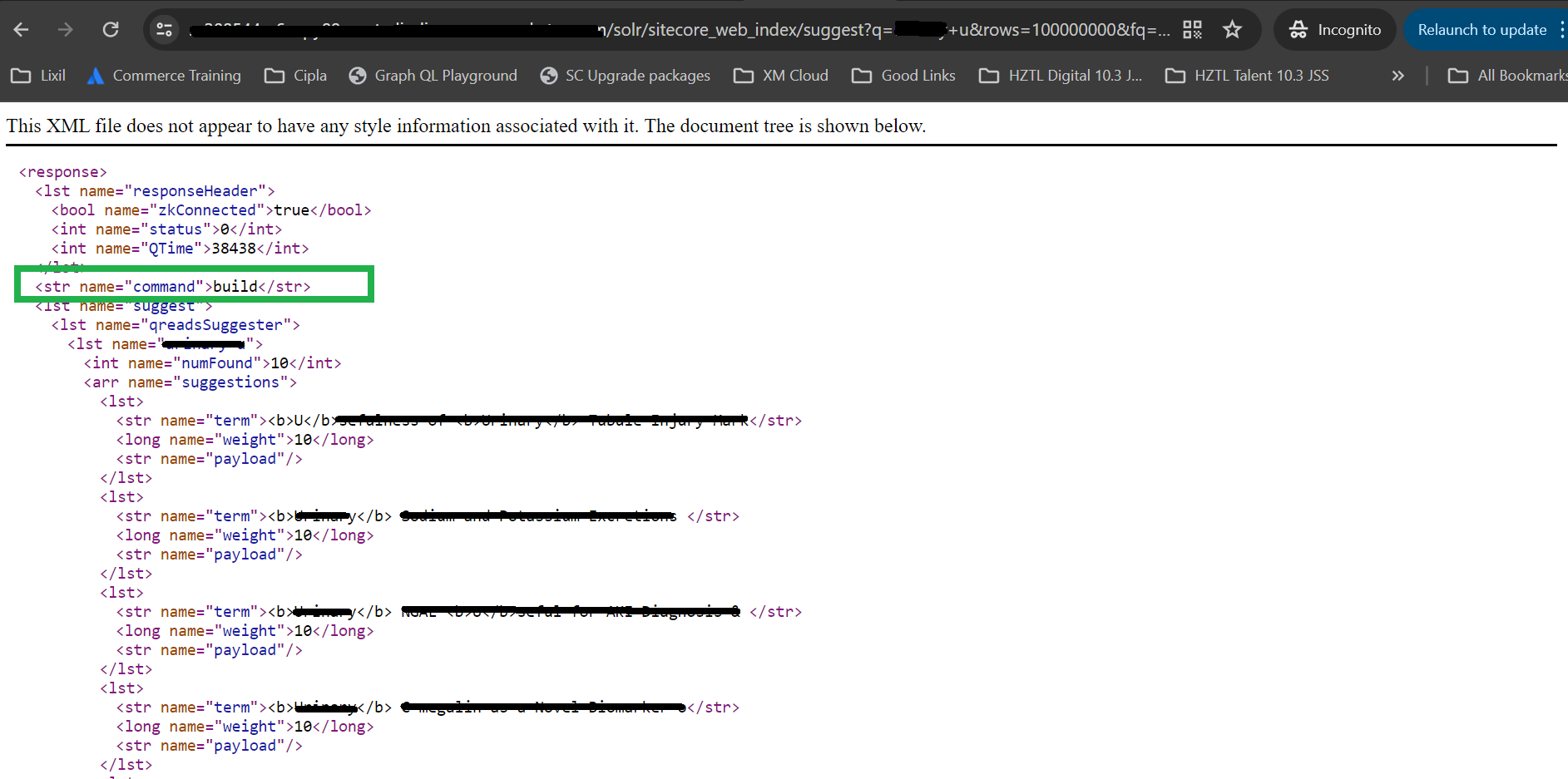
Before creating a support ticket with SearchStax, i wanted to spend sometime understanding it and looking into the logs in details, i got below URL which was getting fired while someone uses auto suggestion search box, and this URL was giving the error

https://<<solr cloud url>>/solr/sitecore_web_index/suggest?q=test+u&rows=100000000&fq=_indexname%3a(sitecore_web_index)&suggest=true&suggest.count=10&suggest.build=false&version=2.2&wt=xml

I read more about suggest.build and how suggester component is working, so if you refer below link 

https://doc.sitecore.com/xp/en/developers/103/platform-administration-and-architecture/using-solr-auto-suggest.html


Well, i just tried changing that flag to true in above URL and hit it in the browser, Before this, i never did anything like this, it's new for me too, but well it started working and it was able to built the suggester and live site started showing the results just fine 


Though i was able to resolve it, Just to double check this approach and as it was P1 and also to know why it stopped working? I created a ticket with SearchStax for this behavior, Awaiting for their reply & will update this space once i get something around it.

Sitecore Technical Workshops - Top FAQs customers asked on XM Cloud

April 25, 2024 ·

Sitecore Technical Workshops - Top FAQs customers asked on XM Cloud

Hi Readers,

I want to talk to you about interesting things which we have been doing which is "Technical Workshops" for our customers, so here goes the scenarios.

So, we have been doing multiple types of technical workshops. 

1) Training customer and their Sitecore technical team on latest and the greatest technologies like XM Cloud & Another composable stack and try enabling them for new Sitecore tech stack.

2) Customers / Potential Customers have their agenda of existing pain points, and we take a workshop on topics around them with best practices etc. little on new technologies, so they also know the future.

Basically, we prepare custom targeted presentations & demos for individual workshops, and make sure it helps them answer their questions and they get insights of where Sitecore eco systems has to offer from their versatile toolset and try to keep them up to date with it.

So, Purpose of this blog is, because in all these customer & their technical team's engagements we get lot of questions from customers around Sitecore & Composable stack and where the world is moving, and I feel all those questions are so valid and so applicable to anyone, so why not to share it so community can know and have answers too.

Some of the questions they get are below.

QUESTIONS


1) We have our own content storage and asset management system in house, where content approval etc. takes place before making it public, is it possible to keep using it and not move to another DAM like Content Hub? 
          
Answer - 
Well, the whole purpose of composable is to use "Best of the breeds", That means customers ("you") are in control to select which tools they want to use, You will get the ultimate ROI by utilizing the tools you already have, Provided it has standard eco system of APIs which can be consumed, It could be pluggable but how much efforts is needed is purely depending on the system you use, but answer is YES, You can.

2) Can I select data center of my choice? 

Answer -
Yes & No, Because XM Cloud has predefined support for existing data centers, So there are couple of choices. 

But for example, if you already have a data center location in mind and if you want to set up XM Cloud for that region, it could be possible that currently that data center does not exist.

3) In XM Cloud, what is the disaster recovery plan? Because things are controlled by Sitecore.

Answer -

Backup and Disaster Recovery All SaaS Products are designed and configured for high availability and resiliency against local outages. Sitecore runs all critical components of each of the SaaS Products in at least 2 cloud provider datacenters in separate availability zones within the selected cloud provider region. In addition, as part of its backup procedures Sitecore replicates the backup of all Customer Data to at least 1 other region (the paired cloud datacenter region). Whenever possible the paired cloud datacenter region(s) are at least 300 miles apart, but this is not always possible given that, to satisfy data residency, tax and legal enforcement requirements, the paired cloud datacenter regions must be in the same geography.


Sitecore will implement and update on a periodic basis its disaster recovery policies, standards, and procedures, and will maintain strict compliance with its disaster recovery policies, standards, and procedures. Sitecore will report disasters (or potential disasters) to Customer Named Contacts promptly upon identification. Sitecore will schedule and test the components of its disaster recovery plans at least twice a year. In case of a disaster, when one of the cloud datacenter regions is disrupted or inaccessible and deemed non-recoverable by the cloud service provider, Sitecore will use best efforts to achieve a Recovery Point Objective of 24 hours and a Recovery Time Objective of 3 working days recovery at the paired cloud datacenter region. Sitecore shall use reasonable commercial endeavours to restore the lost or damaged Customer Data from the latest back-up of such Customer Data maintained by Sitecore.

See below link for more information.

Sitecore SaaS Service Level Agreement (SLA) | Sitecore Legal Hub 

4) Experience Edge has limit of 50 MB, what happens we have > 50 MB data.

Answer - 

This is the size that you are storing inside a content tree and publishing to experience edge, if you have media item size more than 50 MB, then it is advisable to use Content Hub to store your contents and not inside Sitecore Media Library.

5) To enable our team for composable stack and XM CloudHow much of the training will be needed & what kind of training for different departments and what will be typical timeline for it? 

Answer -

If we talk about full XM Cloud Enablement for below departments 

1) Technical Developers for Headless Development (1 week training can bring them to speed)

2) Content Authors – 3 days of training for “Pages” and “Components” apps and normal Sitecore XM Cloud familiarization training – (2-3 days)

3) DevOps – Creating custom CI/CD, Different hosting options, Understanding XM Cloud Deploy App and things around it, Containerization etc. (1 Week)

NOTE: Above is very customer specific, and very case by case, this was for very specific questions and requirement of training they had. 

6) How about GDPR, HIPAA and other compliance requirements.

Answer -

As of May 25, 2018, the General Data Protection Regulation (GDPR) protects the rights of Europeans to access and control their personal data. This means any brand that markets to prospects in Europe needs to be able to comply with such requirements as transferring an individual’s data to them or deleting it completely upon a user’s request. At Sitecore, we’re working across our organization to ensure compliance with the GDPR and other privacy laws, and understand that our customers will want to know how they can configure Sitecore products and services in a way that will help them with their own compliance efforts.


7) What is not available on XM Cloud which is available in XP?

Answer -

Following items are removed from XM Cloud Features and modules.

Features and modules

  • XP/xConnect/xDB functionality including existing personalization rules (a new 
  • embedded personalization experience is available for XM Cloud)
  • Marketing applications, including Experience Analytics, Experience Profile, FXM, 
  • Experience Optimization, List Manager, Campaign Creator, Path Analyzer, Marketing 
  • Automation, and the Marketing Control Panel
  • Email Experience Manager (EXM)
  • SXA with MVC, and SXA Search components
  • Sitecore Forms
  • Custom search indexes
  • Identity server
  • Sitecore Publishing Service
  • Universal Tracker
  • Device detection
  • IP Geolocation
  • MVC
  • The Update Center
Roles
  • Content Delivery
  • Content Publishing
  • Forms database
  • Web database
  • Web index
  • Sitecore Identity Server
  • Device Detection
  • IP Geolocation

  • Can you tell us difference between Vercel & Netlify?


  • Is it possible to make content available or exported from one XM Cloud project to another?

8) What it takes to migrate from XP to XM Cloud?

Answer -

This is a very subjective discussion. But it depends on a case-by-case basis. Some of the factor to be considered are.

  1. Which version of Sitecore XP it is
  2. How many modules have been used.
  3. How much of the content architecture can be utilized and reused.
  4. How many processors/pipelines have been used and many more such factors.
  5. What are the existing systems and how deeply it is integrated?
  6. Are you existing system MACH Compliant?
  7. And many more questions like these. 

9) We are using existing geo-location services, is it available in XM Cloud?

Answer -

As the world is moving to headless and XM Cloud works in a headless way, now anything related to GEO IP based attributes will be driven from your front end services like vercel, netlify etc.

This will not be provided by Sitecore, Because XM Cloud will not receive the first request, but it will be front-end application which will receive so XM Cloud will never be able to determine the visitor's location.


10) We are using lot of modules like dianoga and other Sitecore modules, are those compatible with XM Cloud?

Answer -

No. The customer should look at what they are using these modules for and evaluate if they even need anything extra at this time. If the functionalities which your modules are providing are something which is must to have, you will need to think different options which are composable in approach.

So, if we take dinoga as an example, Experience Edge, included with XM Cloud, is able to act as a CDN for the images removing the need for the caching of the asset files. The use of Vercel, or Netlify, or other delivery platforms for the head usually have some form of image caching/optimizing/delivery available with them and this also can remove a major use case for having Dianoga. DAM tools also offer web optimization capabilities, if they have this available to them.

11) We have lot of content and those contents are approved contents, so how do we migrate those content from old instance to new XM Cloud?

Answer -

There are three options here

  1. Serialization - If you are using Sitecore serialization (SCS) and using .yaml files, those can still work and you can migrate all serialized things and use to in XM Cloud.
  2. RAZL - Sitecore provides Razl, which has been tested, which is a content migration tool that is also built on serialization and works with XM Cloud as well. If a customer would like a more visual way of picking and choosing which content gets moved, they can install Razl, but Razl does require a license. A customer can install Razl, connect to their existing Sitecore XM instance, and then also connect it to their XM Cloud instance. At this point, the developer will have a source and a destination and can move content using Razl. A customer or a partner can perform that function.
  3. Content Migration Tool - It only works with XM, so if you have XM, you can use XM Cloud Content Migration tool. https://developers.sitecore.com/downloads/xm-cloud
12) It is said that there is no WEB DB in XM Cloud? Then how publish works? and how all the content are stored in XM Cloud? Does that mean our existing code will break if we have a WEB DB reference?

Answer -

Very good question, It is correct, XM Cloud uses CaaS which is Experience Edge, and instead of WEB in the publishing target, you publish it to "Experience Edge" which geo replicated CDN provided by XM Cloud which comes inbuilt with XM Cloud. https://developers.sitecore.com/content-management/edge-xm

13) We know everyone is going Composable DxP? If we decouple our presentation, Currently we host everything on CD and replicate it and load balance it, but how does it work on XM Cloiud?

Answer - 

100% valid question, Here "Unlearning is as equally important as learning", With composable stack, everything is decoupled so, you write you presentation in modern javascipt frameworks like react / NextJS and host them on hosting providers like vercel / netlify etc.

Your backend i.e Sitecore will still have its hosting but that is managed inside XM Cloud only and your publish content goes to CDN i.e Experience Edge

Your front end app to draw the presentation will be hosted platform of your choice like vercel or netlify or azure, and Sitecore provides JSS SDK for NextJS using which you can read content from experience edge and use components created in NextJS to render those data.

Your presentation and content are now decoupled, in XP all were on same CD.

NOTE : All these questions are real questions came from those workshops and which customer asked.

Before ending this blog, just want to make sure i share some of the photos where our team can be seen presenting, myself, my partner in crime Varun Shringarpure & from higher leadership, you can see Hardeep Singh Bhamra supporting us in questions related to infrastructure and cloud engineering for XM Cloud, and those who are not seen in photos but are responsible to make sure our customers are getting what they want were also there with us & supporting us Arpit Shah and Shilpa Darshini 


Some fun part, I have been part of these workshops along with my friend and colleague Varun Shringarpure and without his help and load balancing, it's never possible to cover these workshops along with project work and presales work we already have, so let me share a moment capture around 4 am in the morning where we were at the airport waiting to land at one of the potential customer's location :) 


Everything should start and end with a smile :) 

I hope this blog will get you answers of some of the common questions which are being asked by customers.


Sitecore Serialization - Error connecting to /.well-known/openid-configuration: Bad Gateway

April 08, 2024 ·

Sitecore Serialization - Error connecting to /.well-known/openid-configuration: Bad Gateway

Hi Team,

Recently, I faced an issue where for the new project my Sitecore serialization started giving me following error.


Error: "Error connecting to https://sc10.dev.local/.well-known/openid-configuration: Bad Gateway"

My identity server when browsed above url was also not working and showing following.

Well, I tried seeing logs and different things, I also followed what is given on these links. 

https://sitecore.stackexchange.com/questions/34744/open-id-configuration-issue-with-sitecore-cli
https://tekkishare.azurewebsites.net/pages/sitecore-clilogin-error-badgateway
https://www.stockpick.nl/english/sitecore-cli-login-error/

But I was still getting the same error.

Solution

If you see above screenshot of my identity server, in "Troubleshooting steps" it is mentioned that "Check the system event log for error messages."

It triggered me, I opened event log of windows, and I could see following error. 


Now, i already update my .net run time version according to identity server's config file, which given on following path (also above blog link also mentioned the same step, which i performed but still it did not work)

C:\inetpub\wwwroot\sc10IdentityServer.dev.local/Sitecore.IdentityServer.Host.runtimeconfig.json


But it was showing me to download 3.1.0 which I already did, but somehow something was missing, so now what helped me was 

in the event log itself, it provides link to missing part, you just click that link, and it downloads that version, for me the link was pointing to following.


After downloading the runtime, it worked like a charm for me & serialization is working and identity server error of 502 was also gone