First of all congratulations to all 2024 MVPs, Last year has been a community year where we saw lot of new MVPs and lot of new content coming from lot of people, Good learnings.
I wanted to share some articles on the real discoveries and headless implementation we did and journey we had and what all things were involved in it etc. but i will bring that later on.
Today i am going to talk about "Component Builder", Amazing tool of Sitecore XM Cloud, Last year i did lot of research and hands on to "XM Cloud Component Builder", Very powerful futuristic tooling provided by Sitecore.
At that time it was still in "Early Access" phase, but now the offering is fully available, i wanted to revisit and provide almost all the info related to it and will also show, How to create fully functional website without writing any code, yes "It is low code / no code".
Last year i presented at SUGCON-2023-India on "FeaaS - Front End As A Service" which talked on the same line, but this blog will cover all what you can do with the component builder, So many possibilities and a new ways of working
You can find the video of the SUGCON presentation on this link here
If you are a podcast lover, You can also see the podcast here too
You can find everything related to component builder and the what / why / how on my PPT here
I will highly encourage to go through the PPT too, because it covers lot of research about component builder.
Let's start with what all you can do with it and possibilities are endless.
How many ways you can create Components in XM Cloud Component Builder?
There are majorly 5 possibilities in three distinct categories using which you can create components, Sitecore has not bifurcated xm cloud components in these three categories, it is just me breaking them down into these three categories for better understanding.
1) Static Components - By using elements available to be dragged & dropped onto the canvas
Static components means, very quick and dirty way to create a component, basically you just use the component builder canvas and start drawing different elements like inline or block elements ex. H1, H2 or paragraph, cards etc. and start putting contents into it, You can even copy and paste contents from existing site and it will try to adopt its styling too.
When you stage it or publish it it gets stored as azure blob as a web components, it will have its own HTML tag and everything will be wrapped under that html tag, (Read more in my PPT about all these)
In the example below, I took https://www.sugcon.events/ site as an example, if i want to quickly just create simple component out of it by using static components approach
The moment i "Stage" the component, it will be available for me to use it on pages, all these information.
2) Dynamic Components - By using external data sources and mapping them to elements, Here before creating a component, first what you do is "Create a datasource", And to do that you go to "Data Sources" tab and start adding data sources of your choice, In below image you can see i have three types of data source created
All these three are explained below.
Using Static JSON and map fields with elements
Here, use case can be if you have a service which is behind the fire wall, and you can only hit it once to get the response and you only have that JSON, Or take example of sugcon speaker list, that JSON is static once speaker are locked and it will not change, so in this scenario, you can just take that JSON and paste it in the "Paste JSON" tab option while creating a data source like following
Consuming an API which provides JSON and map the schema with elements
You can actually make a call to your REST APIs or any APIs, which returns you the JSON results, and make use of that.
Using GQL by reading external services
Use cases for GQL are many, any content which is out there on experience edge or edge network or anywhere which supports GQL query, you can use that to retrieve data map it with your component, in below example, I am getting featured blogs from the context item, which is returning me the JSON schema.
By using a standard Sitecore data source and use those fields to map it to elements, this being detailed one, I have a separate blog for it, I will update the link once the blog is out.
3) BYOC (Bring Your Own Code/Components)
BYOC is the way developers can Bring Their Own Code into XM Cloud Component Builder, that means if you have your react or NextJS component library already created, you can actually use them straight into Pages in XM Cloud.
This is one of the powerful feature where your existing library can be included with simple steps and you will get that ROI (Return On Investment) because your existing code will be still reusable
I have blogged in detail about how to create and use BYOC in XM Cloud, I will also link that blog here once it is published.
I hope it gives you idea about the power of component builder.
It has been amazing learning year so far and with the change in technology and shift of the focus on frontend frameworks and composable products, it has been market demand to keep learning and exploring new things.
Reasons behind this blog
Today's topic is something that was in my draft from April-May, and I always thought that there is already a good documentation out there for Leprechaun and a blog post is not needed, Until I realized that there was so many of us facing same kind of issues and same kind of problems and spending same amount of time, That is where I thought, if I could write something which can reduce that repetitive troubleshooting time, That would really help the community.
1) In a project environment, if we get into some configuration issues, we resolve them, we make sure we are not blocked and continue, but if you think same issue, same step and same scenario will come to other people, so if we can draft it online, it will help other people
2) I was aware about point-1 but I always thought with standard leprechaun documentation, everyone will be able to get it working and hence I never drafted my learnings and issues which I run into and steps I performed to resolve them until when lot of people were asking the same question on the floor, in different team who are configuring leprechaun, or over the slack channel, and that is where I strongly thought to draft those steps and learnings and put it online for people to refer to reduce the troubleshooting time,
3) I already drafted common troubleshooting that one will need if you are working with Sitecore XM Cloud starterkitXM Cloud - SXASTARTER Kit Setting up Leprechaun Exited with Code 1 Error (daivagnananavati.blogspot.com) around in May, But I still did not considered steps required to configure leprechaun before troubleshooting it and I always still thought, People will be able to configure it and did not find a value to write them down.
4) But I was wrong, because only troubleshooting steps are not connecting the dots, I was still replying to same questions which I was getting from the community and from team members around, that means there was still a need of step-by-step guide of configuring leprechaun, and that is where I thought, it is definitely worth putting the steps and guide in place to save many hours of work people are doing in same repetitive manner and getting stuck in same questions.
And that is the inspiration behind this blog. and I also did a webinar on it to show what is the step-by-step guide to configure leprechaun for code generation. (Video is attached at the end of this blog)
What is Leprechaun & Why we should use it?
I believe there is a strong awareness about it from the community and the GITHUB link of Leprechaun.CLI from Ben Lipson is just great to get started and understand things around it, so I will not focus on that but will jump directly to minimum steps involved to start generating code from it.
Steps
Step -1: Install Leprechaun
Very first step is open windows PowerShell and go to your root directory where you have .config folder (or where your dotnet manifest file), If you are using XM Cloud starter kit, you will already have .config directory in your root project, so go to the directory inside which you have .config directory and fire below command.
dotnet tool install --no-cache Leprechaun.Cli
After executing this command, you will see success message that it was installed successfully, like below.
Once, it is installed go into .config directory and open dotnet-tools.json file and verify that the file is updated with leprechaun tool entry, that means your step-1 is finished properly.
NOTE: If you see a success message like above image but still do not see the entry in dotnet-tools.json file, Make sure to correct your path, it could be you might have installed it globally and .config was created elsewhere in which you fired the command, if you have correct path, The entry will made to this file.
Step-2:Download Leprechaun.config file & CodeGen files & modify it.
Download the file from here, you will need to modify it to suite your need and your structure, I have created a sample file which you can download from my GIST here, which has all modifications which are required.
Note - Best practice is to put the leprechaun.config file on the same level as your working directory or where your Sitecore.json file and .config folder is residing, but you are not limited to it, you can put it anywhere, but in that case, you will need to make sure all path inside that file is reflecting it too.
Because the paths in leprechaun.config are always relative to $(configDirectory) (configDirectory is the full path to the directory containing the root leprechaun config file being used)
Let's discuss the modifications you will need to do.
1) Once you download the file, first thing you will need to check is the import attribute on
<configurations import="**\*.module.json">
This path will differ depending on where your Leprechaun.config is and where is your module.json file, the import path will vary depending on that.
In my example I am using default start kit structure, so my module files are directly under src folder.
If this path is not configured right, you will end up with one of the Issue No. 4 of Step-4 below (end of this blog I have drafted some frequent issues that might come due to misconfigurations)
2) Second thing is giving the name to the configuration tag like below
Above name attribute should exactly match with @extends attribute of leprechaun configuration instruction in your module.json file, I have drafted further details of it in Step-3 below.
If you have misconfigured this, you will end getting Issue No.-2 (Point-2 from below list of issues I have given at bottom of the blog)
3) Update the scripts and output file attributes, scripts attribute means which code generation file you want leprechaun to use, you have to specify that path, and output means where you want leprechaun to output the generated file
I am using the type of script code generator created by David Ly for which PR is already out against Lerepchaun, but you can use other types available there as well.
Here is how my configuration node look like, and I will also show you the file structure so you can relate with the paths.
Make sure again you enter correct path, else you might get file not found exceptions, but in above "CodeGen" is a folder in which my JssTypeScript.csx file is residing.
Below is the file system structure look like.
Now it is time to update module.json file so that our configurations which we did can start reading them.
Step-3: Update module.json file with leprechaun node
Because leprechaun does not need live Sitecore connection to generate your model, and it only needs persisted *.yml files, Let's put instructions in the module.json file of your choice for which you want to generate the code, it can be your typescript model, it can be model for your templates to be used in custom resolvers, choice is yours.
So, here I am interested in generating typescript model and hence I am giving configuration of leprechaun in my DataSource template module which I already have, here is a my datasource.feature.module.json look like
In above configuration, there are two major instruction that you should configure very carefully and understand.
1) @extends - This is the name attribute of the <configuration tag of leprechaun.config (will show it in a while), That means the name attribute inside <configuration tag of leprechaun.config and @extends value should match exactly for leprechaun to work, See below image
2) @name - This should match with your {Layer}/{Module} path, Meaning, in Sitecore if you have different layers like Feature / Foundation / Project and inside that you have a module, and in which all templates are residing
So, when you run serialization, it will create those physical yml files using those paths, This Name configuration is responsible to match that, whatever the name you give, it should be valid "path" yml for serialization.
For instance, in above example in @name, if I give anything other than Feature.LeprechaunDemo, it will not work and give me error because it will not be able to find any items on that path because it only and only needs Feature.LeprechaunDemo as a name because that is where my items are in Sitecore and all yaml files which got serialized have those paths in it.
Step-4: Run Leprechaun command.
Leprechaun command can be run in two ways.
1) Running it from the command prompt.
Go to the directory where you have configured leprechaun (your $configDirectory) and fire below command.
dotnet leprechaun /c "<<Path where your leprechaun config is>>\Leprechaun.config"
If everything configured fine you will see a success message that model was generated successfully like below
2) Include it as a part of the build process, so at the time of build it will run leprechaun.
You can create .wpp file in your project if you would like to run and generate these models as a part of the build process, it runs the same above command, configuration you will be putting is like below.
<TargetName="Leprechaun">
<ExecCommand="dotnet leprechaun /c <<Path where your leprechaun config is>>\Leprechaun.config"/> </Target>
Step-5: Troubleshoot: You will come across common issues before you get it working.
I have drafted some common issues, that you might be running into when working.
With Sitecore XM Cloud Starter kit, there are below two issues which might come.
1) One of it is "Leprechaun runs fine but it does not generate any model files",
2) If you run from the build process, you might also get "Exited with Code 1" error
1) Missing expected 'path' attribute on 'include' node while processing: <include name="Templates" />
This is because if you have downloaded the leprechaun.config file from the GITHUB link, On the line no. 102 it is missing "Path" attribute, Giving a proper path like below.
NOTE: You can use my GIST here directly if you want to use that file and change it, feel free to use that, it has all the modifications.
2) There is an extend inheritance loop, or a container extending a nonexitstant container name.
This is again a mismatch in the extends property in module.json and the name of the <Configuration node, make sure leprechaun.config file configuration name and @extend is matching and other string values are just fine.
3) Item data was null for the provided treenode.
This signifies that serialized data on the disk and your module.json configuration are not matching, or either it is out of data, basically that means either something was renamed in Sitecore and synced for which the leprechaun configuration in module.json file was not updated, Double check that and see those things match.
Example can be, you renamed your module name like from demo to demo1, so on physical disk when you serialize things. It will now use demo1 in the path, so leprechaun.config should also change to reflect that name instead of demo.
4) Loaded metadata with 0 configuration (0 total templates), No modules are being found by configurations.
This is because in your leprechaun.config file the import attribute is having a wrong path and hence leprechaun is not able to find any module.json on that path, Plese check and correct the path in following node.
<configurations import="**\*.module.json">of leprechaun.config , this path depends on your repo structure
Conclusion & Some Take Aways.
1) Leprechaun does not need connection with Sitecore.
2) Leprechaun.config files(s) is always relative to $(configDirectory) (configDirectory is the full path to the directory containing the root leprechaun config file being used)
3) No need to check in the generated model files, if you have set up leprechaun to run it with build, it will help you to avoid those merge conflicts in auto generated files.
4) You can have multiple leprechaun config if you would want to have a separate model generated and different code generation to be used, Example can be for my DataSource template I want to generate type script model and for my page templates i might want to generate C# models.
I did conduct a training session on these configurations, you can refer to below webinar too for further learning and understandings.
With this blog, I hope to save some troubleshooting and configuration time you might run into.
Feel free to buzz me or comment or find me on social media and buzz or connect for any kind of conversations.
Special thanks to David Ly for creating this type script code gen file and Ben Lipsonfor leprechaun tool.
Recently I was working on a search solution, it was simple filtration functionality and we wanted to have simple GraphQL queries so we can get items as we need.
The setup up is Sitecore XM scaled with CM and CDs (No experience edge)
So, I just wrote simple GQL and were trying to test its results, Query worked just fine, and we were satisfied but we also wanted to have a filter for only items which had some presentation details, because we only wanted to return search results which are created from certain templates and having a presentation set on them, So the search list page will link those pages to those items.
So, I just put a standard check of _hasLayout property, using which we could target only those items which have presentation details on them, like following.
By just introducing the _hasLayout property It stopped working, though this particular project was not on XM Cloud, we tried testing it on XM Cloud environment as it is a generic search GQL, and we found out that over there _hasLayout property is working just fine and returning results.
That means, we found that there is something wrong with Sitecore XM with CDs, I tried following.
1) In the QUERY VARIABLES section, I tried passing values like "true", "false", "" but nothing worked
2) Just to check I passed " " (Empty space) and it return everything without applying filter of _hasLayout
So, behavior was wired, and we easily could figure out that there is some issue with the _hasLayout property being set by the Graph QL code somewhere in the DLL
Solution
I opened up the Sitecore Support Ticket and provided the information, after initial troubleshooting, Sitecore registered this as a bug in their tracking system with bug reference number 551736
They provided us the package of two DLLs
1) Sitecore.Service.GraphQL.dll
2) Sitecore.Services.GraphQL.EdgeSchema.dll
After putting this hot fix, Things are working, and it returned us the results just fine as we wanted.
Just for my learnings, I will be dissembling those DLLs just to see what changed and what was missing in the standard Sitecore 10.3 XM DLLs which ships OOTB, if I find something will share it for you all too.
Recently we came across two distinct scenarios with same error message.
1) We started getting below error when we try to hit our layout service API endpoint.
If we hit end point of CM, it was working fine and when we try to hit end point of CD it was giving this error, It was clear there is something in backend expecting master DB instead of WEB DB
In first scenario my colleague Jatin also got same issue while setting up docker instance for 10.3, and my friend Akshay Barve and I had the same observation.
2) Second scenario I was having the same exception, It was another project on 10.3 XM with CD, It was one of the migration project so we were migrating from 10.2 to 10.3, Older site was not giving any error but new site the moment we hit, it was giving same exception in the log
Issue in second scenario was in site grouping there was only site and both CM and CD URLs were given in host name and had WEB db as database, so basically there was no preview site, but both of the URLs were trying to show data from a WEB db, but issue was same because it had WEB DB and some configuration was still trying to find master DB either from DLL or from Config.
So different scenarios but same behavior and pointed to a same problem.
To troubleshoot second scenario where after upgrading it started giving error, we tried following.
1) We checked our code and tried to find if any code is using master db configuration
2) We also tried to check if any existing new 10.3 DLLs are having any master db reference
3) We checked in whole app_config folder and tried to search <databaseName>master</databaseName> configuration
and that is where Jatin pointed the same issue we faced and changing this file in order to give CD specific role to make it work
Same patch configuration worked for all of the two scenarios. See below in green,
Solution
We created a patch file with below configuration, it is clearly seen that without this patch file CD will was looking for <databaseName>master</databaseName> instead of a WEB DB.
Today's post will interest most of the coder and Sitecore technologist who are working in Sitecore JSS apps and want to ignore some paths from prerendering and also want to it to content manage them, so those items which you want to ignore can be in sitecore and everything will work dynamically.
I am going to talk about how to exclude specific pages from being prerendered
I will cover the scenarios on "How can you exclude some pages from being prerendered" in Sitecore JSS 10.3
Why you need to exclude pages?
There can be scenarios where you do not want some pages to be generated statically, for example redirect page items, or pages which dynamically changes like after login pages, those should be kept SSR and not SSG.
Talking about the specific scenario where if i talk about redirect page items, if you prerender them, Your NextJS app will fail at build time complaining that "Error: `redirect` can not be returned from getStaticProps during prerendering", in that case you will need to make sure that those redirect items are excluded from the array of pages which "getStaticProps" uses to generate the static pages.
Interesting enough? and sounds like a known challenge to you all? Let's get to the solutions
Ignore specific items from being prerendered
There are multiple ways to do one thing in this new world of Sitecore JSS headless and NextJS world and it depends on what version you are but I am talking about Sitecore 10.3 JSS, Because of the different directory structure
If you read the documentation given on https://doc.sitecore.com/xmc/en/developers/xm-cloud/customize-build-time-static-paths-in-jss-next-js-apps.html you can see the it provides "excludePaths" property in which you can give an array of paths, and those will be ignored from being statically generated, Fair enough, but this will only help when you already have known the path ahead of time, what if you want to exclude items of specific template, so when content author creates item in Sitecore, Our JSS app should automatically ignore it from prerendering?
Solution
Because we know that we can use this "excludePaths" property of "GraphQLSitemapService" and if somehow we fill this property dynamic before the getStaticProps is called, and generate those paths to be ignored dynamically, it will ignore those paths
Solution is GraphQL Search query
So idea is, You write and test query which can only get item path of specific template and make sure it is called before getStaticProps and "excludePaths" property of "GraphQLSitemapService" is filled out, following is the example where i wanted to exclude redirect items and they were created from OOTB (Out of the box) JSS redirect template
query RedirectQuery(
$rootItemId: String = "<<home item guid>>"
$language: String = "en"
$pageSize: Int = 1000
$after: String
$redirectTemplateId: String = "<<redirect item template id without {} and "-">>"
If you run above query in GraphQL editor, It will return all the path of redirect template's item under the home node.
Now, we have the paths, we just want to find a way so it can be ignored during getStaticProps process, so to do that what we will do is we update "graphql-sitemap-service.ts" file and just before fetchSSG method of "GraphQLSitemapService", we will make sure that we update the property "excludePaths" by running a loop and creating an array of all these item which we got from the GQL query, Something like below
If you see above code has a function which is getting called "GetExcludePath", which is calling above graphQL query and just returning the path of item, and that array we are giving into "excludePaths"
Full code of "graphql-sitemap-service.ts" looks like below
Now, this items will be excluded from prerendering, remember if you have limited items and if they are known at build time, you can also give it directly in excludePath property in array and it will ignore those paths from being prerendered.
NOTE: In a GraphQL above, I have used "path" and not "url { path }", There is a reason to it, because there is a bug if I use url { path } which I have explained in my blog post
Recently, we had a requirement we needed to prerender pages in NextJS using GetStaticProps but excluding some pages, but it was failing due couple of reasons, I created two blog post around it
First blogs explains, what issues we run into while prerendering pages and what is not supported at build time, it is good to understand the concept of prerendering and why redirects does not work while prerendering
and second blog explains once we knew redirect items in GetStaticProps does not work at build time, what are the possibilities and what is that we did to exclude those items from being given to GetStaticProps, so that it ignores those items and does not prerender them and build gets successfully built.
Today, in this blog post I will explain one more bug that exists in Sitecore JSS, In My blog post I have explained how you can use excludePaths property to exclude array of paths which you want to exclude from prerendering, but if redirect items are used in this array & if any redirect items has space in its name, it fails with following error, we needed to exclude redirect items because they are not supported at build time in GetStaticProps
"ClientError: GraphQL.ExecutionError: Provided exclude path <<path to the problematic page with space" is not exist in the <<site name>> site"
When you write a GraphQL query to get your redirect items using a search query, so basically try to find item with specific template, in my case, the query is find all item using redirect template, which is like following
Now, if you hit this query in GraphQL IDE, it returns all the items which are of redirect type like following
If you observe the first item path, which says "test-redirect-item", now this item in sitecore has a name with space but the GRAPHQL query and url { path } is automatically converting it and replacing spaces with "-"
This is expected behavior but the problem with this and build fails when "DefaultSitemapQuery" runs when you build the project
In normal scenario everything will work, but in our case we wanted to exclude some items from getStaticProps and for that we used "excludePaths" properties of GraphQLSitemapService, so what ever is the output of above graphql, we were running the loop in our NextJS and creating an string array and were giving it into "excludePaths" property, this whole execution is mentioned on the https://daivagnananavati.blogspot.com/2023/07/sitecore-xmxm-cloud-exclude-specific.html blog
Now, issue we run into was, because we had space in Sitecore item name, and our query was returning item path with "-" and "DefaultSitemapQuery" when runs along with "excludePaths" switch, it tries to find item with that "-" and it does not find that item and build fails
Because the build error also printed the default query it is executing, i tried to run the same query in the GraphQL editor to see what is causing it to fail? and i got the same error as shown below
So, now it clearly looked like a bug to me, because in ideal scenario, DefaultSitemapQuery (above) should also replace the item name's space with "-" and then compare but it was not doing that and that is why it was not able to find that item and build was failing.
Solution
One quick fix which I did was, instead of url { path } in my redirect item GraphQL query (first which I showed in this blog post), use path directly so you will need to change the query section like below
so now instead of the "-" it will show actual item name without replacing which our "DefaultSitemapQuery" expects
but this has another draw back is that, instead of relative path, it shows the full path like "/sitecore/content/<<tenant>>/<<site name>>/Home/test redirect item" item, and that path does not work with "excludePaths" it only needs relative path because it only finds under home node and if you give full path, it will still not work
to get around that, in the .map function, you will need to replace "/sitecore/content/<<tenant>>/<<site name>>/Home" with empty value before pushing in to an array, this full code is available on https://daivagnananavati.blogspot.com/2023/07/sitecore-xmxm-cloud-exclude-specific.html blog, i am pasting a small screenshot from that blog here so you know which .map function I am talking about, so then you can refer to above blog to connect the "dots"
Now, "DefaultSitemapQuery" which gets executed by default on build time, will be able to successfully ignore all those items and build will not fail and everything will work
On XM or XM Cloud if you are using preview API, you might end up in this issue if you have similar scenario.
NOTE: This behavior was verified with Sitecore and they acknowledge that this is a bug and registered as a bug in bug tracking system with reference number 591500
Recently in one of my project, I faced situation where we had getStaticProps complaining that it is not able to prerender some items and those paths were failing to build the app.
so scenario was everything was working fine and build was working, but then there were redirect items added to sitecore content tree and form that day onwards "npm run build" started failing out of the blue with following errors
First it was hard for me to wrap my head around it because, our Sitecore tree had different redirect items created from standard JSS redirect templates, so those redirect item were old URLs and in the field "redirectURL" we had the new page's path selected, because they are items just like any other items, I was expecting GetStaticProps to work, but build time only it was failing
our NextJS getStaticProps looked like below
Basically, NextJS code in GetStaticProps meant following
1) GetStaticProps should prerender all the pages at build time
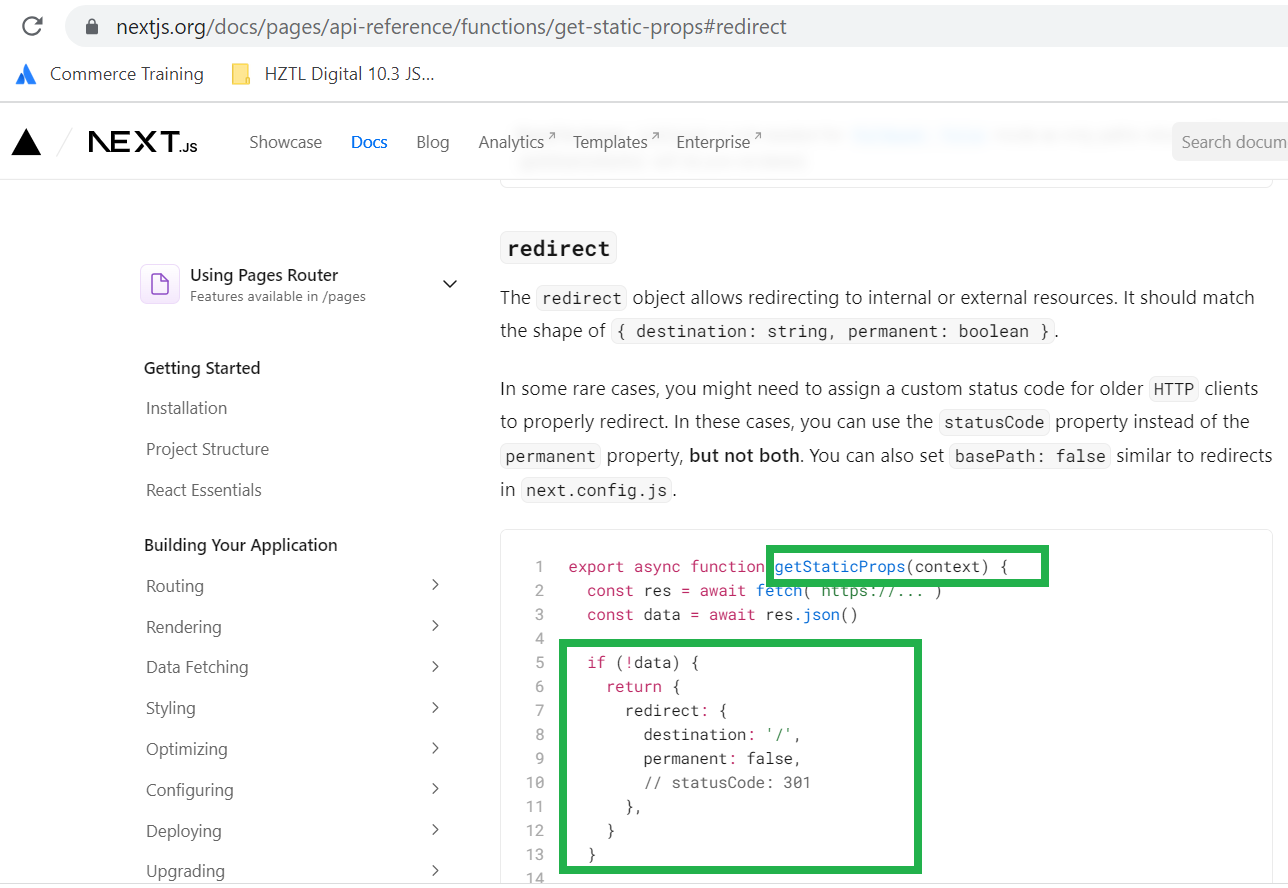
2) If it is redirect item, then assign a redirect from GetStaticProps - ( https://nextjs.org/docs/pages/api-reference/functions/get-static-props#redirect , approach is documented on NextJS documentation that you can give redirect in getStaticProps) and expect it to redirect the page from old to new url when requested
If you see above screenshot of the getStaticProps, We did same as given on the NextJS documentation, where if the item is of type redirect we were giving it in a redirect object as shown in NextJS documentation.
But it was failing at build time only, so when we run "npm run build" it was just giving error for all the pages which were redirect items.
I am not a big front end guy, and I am on my way to become fullstack developer, so it was little difficult for me to understand at first why even if NextJS documentation is supporting the redirect option in its syntax, why it still fails?
After talking to our FED practice lead Anders Hopkins, it was known that redirects are 100% supported but not at the build time, So what happens is that when you run "npm run build" at the time you will need to make sure that all the redirect items are ignored from prerendering and then only it will build successfully
But for those who are facing the same issue and trying to find why redirects does not work that is because "Redirects are not supported at build time, but they are supported once ISR kicks in"
So what happens is ,
1) At build time, all redirect items should be ignored so build gets successfully (you have to exclude those redirect items so they are removed from prerendering)
2) Now, when any redirect item is hit on the browser, because it does not have prerendering, request is served via server side and page is rendered
3) ISR (Incremental Static Regeneration) module handles the redirect and publish event, and make sure that item is redirect from server side (after predefined time set by your configuration for ISR)
So, now build works and redirect of page also works.
Recently i worked on one migration project where app was alrady live and working on 10.2 JSS, but it was supposed to be migrated over to 10.3 headless SXA.
Team already did everything and migrated things, and it was working just fine apart from couple of things, one of them and most difficult error we were getting was below
"Placeholder "sxa-header" was not found in the current rendering data"
Because of above no components were getting rendered
Following steps i did initially to look into the behavior of this error
1) Checked all placeholders on next app side as well as on sitecore side, all looked ok
2) Double checked that headless layout has those placeholder in allowed place holder lists
3) Double checked that my layoutserviceconfiguration is targeting "sxa-jss" configuration and not "jss" because we did not run jss set up command, its all was looking good and it was working fine for "headless-header. headless-main, headless-footer" placeholders, so it all looked good
4) It was observed that the issue only comes when components are put on the partial design, so also double checked that placeholder used inside partial designs are ok, and with my surprise, if you open partial design in experience editor it was all working fine and no error and components were rendered
5) So now issue was only when on actual page when partial design is referenced at that time somehow it is not able to find the component
With above findings, i knew there is some wiring with partial design which is happening at run time and which is not able to find the correct place holders to render the component
I was not able to find anything on the internet because there is no placeholder like "sxa-header" which is out of the box, and when my experience and intuition says, When you do not get any help from internet that means there is some kind of configuration issue or set up issue on our side which is causing this
6) I checked my other XM projects which i have worked on 10.3 SXA in that everything was just working find without any issues, so i was 100% sure there is some issue on our side which is causing this
7) I concentrated my investigation around the name it is showing in the error "sxa-header", i was sure that we do not have any placeholder defined with this name, so from where it is taking this name, and other information i had was when it is used with partial design it does not work
8) Because this was a migration from 10.2 and not fresh 10.3, so i also kept that in mind because otherwise it should work OOTB, so that means there is something missing in the migration process
9) With
these above two info. i tried comparing my working instance with non
working instanceand i found some new learning which i will share here
Solution
There are five steps which you will need to remember if you are migrating
1) In SXA, when you create a partial design, it automatically creates the corresponding placeholder settings item with the same name as partial design (If you do not have them, either create those settings manually or delete the partial designs and create them from scratch, It should create those settings automatically) which has some crucial information about how to read the rendering inside it, I compared the structure and my 10.2 instance did not have these settings
2) On right side is what it should create by default in your 10.3 system, now if you see below what is the wiring (i am going to create a sitecore support ticket to know the exact wiring and touch point it has, but this is what solved issue for me)
As you see, partial design signature and there is a corresponding placeholder key created automatically, this is the exact error it was giving "sxa-header" placeholder was not found
3) Now, in headless SXA, it comes up with OOTB component called "PartialDesignDynamicPlaceholder.tsx", it was giving error as it was not able to find the components put on placeholders, somehow it was pointing to "props.rendering?.params?.ph" instead of "props.rendering?.params?.sig" (see sig instead of ph) like following, this was the component from where the error was coming, and changing it to SIG worked like a charm
4) Make sure your layoutserviceconfiguration path is pointing to "sxa-jss" and not "jss", because you are using sxa, by default if you run jss set up command and if you have code first approach, it generally is set to JSS, in that also it is not able to resolve the sxa patterned partial designs.
To double check that setting, you can check in settings item like below
or if you have jss set up command executed, you can change the <<sitename>>.config to point it to "sxa-jss" instead of "jss" by editing app configuration of layoutserviceconfiguration to "sxa-jss" in a config, if you want more info, go to My Friend's Blog to know more what kind of issue he faced
5) It also has a wiring with your FETCH_WITH environment variable, if you have used REST pattern, you need to make a change in one of the below file, as by default it comes with "default" which is not valid, change it to "sxa-jss" like below. in our case issue was also with this, our vercel app was pointing to REST configuration and our layout-service-factory.ts file was pointing to "default" (see below screenshot, in this if FETCH_WITH is REST it should be "sxa-jss" but OOTB it is "default", so change it to make it work with REST configuration
After doing above changes, everything started working, and all partial designs were back to life and components were working just fine
I hope it will make someone's life easy, I spend considerable amount of time finding out these and resolving it.


![Error in Sitecore 10.3 XM with CDs - Could not find configuration node: database/database[@id='master']](https://blogger.googleusercontent.com/img/b/R29vZ2xl/AVvXsEjKWStGO-ckywfnFH4EQQKBgmRPqfLjp8TvnfMaolQVBFdB7pmzVOoZ2yp1R88t9Lx25c90HE-FVz3xB7hNitlVYuveAJL5QKSJwbTXkFGy7CpMQbALNTE4K7A8vwOXXE6IHI50pp0HI6IQpYMKeLz4xwELW7VmV2BBep1VIm9sXpsD-WsPjIfgYq4YAAYm/w760-h427-p-k-no-nu/image%20(1).png)
.png)