Decomposing the composable, Sitecore Composable DxP the buzz around

October 11, 2022 ·

Decomposing the composable, Sitecore Composable DxP the buzz around


 Hi Team,

You must be hearing a lot about what is happening around Sitecore ecosystem, There have been lot of talks, Presentations around "Composable DxP" and whole Plug-n-Play architecture where Sitecore is moving (Already moved i would say :))

And if you are a sitecore technology enthusiastic, then you must have started connecting all the DOTS....Where there have been lot of acquisitions of other third party vendors for good reasons, and there have been lot of investments happening just to make sure that the Sitecore eco system is thriving and is compatible with whole composable world we are going towards.

Also Sitecore is working behind the scene to launch the most awaited product called Experience Manager (XM) Cloud, A SaaS based services , Take a look at my blog on https://daivagnananavati.blogspot.com/2022/08/getting-started-with-xm-cloud-step-by.html of getting the XM-Cloud introduction repository into your local and explore.

In today's blog post i just wanted to make sure that, i will try to explain different terminologies and the new buzzwords which are coined and anyone from a developer to someone who is experienced but have not been able to follow things around headless or anyone who is orchestrating their path towards DxP and whole headless and XM-Cloud journey, should be able to understand these buzzwords, As it will help in understanding all the articles and blog posts around the whole paradigm shift that is happening.

So, What i am planning in this blog post is to let our fellow developer understand these terminologies and why they came into picture, and then my upcoming blog posts will show "A path to XM-Cloud" or the steps which we took in our project to decide what are the processes and through discovery involved around going from totally monolith to headless and finally towards XM-Cloud, I hope many of us will be having same questions so it will help other also to follow the same or similar process for their organization or work.

NOTE: If your target is to go to XM-Cloud or upgrade your current code base to XM-Cloud, You have to go headless first, because XM-Cloud works on headless way, my next blog posts will be talking about it but that is why understanding headless and its buzzwords are important.

And to know what is headless we will need to first understand what changed from traditional CMS and if it changed what are those tools using which headless CMS is possible.

No head? Or no body? Why its called headless?

Ever wondered why its called headless? and why going headless is important and what challenges it solves? 

This is not something which is not discussed but it is always good to know before we implement something and know why we are doing it.

Bottleneck issue with traditional Sitecore CMS is that data and presentation both are tightly coupled, so when a request is made our CMS pipeline tries to combine both before the page or component is rendered and this process typically takes little time until final output is rendered in a browser and it gives sense of slowness for known reasons.

Now, Think about if we can just remove front end part or presentation ("Head") from content ("Body"), so front end which is complied HTML mark up will be created by developers and it will be filled up using APIs which will drive content and fill out content into them, This will significantly reduce time of rendering the final output, This is what headless is, removing the presentation dependency from CMS and let the best UI framework handle it and use CMS as content repository and a content provider. 

Now, we know about headless and how it works, So next step is to understand the terminologies and building blocks around it to achieve headless in Sitecore.


Buzzwords

MACH

This is at the core of all the composable DxP, MACH is the reason which gives us the whole composable and decoupled and plug and play way of working, I personally learnt what is MACH when i did my Order Cloud certification.

MACH architecture is a set of technology principles behind new, best-of-breed technology platforms. The acronym stands for Microservices-based, API-first, Cloud-native, and Headless:
 

  • Microservices: Individual pieces of business functionality that are independently developed, deployed and managed.
  • API-first: Very self explanatory, API is at the center of everything in these MACH complaint apps,  All functionality is exposed through an API, making it possible to tie together two or more applications or services.
  • Cloud-Native SaaS: Software-as-a-Service that leverages the full capabilities of the cloud, Functionality is updated manually, eliminating the need for upgrade management.
  • Headless: The front-end user experience is completely decoupled from the back-end logic, allowing for complete design freedom in creating the user interface and for connecting to other channels and devices.

Layout Service

A very detailed understanding is given on https://doc.sitecore.com/xp/en/developers/hd/190/sitecore-headless-development/layout-service.html but if i were to define it in a quick and easy way, "It produces structured JSON output, by decoupling layout and rendering, and allowing us to render Sitecore components with any front-end technology stack capable of consuming JSON data"

Import Service

Import service is specifically helpful or rather supports code first development environments where it provides an endpoint on the Content Management (CM) instance, enabling developers to import an application created and defined structurally while disconnected from Sitecore.

Rendering Engine 

Rendering engines render content and layout data returned by the Sitecore Layout Service from a Sitecore instance, So now that you know the drill, Basically import service has all the items from Sitecore tree, and those are being fetched by layout service in structured format from Sitecore instance and then rendering engine renders them.

XP (Experience Platform)

There have been a lot of research & arguments around XP vs XM and which one to go for, Because sitecore comes with both the options, So its on us to identify which fits the best, First let's see what is XP (Experience Platform) 

This is the full fledged offering from sitecore where it includes All personalization in details with all rules, marketing features, Full cortext, Marketing automation etc.

So its all in one offering where you get everything in the box.

XM (Experience Manager)

This is a subset of XP, so this is CMS only offering from Sitecore which is lightweight, With its introduction there have been lot of things which got removed in the package of XM from XP, and it is a good choice if we are not using too many analytics features or marketing features, It comes with all other goodies like sitecore forms,  WYSIWYG editor and much more.

NOTE: There are OOTB personalization rules available so its not completely removed, there is little personalization you can still do in XM.

Experience Edge 

Experience Edge is an API-based service from Sitecore that gives you globally replicated, scalable access to your Sitecore Experience Platform items, layout, and media. You can use the standard publish tools in XM , but instead of rendering content from a self-hosted Content Delivery environment.

Experience Edge provides you a Sitecore-hosted GraphQL API. You can build your solution in any language and pull the content you need to power it with GraphQL

Experience Edge for XM acts as a publishing target for your Sitecore content and media, and provides a GraphQL API:

Experience Edge also provides a CDN for your Sitecore media library that supports media resizing and manipulation using query string parameters that mirror those of the existing Sitecore media handler.

Unlearning here is : In headless XM topology there is no content delivery role (As i said its unlearning to learn something new),  It has different way of working, for which "Experience Edge" comes into the picture.

 GraphQL

To cut the story short, It is a hosted API using which we get some data, fair enough right? but it is much more than that, and why its important to know is because it has some sitecore specific features too (you can use any data source, here we are taking about sitecore)

We can do following thing using GraphQL

  • You define endpoints with absolute URLs
  • These end points understand the GraphQL language or a query.
  • The GraphQL type system knows about Sitecore templates
  • Template changes are updated in real-time
  • Traverse the content tree by ID or path.

  • Get a snapshot of the Layout Service output for a route, for use with Sitecore Headless SDKs such as the Next.js SDK.

  • Perform Boolean queries for items based on field values and other item properties.

Horizon 

If you are like me the only editors we knew were content editor and experience editor, but as paradigm is changing we now also have "Horizon" 

Which is the next-generation editor in Sitecore Experience Platform. Couple of things about horizon

  • Introduced with 9.3 as a separate installation compatible with 9.3+
  • The page editor, which you use to create and edit web pages. As you edit a page, you can see how it will appear on different devices.
  • Simulator mode, which you use to preview web pages as they will appear on different dates and on different devices.
  • Insights view, which you use to see analytics for your web pages.

Front-end as a service ("Symphony", "Sitecore pages")  

When i hear a word "Symphony", i visualize "Musical orchestra", That also means many instrument working in harmony to create on tune.
 
I think at first i was so confused between all of these, "Sitecore horizon", "Symphony" , "Sitecore pages" Because they all look same with little difference, so i will put this topic on my readers to come to a conclusion, Because i do not know when something will be obsolete and something else will introduced.
 
The purpose of all of them is to give seamless UI experience to content authors.

Vercel

Vercel is a technology partner of Sitecore and provides scalable solutions to the organizations reducing the overhear which was needed previously for sitecore application deployment.

  • It works with over 30+ different framework.
  • Front end development activities are not solo anymore, Vercel makes it collaborative.
  • Already have website templates built on next.js which are ready to be deployed
  • Supports automatic deployment and CI/CD.
  • Support of integration out of the box available with vercel like google lighthouse, Slack etc.

NOTE: They are creators and maintainers of Next.js, the world's leading React framework, So its obvious choice for sitecore headless apps (And that is the reason why we are talking about it ;-) )


If you see below diagram provided on https://doc.sitecore.com/xp/en/developers/hd/200/sitecore-headless-development/architecture-overview.html , All the working parts are shown and which will give you a better idea of how things work.


I know that all of these are not new but if you ask me, i was so curious to know one term a day, every morning i used to hear something new from sitecore, some new word, some new tool for solving some old problem :) and hence instead of assuming that everyone knows this, i just did a blog post where i had all these under one blog post 
 
My next post i want to talk about what research helped us in "Discovery on monolith sitecore to composable DxP", It will be a business case, but to understand that, it was important to understand all these BUZZWORDS, and after that my target is to show how it all ends up in XM-Cloud and how it works, and all things about XM-Cloud.(But its a long journey and not immediate)
 
I hope it make sense to all of you !!!


Getting started with XM Cloud Introduction repository - Step by step

August 23, 2022 ·

Getting started with XM Cloud Introduction repository - Step by step

Hi Folks,

We have heard so much about XM Cloud and its capabilities and whole composable approach towards DxP

I so wanted to get my hands on to something as soon as it is out, and i was constantly following the news and articles to get some info out of it, There were so many good webinars and sugcon sessions on it giving very insightful info, But as a technologist, until and unless you do not get touch and feel, you are not satisfied.

So it all started with the end point which i got in my research (of course now it will out, but i think the documentation and all power shell commands etc are still behind the credentials on this link 

I already have a blog post in draft mode, about different terminologies to understand the bigger picture, Because when you start exploring XM Cloud and researching, there are so many different things which have been shifted to a new engine and lot have been modified and clubbed etc so understanding the terminologies like XP, XM, Symphony, Experience Edge, Headless is very important before you start your journey to explore further, i soon will be publishing that blog.

Sitecore's "Techno Marketing" team has code-base with series of sites built against the per-release of XM Cloud and the full repository can be found on below link.

https://github.com/Sitecore/XM-Cloud-Introduction

Let's get started

Step-1

As usual, Make sure you have the prerequisites installed, it demands 

Step-2

From the repository URL (Given above), once you get the repo in your local, you can follow the steps mentioned in the documentation so that means first you will need valid license, so for me i already copied repo to my folder and i have kept latest license file at my preferred location now , It's time to run the command to set up the repository in local mode, using following power shell. (Make sure you are in the same folder where you repo is before you run this command)

.\init.ps1 -InitEnv -LicenseXmlPath "C:\Daivagna\2022\license.xml" -AdminPassword "<<your password>>>"

It will initialize things for you and set host names and licenses etc like following screen, all knows drills which you might have one before for other Sitecore docker instance previously.


Step-3

Once things are fine on Step-2 and no exceptions or anything, next step will be to bring up all the containers required to run in local mode by running "Up.ps1"

in the powershell next script you will run will be .\up.ps1, once executed it will take some time to bring up all the containers 

I think before you do this, it always good to check if you docker is running in windows container or linux container, otherwise you will end up getting below exception and build will fail, so it is better to change your docker to windows container mode before executing the "up.ps1"

I got below exception 


Which says

"------
failed to solve with frontend dockerfile.v0: failed to create LLB definition: no match for platform in manifest sha256:c827903a303cb7a76214adb4376e462a241b3cd763cb88655cd901c5a0e867a0: not found
ERROR: Service 'solution' failed to build : Build failed" 

Also in one of the logs it was saying "image operating system "windows" cannot be used on this platform", It clearly means that its build on windows platform and if docker is running on linux, this is not going work.

I switched my docker to windows container and again run the script, But this time it came with a different error (Before that i also restarted my terminal, just because one of the script above is saying that you might need to restart your terminal, so i just did it just to avoid any issues) 

Got below error

"a Windows version 10.0.20348-based image is incompatible with a 10.0.19044 host" 


Frankly, i did not much about this, but what i knew is that what it is saying is, the image is built on the latest OS version and because i am running it in my local, and my local is windows 10, so i needed to find some way to make it compatible.

Basically, its the Microsoft nano server which are compatible with build version of the docker image, It clearly says in step 5/14 of above image that what version it is using, somehow i will need to change that to a compatible version to run it my local windows OS.

So, like old school, i tried searching this text in the repository i download from GITHUB, and script is reading these settings from the ".env.template" file


I needed compatible entries here, and frankly i had no idea what should go here, so more research was put in to find the right compatible entries for local windows OS. Read my BLOG here

https://docs.microsoft.com/en-us/virtualization/windowscontainers/deploy-containers/version-compatibility?tabs=windows-server-2022%2Cwindows-10-21H1  this article explain things very nicely

Well, i saw that in this file there are other entries too of SOLUTION_BUILD_IMAGE and SOLUTION_BASE_IMAGE

i just tried to use same entries for NETCORE_BUILD and NETCORE_RELEASE and only difference was instead of latest 2022 it should be compatible which is 1809, so i tried those entries, but still it was giving me same error

now there was no reference of 2022 but it was still showing me same error, and because it was stupid of me instead of changing .env file i was changing the template file itself in the visual studio :) 

Now this time i went to a folder structure and made these changes to .env file from which docker-compose read the values......and it worked !!! 

 but issues now i had was, it was now giving some other error like following

"solr-init and the container is unhealthy" and i tried to look for the specific logs for that particular container and i found something like following 

"unavailableexception: error processing request. corecontainer is either not initialized or shutting down docker"   

The same error is mentioned here too CoreContainer is either not initialized or shutting down · Issue #29 · Sitecore/MVP-Site · GitHub

I did not have much clue to this, what i was understanding is it is not able to get the core, well solution was just to delete configsets , filestore, userfiles, zoo_data folders from following folder.

"/docker/data/solr" 

and once done, just run the .\down.ps1 and .\up.ps1

Thank you Jatin Prajapati for suggesting me to try above, deletion and start over, i had no clue from the error that it needs a fresh start.

it all started working without any issues this time , and i was able to see the following authentication screen 


and After confirmation, you will get a success message 


After few steps and execution, if all goes well, you will be able to see console is asking for your user name and password to login


You will need to create a new account as it will be created on Sitecore cloud, once you create an account, it will send an email to your email to verify the account and once account is verified and all looks ok, we will be able to see the launchpad 


I was pretty excited to see this, just like i was excited to see SC09, SC10 first time, new way of working, freshness and the weightlessness, and excitement of getting deeper into its understanding.


A Windows version 10.0.20348-based image is incompatible with a 10.0.19044 host

August 19, 2022 ·

A Windows version 10.0.20348-based image is incompatible with a 10.0.19044 host

 Hi Folks,

Recently i was trying to explore XM-Cloud and the repository provided by Sitecore technical marketing team from GITHUB

I followed all the steps but i was trapped on following error 

Problem

A Windows version 10.0.20348-based image is incompatible with a 10.0.19044 host  docker

See below image, what i was seeing


Solution

Basically that error is saying is that the image is built on the latest OS version and because i am running it in my local, and my local is windows 10, so i needed to find some way to make it compatible.

Basically, its the Microsoft nano server which are compatible with build version of the docker image, It clearly says in step 5/14 of above image that what version it is using, somehow i will need to change that to a compatible version to run it my local windows OS.

https://docs.microsoft.com/en-us/virtualization/windowscontainers/deploy-containers/version-compatibility?tabs=windows-server-2022%2Cwindows-10-21H1 this talks very nicely about all these versions in details

Also good information of what are our options for if the container was built on higher version and in local we want to be compatible given n https://hub.docker.com/_/microsoft-windows-nanoserver 

So, as you can see in below image, RED is the actual values which got shipped with repository and green is what i changed to

Basically, i copied SOLUTION_BUILD_IMAGE value to NETCORE_RELEASE_IMAGE and SOLUTION_BASE_IMAGE to NETCORE_BUILD_IMAGE


 After that things were smooth and container was built successfully !!!

I am sure because this repo is built on windows server 2022, if we try to run it locally in windows OS, everyone is going to get the same error, so hope this will be helpful

Happy XM-Cloud troubleshooting :)

Sitecore SXA wild card redirect from language code url to non language code url

July 20, 2022 ·

Sitecore SXA wild card redirect from language code url to non language code url

Hi Folks

This will be a quick post as i wanted to quickly share this scenario and i am sure it will be helpful for many of you as it includes SEO inputs and how we had to change few things to support it


Scenario

Recently we changed the implementation of our sitemap generator as it was not respecting the "language embedding" flag, which is a known issue mentioned here , so we had to overwrite it and make our own to make it work, but all good so far so now our site map did not have any URLs with language code appended to it.

But our SEO team came up with the analysis that there are users still going to 404 page because of they are hitting URL with the language code, Although we had that flag to true in Sitecore.config settings


So, Logically all pages should be accessible only without language code in the URL

Now, we knew that if we hit pages with language code they are going to 404, but our SEO team insisted that it should go to the actual pages with 301 redirect, and it should happen site wide because of either old URL book marked or search engines might have references of it and if someone is coming from there.

Solution

Well, SXA redirect module is there from the inception but till now i only did one to one mapping of OLD to NEW url, but in this case we wanted to identify the language code (we only had one language i,e "en") in the incoming url and wanted to redirect users to non language specific URLs and that is where i started playing around with wild card pattern in the SXA redirect module.

Question i had was i will be able to write the pattern for incoming URL but how can i redirect user to pages without the language code? that is where TOKEN came into picture 

SXA redirect module provides tokens like $1, $2 and so on which will be replaced by corresponding strings from the input regex

so now it was time to test things my left side regex was like below (or refer the screenshot on the top to see how mapping was done to achieve this)

^/en(/.*)$

and gave its corresponding URL on right hand side as "/$1"

that means, redirect all incoming request with language code to the corresponding page without the language code

I tested and it worked like a charm !!! and now we did not have any users landing to error page if they hit pages with language code in the URL.

I hope this will help someone looking for something like this.

SXA creative exchange export error "Export failed. There is no storage definition in the site"

July 10, 2022 ·

SXA creative exchange export error "Export failed. There is no storage definition in the site"

Hi Team,

One more amazing troubleshooting day, And this is when one fine morning one of the developer in our team raised the FLAG that she is not able to export pages using "Export" button available in ribbon in experience editor and she was getting below exception in export wizard, and surprisingly in content editor, "Creative exchange" section and their export/import button were not showing at all.

"Export failed. There is no storage definition in the site"


We use azure virtual machines so she had the same copy as mine, and it was working fine on my machine, so my troubleshooting started, i was not expecting anything major out of it as i thought there must be something minor going on or some access issues as she was playing around with access to Sitecore items but it turned out something else and it took couple of hours to figure out what is going on, following are the steps which were performed to troubleshoot the issue.

Troubleshooting steps performed

1) First thing i checked was if there was no security changes that was done which was preventing the creative exchange not to work, but everything was fine there, user was admin and all roles were just fine no modifications there and no Sitecore item was given security policies 

2) I overwrote BIN folder from recent back up and all configs too, just to avoid any possibilities of any recent config changes etc developer might have done in their local, but no luck, so first conclusion was that there is no config issues of any kind.

Surprisingly, If you search this error google was not giving any fruitful results to understand whats going on 

3) So, next because SXA site gets resolved using host name, target host name and language settings defined in Site grouping, i made sure there are no issues there and correct settings are selected, but everything was just fine there.

4) There was no hints on the LOG, no error or exceptions.

5) I double checked Site Manager to make sure there is no site resolving issues while export but all looks fine there.

6) I did compare ShowConfig.aspx  of my machine where everything is fine and that developer's machine's ShowConfig.aspx and everything looked same to same, all pipelines and flow was just there are evereything was fine set up wise, so second conclusion was there is no issue with SXA module set up as site and everything works just fine.

7) I even remapped the module of "Creative exchange site set up" in the site and re-installed it by right clicking site and installing module for site and selected "Creative exchange" but same behavior and no luck.

8) I observed the the error and it is not able to find the storage definitions, so i double checked that and all settings are fine under site like below

9) Now, Because our SXA solution is multi site solution and having multiple site, i tried to check export in another site and it was working just fine there, now i was 200% sure it is issue with some kind of settings on site level.

10) So i double checked all settings on site level and everything was same to same, and i compared site grouping of both the working and non working site, and with my surprise culprit was below settings


So when "Enable Preview" was false the in content editor it was not showing creative exchange EXPORT/IMPORT  buttons too, and in


experience editor it was showing "Export failed. There is no storage definition in the site" message

and when you turn that FLAG to ON, everything worked fine, content editor started showing those ribbon buttons too and experience editor started working too, see below screen, in content editor the moment you click "enable preview", it started showing export and import buttons and also export in experience editor started working


Solution

If "Enable Preview" is OFF, export is not working so turn it ON, and export and import will work just fine and some how the radio button in "Export window" also started showing correct options of "Zip file" and "Folder on the server" both started showing too and export worked just fine.

Some further digging
 

After finding out the solution that it works with "Enable Preview" ON, i further tried to de-assemble the "Sitecore.XA.Feature.CreativeExchange.dll" and tried to find the root cause which are following findings, i am still working on to get the the exact conclusion but findings till now are following (Sharing, So that if anyone is interested in knowing and have any inputs to that)

 There is a class called "ExportWizard.cs" in "Sitecore.XA.Feature.CreativeExchange.Wizards" namespace which is responsible to show the export wizard with all options 


I will show you the implementation of this method in next screenshot from where the exception message us being shown, but if you closely see this method, it takes HOME ITEM, and that home items is coming from below code


this "GetSiteInfo" is under my radar and it seems, it is not getting the right context of the site and hence, Sitecore thinks that its not SXA site and not showing those creative exchange button and giving export exception, but i will have concrete findings in my next blog, but main method which gives export error is below in the code 


Troubleshooting continues to find the root cause...

Webinar - Hands on to "Sitecore 10 Content Serialization (SCS)"

June 19, 2022 ·

Webinar - Hands on to "Sitecore 10 Content Serialization (SCS)"


 Hi Team,

At Horizontal Digital , we as a team decided to create set of webinars and online sessions for developers to help learn new concepts of "Sitecore 10" offerings.

As a part of that, different team mates started preparing for Sitecore 10 new features so those information can provided to the team and they can all push and learn SC10 in much better way and those topics can help them in their certifications too


As a part of those different webinars, I took the topic on "Sitecore Content Serialization (SCS)"

In SC10 certification one (out of many) competency is "Content serialization", We all have been working in TDS, Unicorn tools to serialize the content and use it to share, deploy sitecore content, but with SC10 there is a new way of serializing content.

Basically there are two ways which we can use SCS

1) Sitecore CLI : Is a dotnet core based command line interface, we can install nuget modules on top of this for SCS and we can start using Pull and push commands to serialize items back and  forth to/from Sitecore, No license is required

2) Sitecore for VS (SVS) : A developer can download Sitecore for VS Module VSIX package and install it in their VS studio, Existing TDS License will work otherwise one will need to purchase TDS license.

I will not write all the details of what are the perquisite to get started and what all GOTCHAs as i already have the below recording where i have shown complete DEMO and hands on of SCS

 Session can be found on following video

Hope you get your hands dirty with above demo and get started with SCS... 
High CPU to completely normal CPU - SXA issue, SXA pages not loading in mobile device

June 09, 2022 ·

High CPU to completely normal CPU - SXA issue, SXA pages not loading in mobile device


Hi Team,

Today i am going to share one of the nightmarish issue with you all, We are having Sitecore 9.1.1 hosted in azure PaaS environment

Our site was working just fine and no noise, but we have been working on a feature release where 7-8 months of development needed to be released to production, Big GO LIVE event right? 

Also to make the development smoother we also introduced BLUE/GREEN deployment slots in the same release, so we can easily SWAP slots and go live

Everything went well, we went live, we even did load and performance testing on our staging and pre-prod and we were confident enough of results

Very next day we started getting "SITE DOWN" alerts, and also product owners and clients mentioned that site is very slow for them in US time and in our morning when we were accessing it, it was working lighting fast so we were clue less at start, but we started digging 

1) First thing caught our eyes were HIGH CPU spikes, in US time, also without any traffic CPU used to spike to 100% and it never used to come down until we restart the azure app (see below it used to stick to 100% for hours)


2) There was nothing helpful in the logs, apart from couple of exceptions but we resolved them and still CPUs were high

3) Nothing helpful in application insights too

4) All the roles like processing, reporting, xDB, refdata were looking just ok and no CPU spikes there, We observed that "pools db" was having high DTU, but after re indexing the index, it also came down but CD CPUs were still high

5) We tried up scaling the plan from S3 to P2V2 also we increase REDIS CACHE from C1 to C2 to try our luck, but NO, CPUs were never coming down

5) Because we were in azure PaaS, We enabled proactive CPU monitoring to make sure when CPU goes above 95% for a minute, It should take the dump (*.dmp)

6) We got couple of dumps, and most of the top 5 calls were showing one specific component that we have on the page

7) Another analysis we got was CPU spikes are only happening after we went live, before that it was stable, and with our surprise that component was reusable and it has variants of different kind, and it was already present on other pages but it was not having any issues there 

8) So, now we started to find the difference between what is the difference in presentation detail of those pages and our new pages and there was nothing eyebrow raising apart from few different components

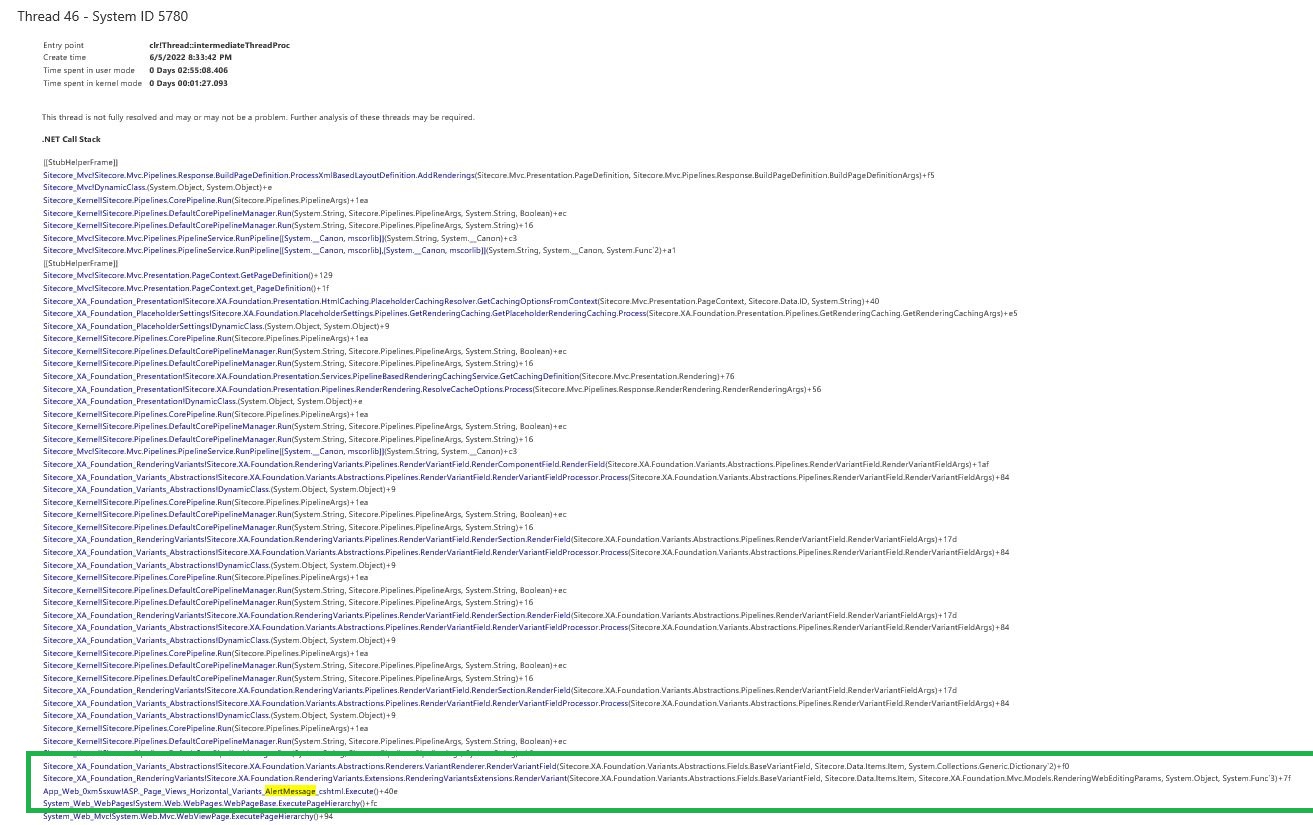
9) We again got back to our dump which were taken when CPU was high, we had couple of dumps and it was pointing us to one common rendering which we have used, following is a quick snapshot of our dump

TOP 5 Threads by CPU time


Now it time to look into these threads, so Thread 46 and 45 were pointing to our problematic rendering , In below table dump is showing the problematic page and on this page we had that rendering which was causing issue.


Upon inspecting further to see what this thread is executing, we saw our culprit 


and all the dumps were showing these new pages only with which we went live, with our surprise these renderings were already being used on other page but no issues there, so we concentrated to look into this component in detail

10) So now our issue was because our new pages were using these rendering excessively, we plan to remove them from our stage environment as issue was there too, so we renamed the placeholder keys in presentation details so these do not get rendered and with our surprise, next day CPUs were absolutely normal, So it was our first success in identifying that issue is with any specific variant of this rendering, because rendering did not have any issues, any particular variant had some issues

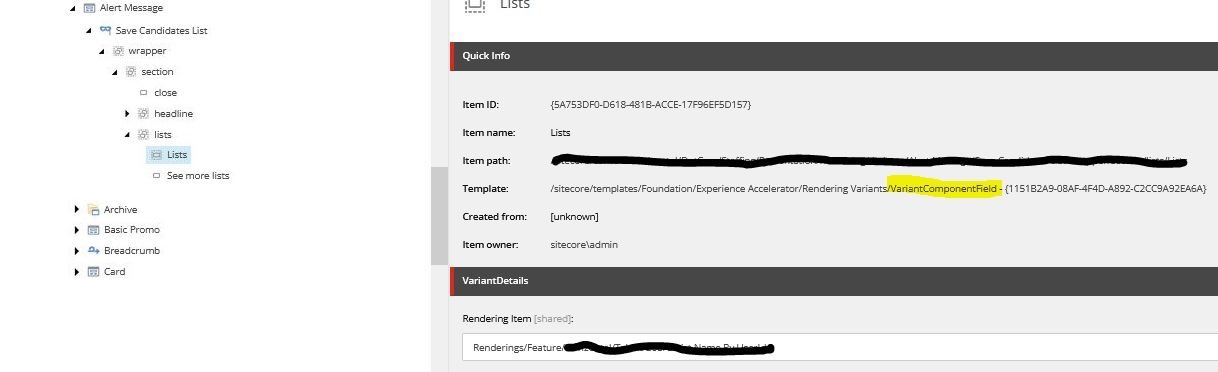
11) So we started looking at one by one variant their data sources to see if there is any specific operation being done which is causing this? in that process one rendering caught our eyes which had used "component" field in the variant like below


12) Now we used "component" field which is calling one more controller rendering from inside of it, so first thing i did was, i commented the complete back-end code i.e i commented everything inside that action method and returned empty result, so that if any back-end code is doing anything we can get rid of it and CPU should come down, but with my surprise CPUs were still high :( 

13) But if we remove that rendering item completely from component field's reference, it was working fine, which was even more disheartening, because now its not our code but something else in sitecore doing this and making CPU high

14) Believe me till now we were clueless and were thinking to remove this component and use something else, but we thought to revisit our DUMP to see if we get any other hints and what we got was below 


 Well, we were observing device specific code getting executed too, so we also tried disabling device detection but no luck with rendering enabled nothing worked

15) Because it was showing devices, we tried to browse the site from mobile and suddenly it caught our eyes that those pages which had this rendering variant were not opening in mobile device and they were giving 504 bad gateway error page.

Well, At this point of time we were 100% sure that these things are related, so finally after lot of dump analysis and research we found below

Finally the solution

Now, we had 100% scenarios that when someone visits pages with that rendering variant from mobile CPU was spiking up, and that rendering variant was only available after post login, and our team mate Akshay Barve pointed to one of the KBs titled "Illegal recursion detected", with our surprise it clearly mentioned below 

"SXA website pages might fail to load with a high CPU usage and an unhandled exception if the page is requested with a mobile device or in the mobile mode of a desktop browser. The root cause of the issue is an infinite recursion on page load when using a component variant field for a mobile device"

Strangely we were not getting these logs otherwise we could have captured it in initial findings, we tried this patch and it worked like a charm and our nightmare was over, after this fix CPUs just slept and were able to take large number of requests and was able to hold huge traffic.  

But in this troubleshooting journey we did so much of other things, we got rid of exceptions which we were coming, we touched performance parts for which i am going to write one blog post of what all we did, so its all learning...

Hope some of you will find this helpful and get early help if this weird behavior happens !!!

Many thanks to Muktesh Mehta and Kiran Patil for helping on this troubleshooting and taking out time from their busy schedule, and providing valuable inputs, Much appreciated !!!

Sitecore OrderCloud exam tips & tricks

May 11, 2022 ·

Sitecore OrderCloud exam tips & tricks


Hi Team,

Recently i appeared for OrderCloud certification exam and though everything is available on the OrderCloud web portal Platform Overview | Sitecore OrderCloud & on Sitecore e-Learning portal, but what i want to share is some ideas of what kind of questions or what is the pattern of questions and what is the best way to prepare for this exam

Amazing documentation of OrderCloud 

First and foremost is the documentation available on  Platform Overview | Sitecore OrderCloud itself, but when you first start studying you will be overwhelmed with the information available on the portal, It will be little more to digest if you do not have any commerce background (Commerce i mean e-commerce way of working buyer, seller, products, catalog, shipping, fulfillment, Basically if you use any of the online shopping site you already know what i am talking about, but here you will be thinking as a developer and not the buyer, because we want to build something in OrderCloud).

Sitecore e-Learning module

As you feel overwhelmed with the information available on the OrderCloud portal, that is where Sitecore e-learning comes in, Personally what i felt is, it gives us steps by step reading material of competencies which are needed to work in Sitecore, It is like instead of reading a full book, someone is giving you the index of the pages to go through flow by flow and that will make more sense as you browse through them, I personally had amazing support of our team mates who already had this guidelines defined for us by Vignesh C , Brijesh Patel , Deepak Kumar , Pratik Satukunvar , So i already had lot of info where to start and plan my exam and schedules, so this blog is for those who are looking for some more info about exam.

So basically as i said you get something like following on e-Learning


which makes more sense competency wise links which you can read through, and believe me, If you refer all the links and sub links inside the main links and read through all the material, you are just done, it has everything to prepare for exam, and kudos to the OrderCloud team of getting such an amazing details still concise documentation out there, In very simple terminology.

In a nutshell, you will need to prepare for following competencies, this information is already available on e-Learning site and on Sitecore

  • Competency 1: OrderCloud Architecture and Conventions 
  • Competency 2: Integration 
  • Competency 3: User Management and Access Control 
  • Competency 4: Environments 
  • Competency 5: Product Management 
  • Competency 6: Order and Fulfillment Management 
  • Competency 7: Troubleshooting

My personal experience of type of questions that i got in exam

I will not talk about how to register for exam or how to do other things of setting up a machine or taking it up from the center, as that information is already available, what i want to talk about is what you should be closely following in the OrderCloud guide 

Make sure you do hands onto OrderCloud API console available for free for trial

There will be questions in the exams about certain aspects of the UI and how to do different things for certain area, so it is very important that you do step by step hands onto OrderCloud portal, You can create your account there and start playing with APIs and Market place, remember e-Learning has those steps and you can do side by side, So you get familiar with the UI and kind of set up it has, Starting from setting up market places, working with market place and buyer, seller set up and API calls of those.

Scenario based questions 

Why it is important to go through full documentation is, there will be scenario based questions, where you will only be able to answer if you know about it, as all options will look correct to you if you do not have gone through the documentation and understood the concept 

OrderCloud has some generalized approach if you are browsing the site as a buyer, or seller or supplier, so context is important factor, in which context you are making the call, and you will be able to answer question related to APIs only if you know this context and details.


API Based questions

It is very obvious if you are appearing for OrderCloud which fully API based and language agnostic, meaning you can write code in any language you know, so It is important for you to go through all API examples given on OrderCloud, You can get scenario based questions from any of the API end point, and if you have not gone through them, all of the options will look same to you, but there will be minor difference and you can only spot if you know about them.


False positive questions

Why reading everything on OrderCloud documentation is important because, you might get questions which might challenge your knowledge about OrderCloud to know what is not available in OrderCloud or what is not correct for OrderCloud, and to point out what is not correct or what is not available, you need to know what is already available, and if you know what is available, you can easily "SPOT THE NOT".


I hope this helps and you get your certification, All the very best and feel free to connect with me if you have any questions or concerns


NOTE : Above are my personal views from my experiences which i had while giving and preparing for exam.

SXA decision making on different rendering approaches and components

May 01, 2022 ·

SXA decision making on different rendering approaches and components

Hi Team,

I am taking a break from a COVEO series for sometime, I will still finish up all of them this year so we have end-to-end guide for it like a crash course

Today, I would like to draft something which I have been asked many times, as well as many of us working with SXA must have came across, the question of "How to decide what kind of option one should choose out of so many option available in SXA, like view over riding, rendering variants, OOTB components, cloned components, Custom components" which one should be used and when is a very common question you all must have came across, I thought to write my view here to simplify the understanding of each and will put it on you end users to decide which one should be selected and when.

Though, The purpose of this blog post is to give brief understanding of which does what and you can cross check with your business need and take the decision, I have experience of working with all of the  following different types and ways of SXA so I will just provide you real life scenarios too, so you can compare it with your business case at hand. 

Overriding view


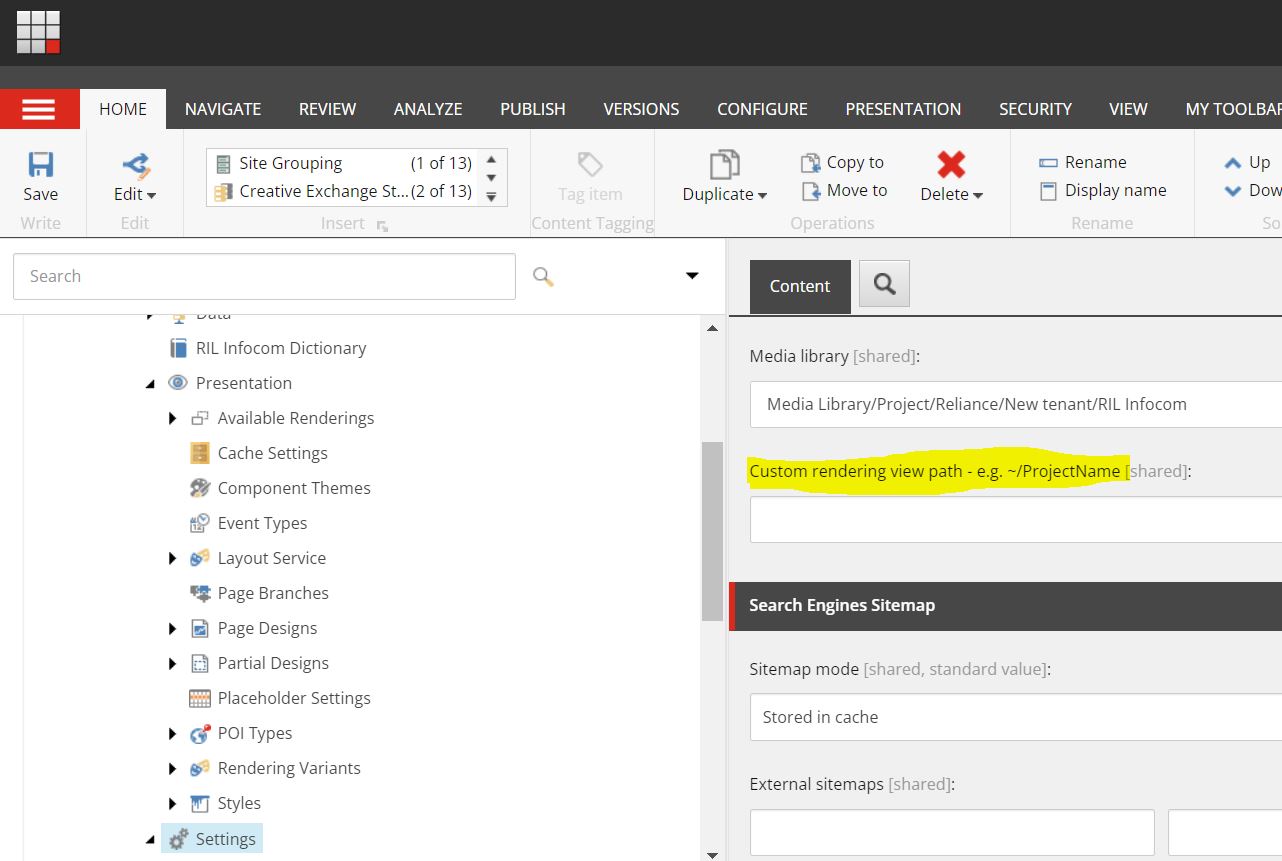
This setting is available under your settings item under the site node, i.e "/sitecore/content/<<Tenant>>/<<Site>>/Settings" and there is a field called "Custom rendering view path"

Beauty of this field is if you have a requirement only to modify the view of existing OOTB SXA, for example if you just want to add some custom mark up to any existing component like promo or any other OOTB component, via this field what you can do is, you can give path to your custom view folder and .cshtml path (name of the component should be same as OOTB component), so now while rendering SXA engine will check if there are any custom folder path defined in this field, it will try to render the view from that location instead of existing OOTB SXA view path, this should be used only when you want existing component's repository and model and everything to work "as-is" but somehow you just want to change the view, so all the business logic of existing component will work "as-is" only HTML will be served from the custom view path folder that you gave.

Here, even if you upgrade SXA, it will update its existing views, your custom view path folder and the view inside it will still be intact, hence you will not loose anything even if you upgrade.

NOTE: Only thing in above approach is for example if you have created custom html view for promo component, so SXA will replace this custom html site wide, if you have a requirement where you want existing promo as well as and another component with little different html structure on other pages, then following is an option.

Rendering Variant

As said above, if you have a requirement where existing component's fields are satisfying your need for your component but you want different variation of same component on different pages, at that time you should create the rendering variants, they are just responsible to create the desire HTML structure from the data source given, you can create completely new type of HTML structure which will get render when you select the variant from editor, Provided the fields that you refer are matching with the OOTB's template and data source is set.

Also rendering variant helps when you kind of have lopping mechanism, so for instance if you have one Author component which displays author bio and blogs written by that author in same component, this type of requirement can also be achieved using variants, It all depends on what kind of template you have used, so if you are identifying blogs written by authors using multi list (using field source), you can use "passthrough field" of variant, so blogs will be your reference field so SXA will when generating HTML for author, it will also loop through these reference field and get blogs written by that author

Pass through field example

Consider you have a item, and it has one of the field which is either multi list or drop list, now in either of case there can be a business scenario where you want to show detail of those fields along with main rendering item, As i said SXA offers so many option of doing this same thing in so many ways, but most optimum is by using a variant and a pass through field (basically it loop through that field and runs through all those item and get those field to display)

In my case, i wanted to show on my blog detail page, i wanted to show the detail of author who wrote that blog


 Here as you can see my blog item has author drop list, and following how you can use it using a variant


and following is the output (of course use case will differ from person to person, but that is an example)


Similarly, Variant also support loading of preexisting components into existing HTML structure, by using "component" field, you can give any rendering and it will be rendered at the exact location in your mark up which you have created in your variant.

You can easily write an article only on how to use variants effectively, but it's not the scope today so i will not get into it, but variant can give you so much and control over things, i would strongly recommend individuals to try to see how many options do variants offer for their individual needs.

NOTE: It is always a good practice to select thumbnail for your variant, so content authors can easily see which variant is for which purpose from the image and they can select accordingly, otherwise it will only show names and it is hard for them to decide which one to select.

Scriban Template  

One of the another powerful feature of SXA is Scriban, They can be used as an "Additional renderers" of fields or tags or even sections

scribans have lot to offer, and you can display additional fields using template syntax provided by SXA

Clone component

Cloning will help when we do not have control over OOTB view either using variant or any other way, so for example if existing OOTB component has 3 fields in its template, title, description and CTA, but your need you want one more image, two more CTA and one more description field, in this type of scenario you can also create a rendering variant and inherit it from your new template, but rendering variant are not for those purposes, in these types of scenario, we should always clone the component and have our fresh version of that component created from OOTB component, now because its totally a new component, we can change the template the way we want and use it as we want as its our own component, remember the rendering pipeline etc. will still remain same, but we will have more flexibility over additional fields.(again you can combine power of variant along with this)

Custom Component

When we want total control over business logic and view, consider reading from third party API and trying to create a view from that, we will need totally custom view

Consider a example where you want to read from a weather API and show the weather of selected cities, here cities can be passed from Sitecore but we will need to make and API call to RSS feed or on some end point to get the weather data, this is where custom component will come into picture, where it will be totally custom view, model, controller, and even repository.

As you can see SXA has so many different ways to offer same thing, so no way is right way or no way is wrong way, it all depends on what is the business need and how can you achieve most efficiently

I am planning to write some of the real tricks or rather smarter ways which we used different scenarios, may be will cover that in the next post

Hope this was helpful.

Thanks for today