Xconnect certificate thumbprint and communication with sitecore and xconnect

June 09, 2019 ·

Xconnect certificate thumbprint and communication with sitecore and xconnect

Hello People,

One of my blog post i was writing about the issue i had with my xconnect and experience analytics not working

On the same line i had to troubleshoot and check xconnect certificate and thumbprint in config files, So i also discovered in this process that lot of people like me did not have exact idea about how xconnect and sitecore communicates and what is thumbprint and why it is used and where it is configured, So thought to do a quick blog post about it.

Communication between Sitecore and Xconnect
Everyone of us will need to work with xconnect directly or indirectly, so its better to understand how sitecore talks to xconnect.


xconnect (Definition)
xConnect is the service layer that sits in between the xDB and any trusted client, device, or interface that wants to read, write, or search xDB data. Communication must happen over HTTPS and clients must have the appropriate certificate thumbprint

Now my point of interest here is to tell you is how Sitecore and xconnect connects and what is the  thumbprint for it and where it is configured.

So xconnect is the server where client connects, so here in our case sitecore is the client which connect to xconnect for its services like analytics and marketing automation features and services which are abstracted in xconnect.

Why xconnect certificate is used
It provides additional layer of scurity and It is considered secure than traditional user name and password to communicate and it is cryptographically secure way to have a communication between Sitecore & Xconnect.

Now if we observe the xconnect AppSettings.config file of xconnect role


  • AllowInvalidClientCertificates 
         This defines if the Sitecore is allowed to connect even if the certificate is invalid, So this is also   interesting to know that if you still want to connect if you do not have trusted client certificate, you can still use that certificate but you just need to keep the value of AllowInvalidClientCertificates =true. (though not recommended for production)


  • ValidateCertificateThumbprint
         This is thumbprint of the xconnect certificate, and this setting defines that what other roles should have which thumbprint, you can verify this thumbprint with the certificate thumbprint to make sure that which certificate is being used to communicate.


As shown above, i have opened the xconnect certificate and see the thumbprint, so we can make sure that this is the certificate and the thumbprint should be used in all roles (if scaled environment)

  • Thumbprint needed in what roles in scaled environments 
In our case we had CM server and CD server, and on CM server we had different roles installed on same CM server with different IIS instance of those role configured, So go to Connectionstring.config and AppSettings.config of all roles like Processing, Reporting, Xconnect Search, Content Managemnet, Content Delivery and verify the thumbprint with xconnect thumbprint and make sure that those are same as xconnect certificate thumbprint.


So, hope above information helps to understand why xconnect is needed, where to find thumbprint, what if we do not have trusted certificate and what all roles will need the same thumbprint to connect with xconnect.


February 07, 2019 ·

Configure https on existing solr running on http

Hello All,

I had the scenario today where i installed my solr nodes and services and everything was working fine, but later i noticed that we will need solr running on https with sitecore 9.1, and i saw on the internet that how we can generate the certificate and put it in the trusted certificate store and update solr.in.cmd file so that it has all those entries to make solr run as https and also we will need solr certificate .pfx file on the path $solr\server\etc folder.

I also got some scripts on the internet and i tried them out but there was something missing and my solr did not start with https somehow.

So what i did was i took my solr installation powershell script which installed solr from the scratch, installs certificate and configures it, also restarts services etc.

So i took that script and modified in a way so that it only does things for making existing installed solr from http to https.

Following is the script

Param(
    $solrVersion = "6.6.2",
    $installFolder = "C:\Daivagna", ##Path to your solr folder, where your solr foler i.1 solr6.6.2 is copied, in my case it is inside c:\daivagna
    $solrPort = "8787",
    $solrHost = "solr",
    $solrInstanceName ="testsolrservice"
)
$solrName = "solr-$solrVersion"
$solrRoot = "$installFolder\$solrName"

## Verify elevated
## https://superuser.com/questions/749243/detect-if-powershell-is-running-as-administrator
$elevated = [bool](([System.Security.Principal.WindowsIdentity]::GetCurrent()).groups -match "S-1-5-32-544")
if($elevated -eq $false)
{
    throw "In order to install run solr as https please run as administrator."
}

# Generate SSL cert
$existingCert = Get-ChildItem Cert:\LocalMachine\Root | where FriendlyName -eq "$solrName"
if(!($existingCert))
{
 Write-Host "Creating & trusting an new SSL Cert for $solrHost"

 # Generate a cert
 # https://docs.microsoft.com/en-us/powershell/module/pkiclient/new-selfsignedcertificate?view=win10-ps
 $cert = New-SelfSignedCertificate -FriendlyName "$solrName" -DnsName "$solrHost" -CertStoreLocation "cert:\LocalMachine" -NotAfter (Get-Date).AddYears(10)

 # Trust the cert
 # https://stackoverflow.com/questions/8815145/how-to-trust-a-certificate-in-windows-powershell
 $store = New-Object System.Security.Cryptography.X509Certificates.X509Store "Root","LocalMachine"
 $store.Open("ReadWrite")
 $store.Add($cert)
 $store.Close()

 # remove the untrusted copy of the cert
 $cert | Remove-Item
}

# export the cert to pfx using solr's default password
if(!(Test-Path -Path "$solrRoot\server\etc\solr-ssl.keystore.pfx"))
{
 Write-Host "Exporting cert for Solr to use"

 $cert = Get-ChildItem Cert:\LocalMachine\Root | where FriendlyName -eq "$solrName"

 $certStore = "$solrRoot\server\etc\solr-ssl.keystore.pfx"
 $certPwd = ConvertTo-SecureString -String "secret" -Force -AsPlainText
 $cert | Export-PfxCertificate -FilePath $certStore -Password $certpwd | Out-Null
}
else
{
 Write-Host "Old certificate already found on the path = $solrRoot\server\etc"
}
# Update solr cfg to use keystore & right host name
if(!(Test-Path -Path "$solrRoot\bin\solr.in.cmd.old"))
{
 Write-Host "Rewriting solr config"

 $cfg = Get-Content "$solrRoot\bin\solr.in.cmd"
 Rename-Item "$solrRoot\bin\solr.in.cmd" "$solrRoot\bin\solr.in.cmd.old"
 $newCfg = $cfg | % { $_ -replace "REM set SOLR_SSL_KEY_STORE=etc/solr-ssl.keystore.jks", "set SOLR_SSL_KEY_STORE=$certStore" }
 $newCfg = $newCfg | % { $_ -replace "REM set SOLR_SSL_KEY_STORE_PASSWORD=secret", "set SOLR_SSL_KEY_STORE_PASSWORD=secret" }
 $newCfg = $newCfg | % { $_ -replace "REM set SOLR_SSL_TRUST_STORE=etc/solr-ssl.keystore.jks", "set SOLR_SSL_TRUST_STORE=$certStore" }
 $newCfg = $newCfg | % { $_ -replace "REM set SOLR_SSL_TRUST_STORE_PASSWORD=secret", "set SOLR_SSL_TRUST_STORE_PASSWORD=secret" }
 $newCfg = $newCfg | % { $_ -replace "REM set SOLR_HOST=192.168.1.1", "set SOLR_HOST=$solrHost" }
 $newCfg | Set-Content "$solrRoot\bin\solr.in.cmd"
}
else
{
 Write-Host "File already exists on the path $solrRoot\bin\solr.in.cmd.old"
}   


# install the service & runs
$svc = Get-Service "$solrInstanceName" -ErrorAction SilentlyContinue
if(!($svc))
{
    Write-Host "Installing Solr service"
    &"$installFolder\nssm-$nssmVersion\win64\nssm.exe" install "$solrInstanceName" "$solrRoot\bin\solr.cmd" "-f" "-p $solrPort"
 &"$installFolder\nssm-$nssmVersion\win64\nssm.exe" set "$solrInstanceName" "Description" "$solrPort"
    $svc = Get-Service "$solrInstanceName" -ErrorAction SilentlyContinue
}
if($svc.Status -ne "Running")
{
    Write-Host "Starting Solr service"
    Start-Service "$solrInstanceName"
}
else
{
 Write-Host "Re-Starting Solr service"
    Restart-Service "$solrInstanceName"
}

# finally prove it's all working
Invoke-Expression "start https://$($solrHost):$solrPort/solr/#/"


What is does is simply creates certificate for existing solr running on specified port, installs it on a machine and copies it to etc folder of the $solr\server\etc, and edit its solr.in.cmd file with generated certificate and restarts or starts service.
Now, I am using the same script to make any non https solr to https. Cheers !!!
"Find All Reference" like functionality for sitecore content tree

January 16, 2019 ·

"Find All Reference" like functionality for sitecore content tree

Problem
I was new to Sitecore and I had to trace lot of things on the existing project to find out where all the elements are connected, like these renderings are used where? which item is using which template or if you have a template, which item is being created from that template, all those references I was trying to find.


Being a .net guy and visual studio familiar, you always love to see if you can get something like "Find all references" and can find where the object you are refereeing to is referenced.


Solution
Sitecore provides real good referencing in its "Navigate->Links" menu, You select any object be it, layout, rendering, template and go to Navigate menu
and inside it click "Links" menu it will give you following two types of reference

  • Items that refer to the selected item.
  • Items that selected item refers to.

It becomes easy when you are having some experience in Sitecore, but if you are just new to Sitecore, this will definitely help !!!

How to see logs on azure pass apps

November 27, 2018 ·

How to see logs on azure pass apps

Hello People,


Problem

Is it only me or you also faced the issue where you uploaded your app on azure web app and you wanted to troubleshoot why it is not working? And like everyone, I was missing the folder structure views where i can go and see my log files which i have written c# code on my methods.

What i had in my catch block was below

Trace.TraceError("Error = " + ex.Message);

Now on azure web app, everything was deployed and i wanted to see where it is breaking so following is the path where you can see it

  • Login into your azure portal
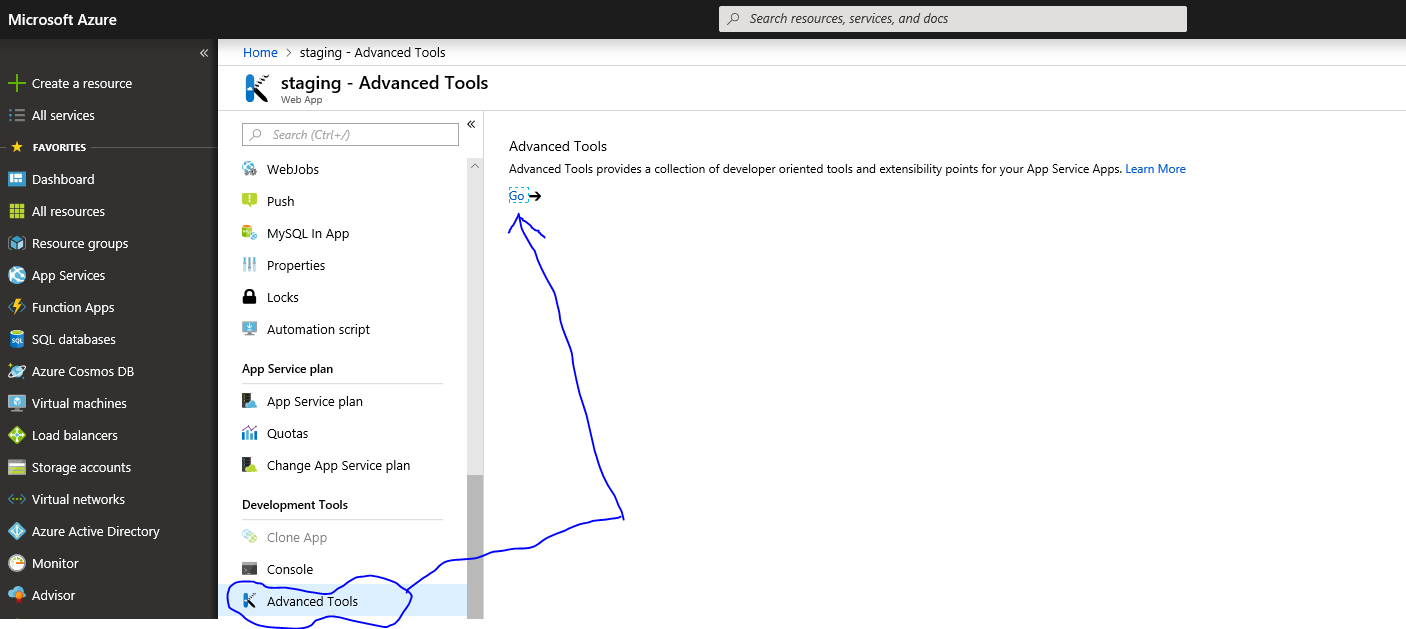
  • Go to your web app and you will find below option
  • After clicking GO, you will be taken to Kudu UI, Click on Debug Console menu and select CMD
  • This will take you to the folder structure and you can go to your LogFiles folder using standard console command and will be able to download the log files


Hope it helps !!!

November 01, 2018 ·

One or more exceptions occurred while processing the subscribers to the 'item:creating' event

I was recently installing the packages from one of the QA environment to my local Sitecore instance, "Media library package" to be precise, And it started giving me this below error

One or more exceptions occurred while processing the subscribers to the 'item:creating' event

Looking at the sitecore logs, it gave me more info on the context and the actual inner exception was following
Solution: 'Name' should consist only of letters, digits, dashes or underscore

Now it was evident that some of my file names were violating the naming rule, I could see in the log just before exception from where the installer stopped creating items, and that file name had round braces "(" and ")" at the end of it, with my surprise I was able to create the item with those name in the content tree, but below was the solution for it,

Solution

I am using SC 9.0.1 and in that Go to Sitecore.Marketing.config file residing in 
"App_Config\Sitecore\Marketing.Operations.xMgmt" folder and find two entries as below
<event name="item:saving"> <handler type="Sitecore.Marketing.xMgmt.Definitions.ItemEventHandler, Sitecore.Marketing.xMgmt"
method="OnItemSaving"/> </event> <event name="item:creating"> <handler type="Sitecore.Marketing.xMgmt.Definitions.ItemEventHandler, Sitecore.Marketing.xMgmt"
method="OnItemCreating"/> </event>

Comment them out and try to import the package again, this time it will work, Once you are done restoring the package, You can revert that file back by uncommenting those entries.


Hope it helps !!!

Integrate Sitecore With OPENSOLR

October 29, 2018 ·

Integrate Sitecore With OPENSOLR


Here goes the story...
Personally when I looked up on the internet I did not find lot of documents which could tell how you can integrate Sitecore with OPENSOLR cloud provider, So I did hands on to it, Talked to their support and successfully integrated our sitecore to create indexes in cloud, Following are the highlights and troubleshooting points that I faced and how you can avoid it.
Quick "How-to" integration points

  • Register on https://opensolr.com/users/login
  • From Dashboard hover over "My Indexes" and select "Add New"

  • Select GEO location server where you want to put index

  • One important thing here is, OPENSOLR does not allow indexes with default keyword "sitecore_", so you will not be able to create those indexes, but to create them, you will need to use following configuration in those config files

  • <index id="sitecore_master_index" type="Sitecore.ContentSearch.SolrProvider.SolrSearchIndex, 
    Sitecore.ContentSearch.SolrProvider">
                <param desc="name">$(id)</param>
               <param desc="core">mysitecore_master_index</param>
    

  • I have shown the content of Sitecore_ContentSearch_Solr_Index_Master.config file and as you can see my index name is same but I have provided the "CORE" name so that it does not contain "sitecore_" keyword, You will need to use this name to create indexes in OPENSOLR.
  • On prompt of create index supply index name, NOTE: If you have specified CORE in search index config, name you give here must match with the CORE name of index and if no CORE is specified in search config, It should match with the index name, Default Sitecore index config will have CORE specified and custom indexes might not.
  • Click on "gear icon (settings icon)" on created index to go to index settings page
  • Click "UPLOAD CONFIG FILES" tab
  • Upload SCHEMA.zip first and after that upload SolrSchema.zip NOTE: Here we need to ask support to provide these files and upload order must match.
  • Do step 2-7 for all other indexes
  • Change ContentSearch.Solr.ServiceBaseAddress URL value in Sitecore.ContentSearch.Solr.DefaultConfiguration.config file pointing to the OPEN SOLR cloud URL (you can get that URL by clicking "Admin Panel" button on each of INDEXes settings page (Step-5)

  • Restart IIS and Open sitecoreintsance/Sitecore
  • From Sitecore launchpad->Control panel->Populate Solr Managed Schema
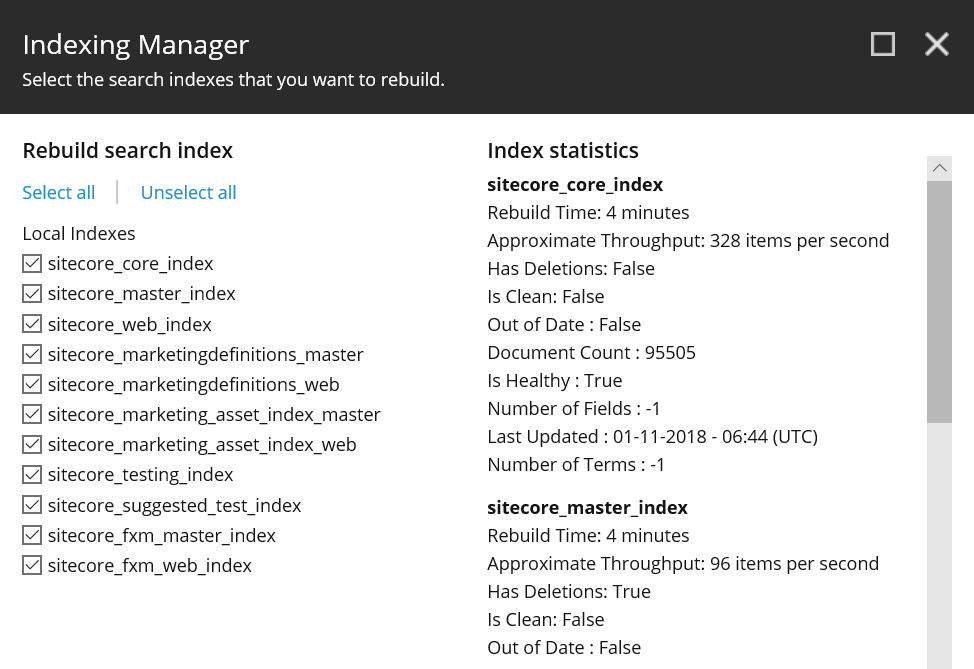
  • Rebuid index from Sitecore launchpad->Control panel->Indexing manager
  • If everything goes well and if you are able to generate schema and rebuild indexes, you can verify the same by going into "Admin Panel" of any index settings and you can see your SOLR user interface and observe that new documents are created as it will show document count.

Major errors and issues
Personally I faced two major issues,
  • Getting 400 bad requests with different field errors, like unknown field_indexName or unknown field "version_im" or Document is missing mandatory uniquekey field: id
  • Managed-schema.xml of my current on-prem sitecore "conf" did not work at all, which is the known issue in SOLR and Sitecore, Refer to the url https://kb.sitecore.net/articles/227897

Solution
  • Very first thing is you need to make sure is that your SOLR schema, contents of the "conf" folders are corrected, you will need to make sure that there are no "managed-schema.xml" file but rename it to "schema.xml" file, From SOLR 6+, There are no schema.xml files available but only Managed-Schema.xml is there, but that needs to be renamed.
  • Make sure you are referring to correct "conf" of SOLR version, My life saver was OPENSOLR support guy, He provided me two files Schema.xml and SolrSchema.xml (zip files), and uploading those files to my index configuration worked like a charm, So you may want to contact OPENSOLR chat support or via email to talk about this issues, They will see the logs on their end to find out what is the actual issue.
  • Make sure upload order of those two files are followed, first upload schema.xml and later on upload SolrSchema.xml (zip)

I hope this would be helpful for people to get started and integrate with OPENSOLR, Cheers !!!

September 23, 2018 ·

Sitecore 9 : Error in controller rendering throws Error rendering controller:the current route url is: '{*pathinfo}'. this is the default sitecore route which is set up in the 'initializeroutes' processor of the 'initialize' pipeline sitecore 9

Hello Guyz,
Believe me but I just had the nightmarish situation where I got trapped in this controller rendering issue where it kept on giving me below error

Error rendering controller: the current route url is: '{*pathinfo}'. this is the default Sitecore route which is set up in the 'initializeroutes' processor of the 'initialize' pipeline 

There mainly two reasons for this exception

  • Controller rendering you have used is having either wrong namespace, wrong controller name or wrong assembly name.
  • There is something wrong with System.Web.Mvc.dll

you should first observe your controller rendering configuration, see if namespace or controller name or assembly name are correctly given? this is common issue when we copy and paste the path and it could contain spaces or aeesmbly name could be wrong, if everything looks good there, read further

I tried everything like changing the name of controller, deleting the physical controller and creating It with different name, deleting renderings from sitecore and try creating them again, deleting global.asax file deleting sitecore cache, but I was ending in the same error all the time, and finally one fine moment I was out side my home one small thing clicked me and I run back to my laptop and tried implementing it and it worked !! Phew !!! which is following .

Solution


Well, When I created my visual studio project it added the System.Web.Mvc.dll by default and it was added with the version 5.2.4.0 which is fine but the issue was that sitecore installation was using the version 5.2.3.0

Now because my general practice is that I delete my projects web.config file and also web..config files from the view, and copy it from sitecore's installation, now my solution had config from sitecore which were pointing to 5.2.3.0 DLL and my solution had 5.2.4.0, which could never work and end up in assembly manifest error, if i deploy, as i did not copied it to BIN that error was not there but somehow solution was using 5.2.4.0 when sitecore requested that page or controller/action path, and due to it the route was not working

A small change i did,

  • Deleted the any old reference from bin folder of my IIS site
  • Copied sitecore's System.Web.Mvc.dll and added it as a reference to my project so i downgraded my project from 5.2.4.0 to 5.2.3.0
  • Deleted web.config and copied it from sitecore's instance
And it worked now sitecore is able to find the route and hitting the MVC controller, Phew !!!

Try above tips if you get trapped in similar situation


September 19, 2018 ·

Sitecore 9: System.MissingMethodException: Method not found: 'System.String Sitecore.ContentSearch.Abstractions.ISettings.


Sitecore® 9.0 Platform Essentials for Developers eLearning Lab Module Error

I was recently doing the Sitecore® 9.0 Platform Essentials for Developers eLearning Lab Modules and in last modules I started getting the below error

System.MissingMethodException: Method not found: 'System.String Sitecore.ContentSearch.Abstractions.ISettings.

Out of clue because I did everything as per the guide and end up in error, I figured out from the exception that it has to do with some DLL which is not finding the method the code is trying to reference.

So I backtrack the module and found out that there were two nuget packages were installed and one of them was Sitecore.ContentSearch.dll, So when you publish the site this DLL got overwritten with the existing which was available with existing sitecore installation In your WWWROOOT

I had a back up of the sitecore installation folder from WWWROOT and I took the DLL from that and put replaced it in the WWWROOT folder and to make sure it works now, browse the site and everything started working

May be any of you are facing the same issues, you should have the original DLL from sitecore installation and reference it instead of the nuget package, if the problem still persist (I hope in future this will not be the case with nuget)

Hope it helps !!!

July 26, 2018 ·

office365 license add exception powershell Set-MsoluserLicense


Hello All :),

It's been long time since I have posted anything, I have so many draft posts but I will just need to make them proper and publish, but today I just though to give you all a quick info on office365's strange error while assigning licenses to a user, If you admins or programmers have found this strange error while fire the command Set-MsolUserLicense, it some times generate following error

Set-MsolUserLicense : Unable to assign this license because it is invalid. Use the Get-MsolAccountSku cmdlet to retrieve a list of valid licenses

And this is where all the confusion starts, By reading the error it seems that you are trying to give invalid license? you double check and find out that license or SKU is correct, but it keep giving this error if you fire Set-MsolUserLicense command, Well actually you did not do anything wrong, but the error that office365 gives back is misleading and that needs to be understood, it actually is trying to say is

It is trying to say that, this user already has this license and you are again running the command to assign already available license to that user and that is where office365 complains that it is invalid, actually it is already given to a user. :)

So, next time when you spend time troubleshooting issues like this? Please first check if user already has this license available? It was a small post but hope it will help you save little time.

Happy troubleshooting friends !!!

June 29, 2016 ·

Get specific user information out of lotus notes without traversing all documents

Getting specific user information out of lotus notes

I had the need of reading from lotus notes specific user information, the solution i had before was traversing whole lotus notes document inside $people view and getting one by one document and comparing if this is the document i need But the problem with that approach was 1) It was not proper of having a loop 2) It was too slow and my web service was getting timed out as it was traversing

There is a better way to do it like following

var session = new NotesSession();
session.Initialize(password);
NotesDatabase _serverDatabase = session.GetDatabase(serverName, "names.nsf", false);
NotesView _peopleView = _serverDatabase.GetView("$Users");
// Searching using email, if any document matches with this email string
NotesDocumentCollection tmpDoc = _peopleView.GetAllDocumentsByKey(userMail, false);

// There could be multiple enteries
for (int i = 0; i < tmpDoc.Count; i++)
{
    NotesDocument tmpDoc1 = tmpDoc.GetNthDocument(i);
                    // Take full name of a user when firstname+lastname+email matches
    if (firstName.ToUpper() == Convert.ToString(tmpDoc1.GetItemValue("FirstName")[0]).ToUpper() 
       && lastName.ToUpper() == Convert.ToString(tmpDoc1.GetItemValue("LastName")[0]).ToUpper() 
          && userMail.ToUpper() == Convert.ToString(tmpDoc1.GetItemValue("InternetAddress")[0]).ToUpper())
              // Do your thing here
}

Above you can see i am loading a view called $Users and trying to getAllDocuments having a key, in my example i am passing an email, but you can have anything there and that key would be searched in whole document, so if you are passing a text which could be in many fields, multiple document would be returned containing those matches in different fields, and you can compare you condition to make sure you get the right document out of those multiple returned documents in this way you can avoid traversing through all the available documents and instead find one, i thought it would be helpful for others hence sharing it ;-)

October 08, 2015 ·

Solved !!! - Integrate lotus notes to third parties APP using interop.domino.dll COM API using C#

First of all before writing anything about this integration, i would like to say, i tried...tried..tried...so many times using the COM but couldn't succeeded and there were lot of things which needed to be understood just to make it work, Also the question i had was there is no documentation on IBM for C# COM API, but a good documentation on JAVA and C , so i was also not sure if this DLL would work? or we need some other way like ODBC or xPages or Webservice etc?

But i think "In IT, you should read your intuitions, that is where answer lies, because they are shouting from your experience.", Because i noticed that DLL has all the required classes and properties etc. and it has same methods as shown in JAVA docs on IBM, so i was sos sure this is the DLL that would 200% work

(i went into this thought process because i tried for 3 days without any luck, and later i found domino also has a web service which can be generated from domino designer etc., if i would have gone on that path, i might needed to understand it differently, but i had full trust on my intuition that this DLL has everything and if i make it work and get rid of the error, we are good to go)

just because it was a new system to me and i had no clue what is wrong, but i will try to put everything in here, So anyone out you can also get some information :), I will list down the issues that i faced, what one needs to do to solve, and also let me give you the URL of the code project which sample i used to have that interop.domino.dll, it is here, it is very good sample.


The error while initializing NotesSession class
Retrieving the COM class factory for component with CLSID {29131539-2EED-1069-BF5D-00DD011186B7} failed due to the following error: 80040154 Class not registered (Exception from HRESULT: 0x80040154 (REGDB_E_CLASSNOTREG))

Above is the error i was getting no matter what i do, even if build the app using 32 bit or 64 bit but i was just was not getting rid of that error message and which took a lot of energy out of me, so if you get this error, just skip directly to the SOLUTION section :(

So my first goal was just to get rid of this error and the other challenge was to understand the classes and their properties inside it and methods available etc. but first goal was to get rid of this error, as i never saw lotus notes,i tried to install the latest "Lotus notes client" to see what it contains and what are the terminologies etc. and suddenly my above error just vanished without doing anything, before that i tried to register the class, tried to register the DLL etc but it just did not work, but now it worked and there was no run time error, i was puzzled, Later in my research i realize that even if you have interop.domono.dll referenced in your project, you still need "Lotus notes client" installed on the machine or the server from where you are making a call top lotus notes server.

Solution:
In order to execute your COM calls and use Notes classes inside it, you need to install "Lotus notes client" on that machine, Else it will keep giving you that Class not register error and you will end up going on that track of finding why it gives this error and registering it and 32 bit and 64 bit hell, and by the time you realize you would be on totally another track of the problem solving :).


The goal of this post was just to let you know that even if you have interop, you still need lotus notes client installed, Code samples you can get it from IBM's java examples, sames classes are available in interop.domino.dll

August 05, 2015 ·

HTTP Error 500.19 - Internal Server Error, 0x80070021 while browsing your web app

Hello :) This is a quick draft as i faed this issue many times and every time i wondered what is the actual solution to it, is it something needs to be changed on web.config? or needs to be changed something in upper level config files as i was getting the same answer from everywhere

But the thing is why it works in other fresh machine with same configuration and why not on this? possible solution are below (apart from changing on config file level or unlocking config elements)
  • If you are using WCF make sure you have turned on the feature called "http activation" is turned on - It worked for me
  • If you are using windows authentication, make sure it is installed and turned on
  • run "c:\Windows\Microsoft.NET\Framework\v4.0.30319\aspnet_regiis.exe -i"

I know there are many reason which can cause this but i just drafted which worked for me as i was working with windows auth and WCF so may be if you have the same kind of scenario, it might help without locking/unlocking things from web.config