Sitecore OrderCloud exam tips & tricks

May 11, 2022 ·

Sitecore OrderCloud exam tips & tricks


Hi Team,

Recently i appeared for OrderCloud certification exam and though everything is available on the OrderCloud web portal Platform Overview | Sitecore OrderCloud & on Sitecore e-Learning portal, but what i want to share is some ideas of what kind of questions or what is the pattern of questions and what is the best way to prepare for this exam

Amazing documentation of OrderCloud 

First and foremost is the documentation available on  Platform Overview | Sitecore OrderCloud itself, but when you first start studying you will be overwhelmed with the information available on the portal, It will be little more to digest if you do not have any commerce background (Commerce i mean e-commerce way of working buyer, seller, products, catalog, shipping, fulfillment, Basically if you use any of the online shopping site you already know what i am talking about, but here you will be thinking as a developer and not the buyer, because we want to build something in OrderCloud).

Sitecore e-Learning module

As you feel overwhelmed with the information available on the OrderCloud portal, that is where Sitecore e-learning comes in, Personally what i felt is, it gives us steps by step reading material of competencies which are needed to work in Sitecore, It is like instead of reading a full book, someone is giving you the index of the pages to go through flow by flow and that will make more sense as you browse through them, I personally had amazing support of our team mates who already had this guidelines defined for us by Vignesh C , Brijesh Patel , Deepak Kumar , Pratik Satukunvar , So i already had lot of info where to start and plan my exam and schedules, so this blog is for those who are looking for some more info about exam.

So basically as i said you get something like following on e-Learning


which makes more sense competency wise links which you can read through, and believe me, If you refer all the links and sub links inside the main links and read through all the material, you are just done, it has everything to prepare for exam, and kudos to the OrderCloud team of getting such an amazing details still concise documentation out there, In very simple terminology.

In a nutshell, you will need to prepare for following competencies, this information is already available on e-Learning site and on Sitecore

  • Competency 1: OrderCloud Architecture and Conventions 
  • Competency 2: Integration 
  • Competency 3: User Management and Access Control 
  • Competency 4: Environments 
  • Competency 5: Product Management 
  • Competency 6: Order and Fulfillment Management 
  • Competency 7: Troubleshooting

My personal experience of type of questions that i got in exam

I will not talk about how to register for exam or how to do other things of setting up a machine or taking it up from the center, as that information is already available, what i want to talk about is what you should be closely following in the OrderCloud guide 

Make sure you do hands onto OrderCloud API console available for free for trial

There will be questions in the exams about certain aspects of the UI and how to do different things for certain area, so it is very important that you do step by step hands onto OrderCloud portal, You can create your account there and start playing with APIs and Market place, remember e-Learning has those steps and you can do side by side, So you get familiar with the UI and kind of set up it has, Starting from setting up market places, working with market place and buyer, seller set up and API calls of those.

Scenario based questions 

Why it is important to go through full documentation is, there will be scenario based questions, where you will only be able to answer if you know about it, as all options will look correct to you if you do not have gone through the documentation and understood the concept 

OrderCloud has some generalized approach if you are browsing the site as a buyer, or seller or supplier, so context is important factor, in which context you are making the call, and you will be able to answer question related to APIs only if you know this context and details.


API Based questions

It is very obvious if you are appearing for OrderCloud which fully API based and language agnostic, meaning you can write code in any language you know, so It is important for you to go through all API examples given on OrderCloud, You can get scenario based questions from any of the API end point, and if you have not gone through them, all of the options will look same to you, but there will be minor difference and you can only spot if you know about them.


False positive questions

Why reading everything on OrderCloud documentation is important because, you might get questions which might challenge your knowledge about OrderCloud to know what is not available in OrderCloud or what is not correct for OrderCloud, and to point out what is not correct or what is not available, you need to know what is already available, and if you know what is available, you can easily "SPOT THE NOT".


I hope this helps and you get your certification, All the very best and feel free to connect with me if you have any questions or concerns


NOTE : Above are my personal views from my experiences which i had while giving and preparing for exam.

SXA decision making on different rendering approaches and components

May 01, 2022 ·

SXA decision making on different rendering approaches and components

Hi Team,

I am taking a break from a COVEO series for sometime, I will still finish up all of them this year so we have end-to-end guide for it like a crash course

Today, I would like to draft something which I have been asked many times, as well as many of us working with SXA must have came across, the question of "How to decide what kind of option one should choose out of so many option available in SXA, like view over riding, rendering variants, OOTB components, cloned components, Custom components" which one should be used and when is a very common question you all must have came across, I thought to write my view here to simplify the understanding of each and will put it on you end users to decide which one should be selected and when.

Though, The purpose of this blog post is to give brief understanding of which does what and you can cross check with your business need and take the decision, I have experience of working with all of the  following different types and ways of SXA so I will just provide you real life scenarios too, so you can compare it with your business case at hand. 

Overriding view


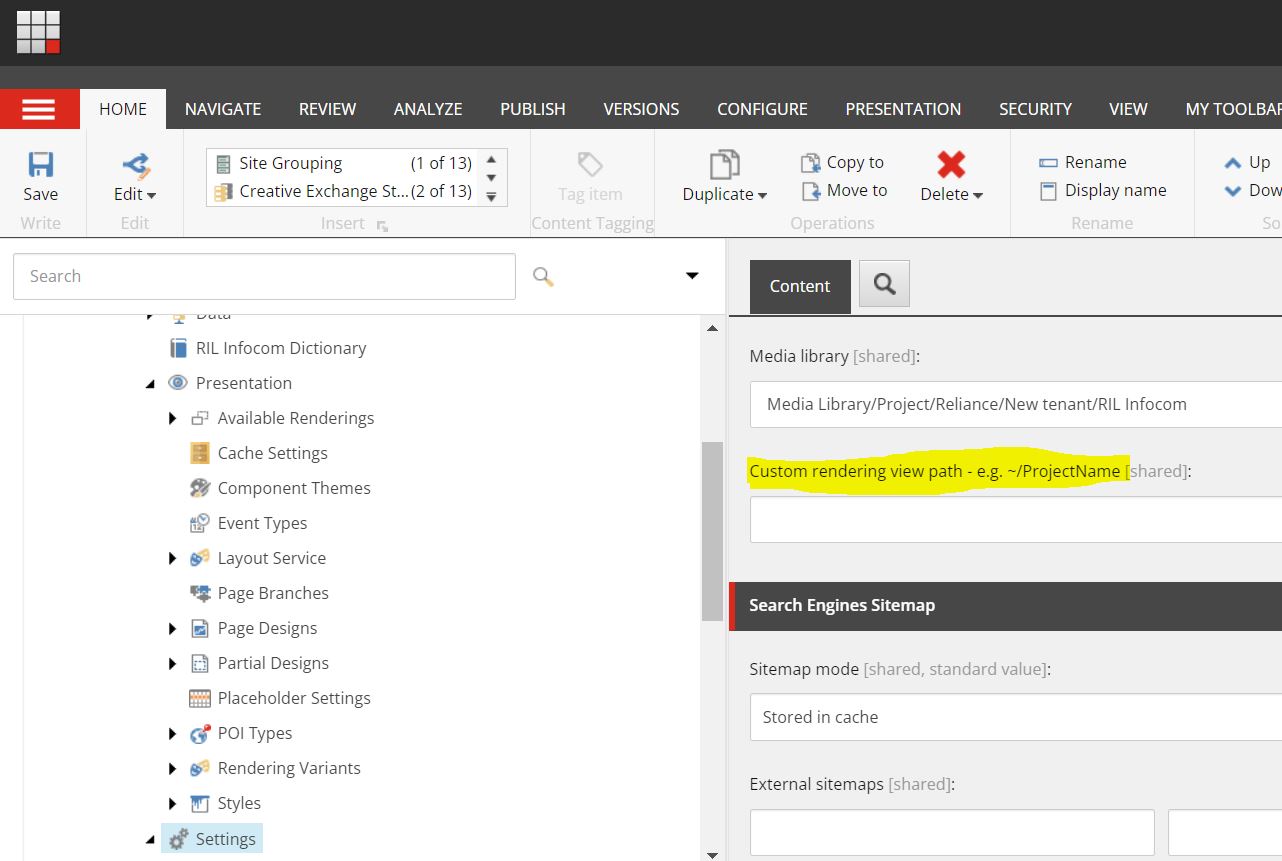
This setting is available under your settings item under the site node, i.e "/sitecore/content/<<Tenant>>/<<Site>>/Settings" and there is a field called "Custom rendering view path"

Beauty of this field is if you have a requirement only to modify the view of existing OOTB SXA, for example if you just want to add some custom mark up to any existing component like promo or any other OOTB component, via this field what you can do is, you can give path to your custom view folder and .cshtml path (name of the component should be same as OOTB component), so now while rendering SXA engine will check if there are any custom folder path defined in this field, it will try to render the view from that location instead of existing OOTB SXA view path, this should be used only when you want existing component's repository and model and everything to work "as-is" but somehow you just want to change the view, so all the business logic of existing component will work "as-is" only HTML will be served from the custom view path folder that you gave.

Here, even if you upgrade SXA, it will update its existing views, your custom view path folder and the view inside it will still be intact, hence you will not loose anything even if you upgrade.

NOTE: Only thing in above approach is for example if you have created custom html view for promo component, so SXA will replace this custom html site wide, if you have a requirement where you want existing promo as well as and another component with little different html structure on other pages, then following is an option.

Rendering Variant

As said above, if you have a requirement where existing component's fields are satisfying your need for your component but you want different variation of same component on different pages, at that time you should create the rendering variants, they are just responsible to create the desire HTML structure from the data source given, you can create completely new type of HTML structure which will get render when you select the variant from editor, Provided the fields that you refer are matching with the OOTB's template and data source is set.

Also rendering variant helps when you kind of have lopping mechanism, so for instance if you have one Author component which displays author bio and blogs written by that author in same component, this type of requirement can also be achieved using variants, It all depends on what kind of template you have used, so if you are identifying blogs written by authors using multi list (using field source), you can use "passthrough field" of variant, so blogs will be your reference field so SXA will when generating HTML for author, it will also loop through these reference field and get blogs written by that author

Pass through field example

Consider you have a item, and it has one of the field which is either multi list or drop list, now in either of case there can be a business scenario where you want to show detail of those fields along with main rendering item, As i said SXA offers so many option of doing this same thing in so many ways, but most optimum is by using a variant and a pass through field (basically it loop through that field and runs through all those item and get those field to display)

In my case, i wanted to show on my blog detail page, i wanted to show the detail of author who wrote that blog


 Here as you can see my blog item has author drop list, and following how you can use it using a variant


and following is the output (of course use case will differ from person to person, but that is an example)


Similarly, Variant also support loading of preexisting components into existing HTML structure, by using "component" field, you can give any rendering and it will be rendered at the exact location in your mark up which you have created in your variant.

You can easily write an article only on how to use variants effectively, but it's not the scope today so i will not get into it, but variant can give you so much and control over things, i would strongly recommend individuals to try to see how many options do variants offer for their individual needs.

NOTE: It is always a good practice to select thumbnail for your variant, so content authors can easily see which variant is for which purpose from the image and they can select accordingly, otherwise it will only show names and it is hard for them to decide which one to select.

Scriban Template  

One of the another powerful feature of SXA is Scriban, They can be used as an "Additional renderers" of fields or tags or even sections

scribans have lot to offer, and you can display additional fields using template syntax provided by SXA

Clone component

Cloning will help when we do not have control over OOTB view either using variant or any other way, so for example if existing OOTB component has 3 fields in its template, title, description and CTA, but your need you want one more image, two more CTA and one more description field, in this type of scenario you can also create a rendering variant and inherit it from your new template, but rendering variant are not for those purposes, in these types of scenario, we should always clone the component and have our fresh version of that component created from OOTB component, now because its totally a new component, we can change the template the way we want and use it as we want as its our own component, remember the rendering pipeline etc. will still remain same, but we will have more flexibility over additional fields.(again you can combine power of variant along with this)

Custom Component

When we want total control over business logic and view, consider reading from third party API and trying to create a view from that, we will need totally custom view

Consider a example where you want to read from a weather API and show the weather of selected cities, here cities can be passed from Sitecore but we will need to make and API call to RSS feed or on some end point to get the weather data, this is where custom component will come into picture, where it will be totally custom view, model, controller, and even repository.

As you can see SXA has so many different ways to offer same thing, so no way is right way or no way is wrong way, it all depends on what is the business need and how can you achieve most efficiently

I am planning to write some of the real tricks or rather smarter ways which we used different scenarios, may be will cover that in the next post

Hope this was helpful.

Thanks for today